Introduction
Horn of the Abyss (HotA) is a global add-on for Heroes of Might and Magic III that extends (and fixes if needed) classical gameplay elements and adds some of its own.
HotA adds three new towns to the game, a number of new artifacts, neutral creatures and objects, as well as new campaigns and maps. In addition, HotA fixes a large number of bugs and many balance flaws of the original game, improves the game interface and the random map generator, adds new map editor features. HotA crew is scrupulous about the quality of all elements of the project and ensures that all innovations fit the spirit of the original game.
This list contains all noticeable additions concerning gameplay.
Changelogs for different HotA versions can be found here:
https://download.h3hota.com/upd/changelogs/eng.txt
HotA Campaigns
Under the Jolly Roger
- A small campaign dedicated to Cove (3 missions, up to 5 hours of gameplay).
- The prologue to the story of the Horn of the Abyss, which tells about the adventures of pirate Jeremy on an unknown island after a shipwreck.
- Difficulty is normal. There are time-limited missions. The choice of difficulty level has little effect on the gameplay.
Terror or the Seas
- A medium-length campaign dedicated to Cove (6 missions, up to 25 hours of gameplay).
- The first part of the story about the Horn of the Abyss. Pirates Bidley and Jeremy are searching for the mysterious Horn of the Abyss.
- Difficulty is normal. In some missions, the player may encounter superior forces of the computer player. The choice of difficulty level has a moderate effect on the gameplay.
Horn of the Abyss
- A medium-length campaign dedicated to Cove (4 missions, up to 20 hours of gameplay).
- Continuation and completion of the main part of the story about Bidley, Jeremy and the Horn of the Abyss.
- Difficulty is normal. In some missions, the player may encounter superior forces of the computer player. The choice of difficulty level has a moderate effect on the gameplay.
Forged in Fire
- A Large-scale campaign, dedicated to Factory (8 missions, up to 165 hours of gameplay).
- The story of Henrietta, a halfling, who is forced to leave her home and flee to Jadame with inventor Frederick.
- Difficulty strongly depends on the choice of the difficulty level before the game.
- Pawn and Knight: Easy. Passing through most scenarios is not difficult. However, in some scenarios there is a time limit, wandering through intricate mazes, or the need to fight without losing an army.
- Rook: Average. The campaign presents the player with tasks of increased complexity, but in most cases it does not torment the player too much.
- Queen and King: Expert. The campaign challenges experienced players with challenging tasks that require a good knowledge of the game’s mechanics and tactics, as well as a certain level of ingenuity. For less experienced players, these difficulty levels may seem torturous. However, even on the “King” difficulty level, the campaign is passable without cheat codes, looking in the map editor, and using the game’s most esoteric mechanics and tedious abuses.
All In
- A long campaign dedicated to Cove (5 missions, up to 35 hours of gameplay).
- A prequel to the Horn of the Abyss story, following the adventures of the pirate Dargem, who was hired to search for the Horn in the past.
- Difficulty is medium. The player may face a time limit and superior AI forces. The choice of difficulty level has a moderate effect on the gameplay.
Cove
General
- Cove is a new type of faction and town with all the necessary elements.
- Rule of availability for a player on original game (RoE/AB/SoD) maps: if Castle, Rampart, Inferno, Dungeon and Stronghold are available, Cove is also available; otherwise, Cove is unavailable.
- On HotA maps Cove availability for a player can be set in map properties, otherwise Cove is available by default.
- Alignment is neutral.
- Native terrain is swamp. After the construction of the Lodestar, Cove creatures move on any without penalty. In addition, they gain +1 to attack, defense and speed, see and ignore the mines and see the quicksand, but the siege of Cove still occurs in swamp. Random map zone without towns can become Cove zone if its terrain is sand or swamp.
Units
Nymph
- Level 1.
- Dwelling: Nymph Waterfall.
- Attack: 5.
- Defense: 2.
- Damage: 1–2.
- Health: 4.
- Speed: 6.
- Shots: 0.
- Cost: 35 gold.
- Population growth: 16.
- Amount on map: 20–50.
- AI Value: 57.
- Fight Value: 52.
- Features.
- Teleportation.
- Abilities.
- Immune to ice (Ice Bolt, Frost Ring).
Oceanid
- Level 1, upgraded.
- Dwelling: Upg. Nymph Waterfall.
- Attack: 6.
- Defense: 2.
- Damage: 1–3.
- Health: 4.
- Speed: 8.
- Shots: 0.
- Cost: 45 gold.
- Population growth: 16.
- Amount on map: 20–30.
- AI Value: 75.
- Fight Value: 60.
- Features.
- Teleportation.
- Abilities.
- Immune to ice (Ice Bolt, Frost Ring).
Crew Mate
- Level 2.
- Dwelling: Shack.
- Attack: 7.
- Defense: 4.
- Damage: 2–4.
- Health: 15.
- Speed: 5.
- Shots: 0.
- Cost: 110 gold.
- Population growth (+Pub): 9 (+4).
- Amount on map: 16–30.
- AI Value: 155.
- Fight Value: 155.
Seaman
- Level 2, upgraded.
- Dwelling: Upg. Shack.
- Attack: 8.
- Defense: 6.
- Damage: 3–4.
- Health: 15.
- Speed: 6.
- Shots: 0.
- Cost: 140 gold.
- Population growth (+Pub): 9 (+4).
- Amount on map: 16–25.
- AI Value: 174.
- Fight Value: 174.
Pirate
- Level 3.
- Dwelling: Frigate.
- Attack: 8.
- Defense: 6.
- Damage: 3–7.
- Health: 15.
- Speed: 6.
- Shots: 4.
- Cost: 225 gold.
- Population growth: 7.
- Amount on map: 12–25.
- AI Value: 312.
- Fight Value: 208.
- Features.
- Shooter.
- Abilities.
- No melee penalty.
Corsair
- Level 3, upgraded.
- Dwelling: Upg. Frigate.
- Attack: 10.
- Defense: 8.
- Damage: 3–7.
- Health: 15.
- Speed: 7.
- Shots: 4.
- Cost: 275 gold.
- Population growth: 7.
- Amount on map: 12–20.
- AI Value: 407.
- Fight Value: 311.
- Features.
- Shooter.
- Abilities.
- No melee penalty.
- No enemy retaliation.
Sea Dog
- Level 3, additional upgrade.
- Dwelling: Gunpowder Warehouse.
- Attack: 12.
- Defense: 11.
- Damage: 3–7.
- Health: 15.
- Speed: 8.
- Shots: 12.
- Cost: 375 gold.
- Population growth: 7.
- Amount on map: 12–20.
- AI Value: 602.
- Fight Value: 376.
- Features.
- Shooter.
- Abilities.
- No melee penalty.
- No enemy retaliation.
- Accurate shot. The ability is triggered after a shot: each creature in an attacking stack has a X% chance of killing a creature in the attacked squad, but the total number of killed creatures cannot be more than (number of creatures in an attacking squad) * X/100 (rounded up). X = 3 multiplier for shooting without penalty and X = 2 if shooting with penalty. Ability doesn’t work if shooting at creatures behind walls.
Stormbird
- Level 4.
- Dwelling: Nest.
- Attack: 10.
- Defense: 8.
- Damage: 6–9.
- Health: 30.
- Speed: 9.
- Shots: 0.
- Cost: 275 gold.
- Population growth (+Roost): 4 (+3).
- Amount on map: 10–20.
- AI Value: 502.
- Fight Value: 386.
- Features.
- Takes 2 hexes.
- Flight.
Ayssid
- Level 4, upgraded.
- Dwelling: Upg. Nest.
- Attack: 11.
- Defense: 8.
- Damage: 6–10.
- Health: 30.
- Speed: 11.
- Shots: 0.
- Cost: 325 gold.
- Population growth (+Roost): 4 (+3).
- Amount on map: 10–16.
- AI Value: 645.
- Fight Value: 478.
- Features.
- Takes 2 hexes.
- Flight.
- Abilities.
- Ferocity. If at least one creature was killed by the attack, a second blow is inflicted.
Sea Witch
- Level 5.
- Dwelling: Tower of the Seas.
- Attack: 12.
- Defense: 7.
- Damage: 10–14.
- Health: 35.
- Speed: 6.
- Shots: 12.
- Cost: 515 gold.
- Population growth: 3.
- Amount on map: 8–16.
- AI Value: 790.
- Fight Value: 608.
- Features.
- Shooter.
- Abilities.
- Casts after a shot (Basic level). Casts Weakness for 3 rounds on an attacked stack. If Weakness is already applied, casts Disrupting Ray (Basic level).
Sorceress
- Level 5, upgraded.
- Dwelling: Upg. Tower of the Seas.
- Attack: 12.
- Defense: 9.
- Damage: 10–16.
- Health: 35.
- Speed: 7.
- Shots: 12.
- Cost: 565 gold.
- Population growth: 3.
- Amount on map: 8–12.
- AI Value: 852.
- Fight Value: 655.
- Features.
- Shooter.
- Abilities.
- Casts after the shot (Advanced level). Casts Weakness for 3 rounds on an attacked stack. If Weakness is already applied, casts Disrupting Ray (Advanced level).
Nix
- Level 6.
- Dwelling: Nix Fort.
- Attack: 13.
- Defense: 16.
- Damage: 18–22.
- Health: 80.
- Speed: 6.
- Shots: 0.
- Cost: 1000 gold.
- Population growth: 2.
- Amount on map: 5–12.
- AI Value: 1415.
- Fight Value: 1415.
- Abilities.
- Ignores 30% of enemy attack value. 30% of the Attack parameter is ignored when a creature attacks Nix.
Nix Warrior
- Level 6, upgraded.
- Dwelling: Upg. Nix Fort.
- Attack: 14.
- Defense: 17.
- Damage: 18–22.
- Health: 90.
- Speed: 7.
- Shots: 0.
- Cost: 1300 gold.
- Population growth: 2.
- Amount on map: 5–10.
- AI Value: 2116.
- Fight Value: 1763.
- Abilities.
- Ignores 60% of enemy attack value. 60% of the Attack parameter is ignored when a creature attacks Nix.
Sea Serpent
- Level 7.
- Dwelling: Maelstrom.
- Attack: 22.
- Defense: 16.
- Damage: 30–55.
- Health: 180.
- Speed: 9.
- Shots: 0.
- Cost: 2200 gold + 1 sulfur.
- Population growth: 1.
- Amount on map: 4–10.
- AI Value: 3953.
- Fight Value: 3162.
- Features.
- Takes 2 hexes.
- Stacks with “Slayer” (any level) on them have increased attack against Sea Serpent.
- Turns into a Bone Dragon with Skeleton Transformer.
- Abilities.
- Poisonous. Has a 30% chance to poison enemy after the attack. Decrements 10% of Max Health instantly and at the begining of every round. Lasts for 3 rounds. Cannot exceed 50% of total decremented Health.
Haspid
- Level 7, upgraded.
- Dwelling: Upg. Maelstrom.
- Attack: 29.
- Defense: 20.
- Damage: 30–55.
- Health: 300.
- Speed: 12.
- Shots: 0.
- Cost: 4000 gold + 2 sulfur.
- Population growth: 1.
- Amount on map: 3–8.
- AI Value: 7220.
- Fight Value: 5554.
- Features.
- Takes 2 hexes.
- Stacks with “Slayer” (any level) on them have increased attack against Haspid.
- Turns into a Bone Dragon with Skeleton Transformer.
- Abilities.
- Poisonous. Has a 30% chance to poison enemy after the attack. Decrements 10% of Max Health instantly and at the begining of every round. Lasts for 3 rounds. Cannot exceed 50% of total decremented Health.
- Revenge. Has an increase to the Damage parameter before the attack by the following formula:

(text style: (((Number of Haspid at the beginning of the battle + 1) * (1 Haspid Health) / (total Health now + 1 Haspid Health) - 1) ^ 0.5) * 100%)
Cannon
General
- Cove War Mashine. Bought in the blacksmith of Cove or in Cannon Yard. Cost: 3000 gold.
- Is put in the Ballista slot of a hero. It cannot be put in a backpack.
- Assault war machine. Only attacks by shooting. Is not blocked by standing next to an enemy unit. Can attack enemy troops and walls. One does not need to destroy the cannon to win the battle. No experience is given for its destruction.
- Is put in place of Ballista during battle. Does not participate in the battle on the side of the defender during the siege, as well as the battles in vaults and banks. Moves at the same time as Ballista (before the First Aid Tent). Controlled by the AI.
Parameters
- Level: 6.
- Attack: 20.
- Defense: 10.
- Damage: (4–7) * (hero Attack + 1).
- Health: 250.
- Speed: 0.
- Shots: 8.
- Cost: 3000 gold.
- Features.
- Takes 2 hexes.
- War machine.
- Abilities.
- Can fire at enemy fortifications.
Effect of Artillery skill
- None. All features work as described above.
- Basic. Gives you control of the Cannon. The Cannon has an increased chance to hit fortifications. The Cannon cannot be dealt more than 40% of their Health as Damage from any single attack.
- Advanced. Gives you control of the Cannon. The Cannon has an increased chance to hit fortifications and inflicts +100% base Damage to creatures. The Cannon cannot be dealt more than 40% of their Health as Damage from any single attack.
- Expert. Gives you control of the Cannon. The Cannon precisely hits fortifications at maximum Damage and inflicts +200% base Damage to creatures. The Cannon cannot be dealt more than 40% of their Health as Damage from any single attack.
Hero classes
Captain
- Might class.
- Town: Cove.
- Starting primary skills.
- Attack: 3.
- Defense: 0.
- Spell power: 2.
- Knowledge: 1.
- Chance of rolling a primary skill before level 10.
- Attack: 45%.
- Defense: 25%.
- Spell power: 20%.
- Knowledge: 10%.
- Chance of rolling a primary skill after level 10.
- Attack: 30%.
- Defense: 30%.
- Spell power: 20%.
- Knowledge: 20%.
- Chance of rolling a secondary skill.
- Pathfinding: 8/112.
- Archery: 9/112.
- Logistics: 6/112.
- Scouting: 4/112.
- Diplomacy: 5/112.
- Navigation: 6/112.
- Leadership: 6/112.
- Wisdom: 1/112.
- Mysticism: 1/112.
- Luck: 7/112.
- Ballistics: 5/112.
- Eagle Eye: 4/112.
- Necromancy: 0/112.
- Estates: 4/112.
- Fire Magic: 2/112.
- Air Magic: 3/112.
- Water Magic: 2/112.
- Earth Magic: 4/112.
- Scholar: 1/112.
- Tactics: 6/112.
- Artillery: 5/112.
- Learning: 2/112.
- Offense: 9/112.
- Armorer: 2/112.
- Intelligence: 3/112.
- Sorcery: 2/112.
- Resistance: 3/112.
- First Aid: 2/112.
- Interference: 3/112.
- Runes: 0/112.
- Restricted secondary skills.
- Necromancy.
- Runes.
Navigator
- Magic class.
- Town: Cove.
- Starting primary skills.
- Attack: 2.
- Defense: 0.
- Spell power: 1.
- Knowledge: 2.
- Chance of rolling a primary skill before level 10.
- Attack: 15%.
- Defense: 10%.
- Spell power: 40%.
- Knowledge: 35%.
- Chance of rolling a primary skill after level 10.
- Attack: 30%.
- Defense: 20%.
- Spell power: 20%.
- Knowledge: 30%.
- Chance of rolling a secondary skill.
- Pathfinding: 6/112.
- Archery: 6/112.
- Logistics: 3/112.
- Scouting: 2/112.
- Diplomacy: 2/112.
- Navigation: 6/112
- Leadership: 2/112.
- Wisdom: 8/112.
- Mysticism: 3/112.
- Luck: 4/112.
- Ballistics: 2/112.
- Eagle Eye: 2/112.
- Necromancy: 0/112.
- Estates: 2/112.
- Fire Magic: 2/112.
- Air Magic: 6/112.
- Water Magic: 9/112.
- Earth Magic: 5/112.
- Scholar: 5/112.
- Tactics: 4/112.
- Artillery: 1/112.
- Learning: 4/112.
- Offense: 4/112.
- Armorer: 1/112.
- Intelligence: 8/112.
- Sorcery: 6/112.
- Resistance: 5/112.
- First Aid: 4/112.
- Interference: 1/112.
- Runes: 0/112.
- Restricted secondary skills.
- Necromancy.
- Runes.
Heroes
A common rule for the availability of new heroes in original game (RoE, AB and SoD) maps is the following: all non-campaign heroes are always available. Campaign heroes are only available in the scenarios where all original campaign heroes are present.
Corkes
- Class: Captain.
- Gender: Male.
- Specialty: Offense. Receives a 5% per level bonus to Offense skill percentage.
- Secondary skills.
- Offense: basic.
- Pathfinding: basic.
- Spell Book: none.
- Default unit count.
- Nymphs: 15–25.
- Crew mates: 6–9.
- Pirates: 4–7.
Jeremy
- Class: Captain.
- Gender: Male.
- Specialty: Cannon. Increases the Attack and Defense skills of any Cannon by 20% for every 6 levels (rounded up).
- Secondary skills.
- Offence: basic.
- Artillery: basic.
- Spell Book: none.
- Default unit count.
- Nymphs: 15–25.
- Cannon: 1.
- Pirates: 4–7.
Illor
- Class: Captain.
- Gender: Male.
- Specialty: Stormbirds. Increases Speed of any Stormbirds or Ayssids by 1 and their Attack and Defense skills by 20% for every 4 levels (rounded up).
- Secondary skills.
- Armorer: basic.
- Tactics: basic.
- Spell Book: none.
- Default unit count.
- Nymphs: 15–25.
- Stormbirds: 3–5.
- Pirates: 4–7.
Derek
- Unavailable on random maps with water (replaced with Elmor).
- Class: Captain.
- Gender: Male.
- Specialty: Crew Mates. Increases Speed of any Crew Mates or Seamen by 1 and their Attack and Defense skills by 20% for every 2 levels (rounded up).
- Secondary skills.
- Offence: basic.
- Leadership: basic.
- Spell Book: none.
- Default unit count.
- Crew mates: 6–9.
- Crew mates: 6–9.
- Crew mates: 6–9.
Elmor
- Unavailable on random maps without water (replaced with Derek).
- Class: Captain.
- Gender: Male.
- Specialty: Navigation. In the presence of Navigation skill hero receives a bonus of 5% extra movement points at sea per level.
- Secondary skills.
- Navigation: advanced.
- Spell Book: none.
- Default unit count.
- Nymphs: 15–25.
- Crew mates: 6–9.
- Pirates: 4–7.
Leena
- Class: Captain.
- Gender: Female.
- Specialty: +350 gold. Increases kingdom’s income by 350 gold per day.
- Secondary skills.
- Estate: basic.
- Pathfinding: basic.
- Spell Book: none.
- Default unit count.
- Nymphs: 15–25.
- Crew mates: 6–9.
- Pirates: 4–7.
Anabel
- Class: Captain.
- Gender: Female.
- Specialty: Pirates. Increases Speed of any Pirates, Corsairs or Sea Dogs by 1 and their Attack and Defense skills by 20% for every 3 levels (rounded up).
- Secondary skills.
- Offence: basic.
- Archery: basic.
- Spell Book: none.
- Default unit count.
- Nymphs: 15–25.
- Pirates: 4–7.
- Pirates: 4–7.
Cassiopeia
- Class: Captain.
- Gender: Female.
- Specialty: Nymphs. Increases Speed of any Nymphs or Oceanids by 1 and their Attack and Defense skills by 10% for every level (rounded up).
- Secondary skills.
- Offence: basic.
- Tactics: basic.
- Spell Book: none.
- Default unit count.
- Nymphs: 15–25.
- Nymphs: 15–25.
- Nymphs: 15–25.
Miriam
- Class: Captain.
- Gender: Female.
- Specialty: Scouting. Increases the scouting range by 1 for every 6 levels of the hero (works only if hero has Scouting secondary skill).
- Logistics: basic.
- Scouting: basic.
- Spell Book: none.
- Default unit count.
- Nymphs: 15–25.
- Crew mates: 6–9.
- Pirates: 4–7.
Casmetra
- Class: Navigator.
- Gender: Female.
- Specialty: Sea Witches. Increases Speed of any Sea Witches or Sorceress by 1 and their Attack and Defense skills by 20% for every 5 levels (rounded up).
- Secondary skills.
- Wisdom: basic.
- Water Magic: basic.
- Spell Book: present.
- Starting spell: Dispel.
- Default unit count.
- Nymphs: 15–25.
- Crew mates: 6–9.
- Pirates: 4–7.
Eovacius
- Class: Navigator.
- Gender: Male.
- Specialty: Clone. Each battle the first cast of Clone spell summons 2 clones of target unit. If less than 2 copies can be created at a time, the available amount is created and the spell is considered a success.
- Secondary skills.
- Wisdom: basic.
- Intelligence: basic.
- Spell Book: present.
- Starting spell: Clone.
- Default unit count.
- Nymphs: 15–25.
- Crew mates: 6–9.
- Pirates: 4–7.
Spint
- Class: Navigator.
- Gender: Male.
- Specialty: Sorcery. Receives a 5% per level bonus to Sorcery skill percentage.
- Secondary skills.
- Wisdom: basic.
- Sorcery: basic.
- Spell Book: present.
- Starting spell: Bless.
- Default unit count.
- Nymphs: 15–25.
- Crew mates: 6–9.
- Pirates: 4–7.
Andal
- Class: Navigator.
- Gender: Male.
- Specialty: +1 crystal. Increases kingdom’s crystal production by 1 per day.
- Secondary skills.
- Wisdom: basic.
- Pathfinding: basic.
- Spell Book: present.
- Starting spell: Slow.
- Default unit count.
- Nymphs: 15–25.
- Crew mates: 6–9.
- Pirates: 4–7.
Manfred
- Class: Navigator.
- Gender: Male.
- Specialty: Fire Ball. Casts Fireball with damage increased by 10% for every n hero levels, where n is the level of the targeted creature.
- Secondary skills.
- Wisdom: basic.
- Fire Magic: basic.
- Spell Book: present.
- Starting spell: Fire Ball.
- Default unit count.
- Nymphs: 15–25.
- Crew mates: 6–9.
- Pirates: 4–7.
Zilare
- Class: Navigator.
- Gender: Male.
- Specialty: Forgetfulness. Casts Forgetfulness with number of disabled creatures increased by 10% for every n hero levels, where n is the level of the targeted creature.
- Secondary skills.
- Wisdom: basic.
- Interference: basic.
- Spell Book: present.
- Starting spell: Forgetfulness.
- Default unit count.
- Nymphs: 15–25.
- Crew mates: 6–9.
- Pirates: 4–7.
Astra
- Class: Navigator.
- Gender: Female.
- Specialty: Cure. Casts Cure with effect increased by 10% for every (8 – n) hero levels, where n is the level of the targeted creature.
- Secondary skills.
- Wisdom: basic.
- Luck: basic.
- Spell Book: present.
- Starting spell: Cure.
- Default unit count.
- Nymphs: 15–25.
- Crew mates: 6–9.
- Pirates: 4–7.
Dargem
- Class: Navigator.
- Gender: Male.
- Specialty: Air Shield. Casts Air Shield with effect increased by 10% for every n hero levels, where n is the level of the targeted creature.
- Secondary skills.
- Wisdom: basic.
- Tactics: basic.
- Spell Book: present.
- Starting spell: Air Shield.
- Default unit count.
- Nymphs: 15–25.
- Crew mates: 6–9.
- Pirates: 4–7.
Bidley
- Campaign hero.
- Class: Captain.
- Gender: Male.
- Specialty: Sea Dogs. Can upgrade Pirates and Corsairs to Sea Dogs.
- Secondary skills.
- Offense: advanced.
- Spell Book: none.
- Default unit count.
- Sea Dogs: 1–3.
- Corsairs: 4–7.
- Sea Dogs: 1–3.
Tark
- Campaign hero.
- Class: Captain.
- Gender: Male.
- Specialty: Nix. Increases Speed of any Nix or Nix Warriors by 1 and their Attack and Defense skills by 20% for every 6 levels (rounded up).
- Secondary skills.
- Offence: basic.
- Armory: basic.
- Spell Book: none.
- Default unit count.
- Nix: 1.
- Nix: 1.
- Nix: 1.
Structures
General Structures
Village Hall
- Cost: None.
- Initially built in every town.
- Requirements: None.
- Makes the construction of buildings possible, brings 500 gold per day.
Town Hall
- Cost: 2500 gold.
- Upgrade of the Village Hall.
- Requirements: Tavern.
- Makes the construction of buildings possible, brings 1000 gold per day.
City Hall
- Cost: 5000 gold.
- Upgrade of the Town Hall.
- Requirements: Tavern, Blacksmith, Marketplace, Mage Guild Level 1.
- Makes the construction of buildings possible, brings 2000 gold per day.
Capitol
- Cost: 10000.
- Upgrade of the City Hall. One player cannot build more than one Capitol. If the city with the capitol is captured, capitol downgrades to City Hall in that city.
- Requirements: Tavern, Blacksmith, Marketplace, Mage Guild Level 1, Castle.
- Makes the construction of buildings possible, brings 4000 gold per day.
Fort
- Cost 5000 gold, 20 wood, 20 ore.
- Can be built by default.
- Requirements: None.
- Allows you to view a general list of creatures available for hiring, provides city with walls during the siege.
Citadel
- Cost: 2500 gold, 5 ore.
- Upgrade of the Fort.
- Requirements: None.
- Allows you to view a general list of creatures available for hiring, provides city with walls, moat and a central tower during the siege. Multiplies the creatures’ gain by 1.5 (rounded down).
Castle
- Cost 5000 gold, 10 wood, 10 ore.
- Upgrade of the Citadel.
- Requirements: None.
- Allows you to view a general list of creatures available for hiring, provides city with walls, the moat, the central and side Shooting Towers during the siege. Multiplies the creatures’ gain by 2.
Tavern
- Cost: 500 gold, 5 wood.
- Built by default, if the city was originally owned by the player.
- Requirements: None.
- Allows the city to hire heroes, hear rumors and gather information in the Thief’s Guild, opens an additional level of information Thief’s Guild towns and garrisons information on enemy towns.
Blacksmith
- Cost: 1000 gold, 5 wood.
- Requirements: None.
- Allows the guest hero to buy a war machine (cannon) for 3000 gold.
Marketplace
- Cost: 500 gold, 5 wood.
- Requirements: None.
- Allows you to trade one resource for another, send resources to other players, and improves prices in Marketplaces of other towns by 1 level.
Resource Silo
- Cost: 5000 gold, 5 ore.
- Requirements: Marketplace.
- Brings 1 sulfur per day.
Mage Guild Level 1
- Cost: 2000 gold, 5 wood, 5 ore.
- Requirements: None.
- Allows you to buy the Spell Book for a hero for 500 gold and offers the study of 5 spells of Level 1.
Mage Guild Level 2
- Cost: 1000 gold, 5 wood, 5 ore, 4 mercury, 4 gems, 4 crystal, 4 sulfur.
- Upgrade of the Mage Guild Level 1.
- Requirements: None.
- Allows you to buy the Spell Book for a hero for 500 gold and offers the study of 5 spells of Level 1 and 4 spells of Level 2.
Mage Guild level 3
- Cost: 1000 gold, 5 wood, 5 ore, 6 mercury, 6 gems, 6 crystals, 6 sulfur.
- Upgrade of the Mage Guild Level 2.
- Requirements: None.
- Allows you to buy the Spell Book for a hero for 500 gold and offers the study of 5 spells of Level 1, 4 spells of Level 2 and 3 spells of Level 3.
Mage Guild level 4
- Cost: 1000 gold, 5 wood, 5 ore, 8 mercury, 8 gems, 8 crystals, 8 sulfur.
- Upgrade of the Mage Guild level 3.
- Requirements: None.
- Allows you to buy the Spell Book for a hero for 500 gold and offers the study of 5 spells of Level 1, 4 spells of Level 2, 3 spells of Level 3 and 2 spells of Level 4.
Special Structures
Shipyard
- Cost: 2000 gold, 20 wood.
- Can only be built in the city that is located next to water.
- Requirements: None.
- Allows you to buy a boat for 1000 gold and 10 wood, next to the city if there is an unoccupied slot.
Pub
- Cost: 1000 gold.
- Requirements: Fort, Nymph Waterfall, Shack.
- Increases the gain of the Crew Mates and Seamen by 4.
Roost
- Cost: 1000 gold.
- Requirements: Fort, Nymph Waterfall, Shack, Nest.
- Increases the gain of the Stormbird and Ayssid by 3.
Thief’s Guild
- Cost: 500 gold, 5 wood.
- Requirements: Tavern.
- Opens 2 additional levels of information in Thief’s Guild, provides towns and garrisons information on enemy towns.
Grotto
- Cost: 7500 gold, 15 wood, 15 ore.
- Requirements: Marketplace.
- Allows the guest hero to sacrifice creatures or artifacts, gaining experience. Works like Altar of Sacrifice (map object).
Creature dwellings
Nymph Waterfall
- Cost: 300 gold, 5 wood, 5 ore.
- Creature dwelling Level 1 (Nymphs). Built in a neutral city or town with a fort by default.
- Requirements: Fort.
- Allows you to recruit Nymphs.
Upg. Nymph Waterfall
- Cost: 1000 gold.
- Nymph Waterfall Upgrade. Residence of upgraded level 1 creatures (oceanids).
- Requirements: Fort.
- Allows you to recruit Nymphs and Oceanids, upgrade Nymphs into Oceanids.
Shack
- Cost: 1000 gold, 10 wood.
- Creature dwelling Level 2 (Crew Mates). Built in a neutral city or town with a fort by default.
- Requirements: Fort, Nymph Waterfall.
- Allows you to recruit Crew Mates.
Upg. Shack
- Cost: 1000 gold, 5 wood.
- Shack Upgrade. Residence of upgraded level 2 creatures (Seamen).
- Requirements: Fort, Nymph Waterfall.
- Allows you to recruit Crew Mates and Seamen, upgrade Crew Mates into Seamen.
Frigate
- Cost: 1000 gold, 10 wood.
- Creature dwelling Level 3 (Pirates).
- Requirements: Fort, Blacksmith, Nymph Waterfall, Shack.
- Allows you to recruit Pirates.
Upg. Frigate
- Cost: 1500 Gold, 5 wood.
- Upgraded Frigate. Residence of upgraded level 3 creatures (Corsair).
- Requirements: Fort, Blacksmith, Nymph Waterfall, Shack.
- Allows you to recruit Pirates and Corsairs, upgrade Pirates into Corsairs.
Gunpowder Warehouse
- Cost: 3000 gold, 5 wood, 5 ore, 5 mercury, 5 gems, 5 crystals, 5 sulfur.
- Upgrades the Upg. Frigate. Dwelling of additional upgrade of the creatures Level 3 (Sea Dogs).
- Requirements: Fort, Blacksmith, Nymph Waterfall, Shack.
- Allows you to recruit Pirates, Corsairs and Sea Dogs, upgrade the Pirates and Corsairs into Sea Dogs.
Nest
- Cost: 2000 gold, 5 ore, 2 gems, 2 crystals.
- Creature dwelling Level 4 (Stormbirds).
- Requirements: Fort, Nymph Waterfall, Shack.
- Allows you to recruit Stormbirds.
Upg. Nest
- Cost: 1500 gold, 2 gems, 2 crystals.
- Upgraded Nest. Residence of upgraded level 4 creatures (Ayssid).
- Requirements: Fort, Nymph Waterfall, Shack.
- Allows you to recruit Stormbirds and Ayssids, upgrade Stormbirds into Ayssids.
Tower of the Seas
- Cost: 3000 gold, 5 wood, 5 ore, 5 crystals.
- Creature dwelling Level 5 (Sea Witch).
- Requirements: Fort, Mage Guild Level 1, Nymph Waterfall, Shack.
- Allows you to recruit Sea Witches.
Upg. Tower of the Seas
- Cost: 2000 gold, 5 crystals.
- Upgrade to the Tower of the Seas. Residence of upgraded level 5 creatures (Sorceress).
- Requirements: Fort, the Mage Guild level 2, Nymph Waterfall, Shack.
- Allows you to recruit Sea Witches and the Sorceresses, upgrade Sea Witches into Sorceresses.
Nix Fort
- Cost: 4000 gold 5 wood, 10 ore.
- Creature dwelling Level 6 (Nix).
- Requirements: Fort, Nymph Waterfall, Shack, Nest.
- Allows you to recruit Nix.
Upg. Nix Fort
- Cost: 3000 gold, 5 wood, 5 ore, 5 sulfur.
- Upgraded Nix Fort. Residence of upgraded level 6 creatures (Nix Warriors).
- Requirements: Fort, Nymph Waterfall, Shack, Nest.
- Allows you to recruit Nix and Nix Warriors, upgrade Nix into Nix Warriors.
Maelstrom
- Cost: 15000 gold, 15 wood, 15 ore, 10 sulfur.
- Creature dwelling level 7 (Sea Serpents).
- Requirements: Fort, Mage Guild Level 1, Nymph Waterfall, Shack, Nest, Tower of the Seas, Nix Fort.
- Allows you to recruit Sea Serpents.
Upg. Maelstrom
- Cost: 15000 gold, 15 wood, 15 ore, 20 sulfur.
- Upgraded Maelstrom. Residence of upgraded level 7 creatures (Haspids).
- Requirements: Fort, Mage Guild level 2, Nymph Waterfall, Shack, Nest, Tower of the Seas, Nix Fort.
- Allows you to recruit Sea Serpents and Haspids, upgrade Sea Serpents into Haspids.
Lodestar
Grail structure. Is built for free if the hero possesses the Grail. Grail disappears after construction. Brings 5000 gold per day, multiplies the growth of creatures by 1.5 per week (rounded down). Makes any terrain native to Cove (Movement without penalty, +1 to attack, defense and speed, see and ignore mines and see quicksand). Cove’s siege remains on swamp.
Building tree
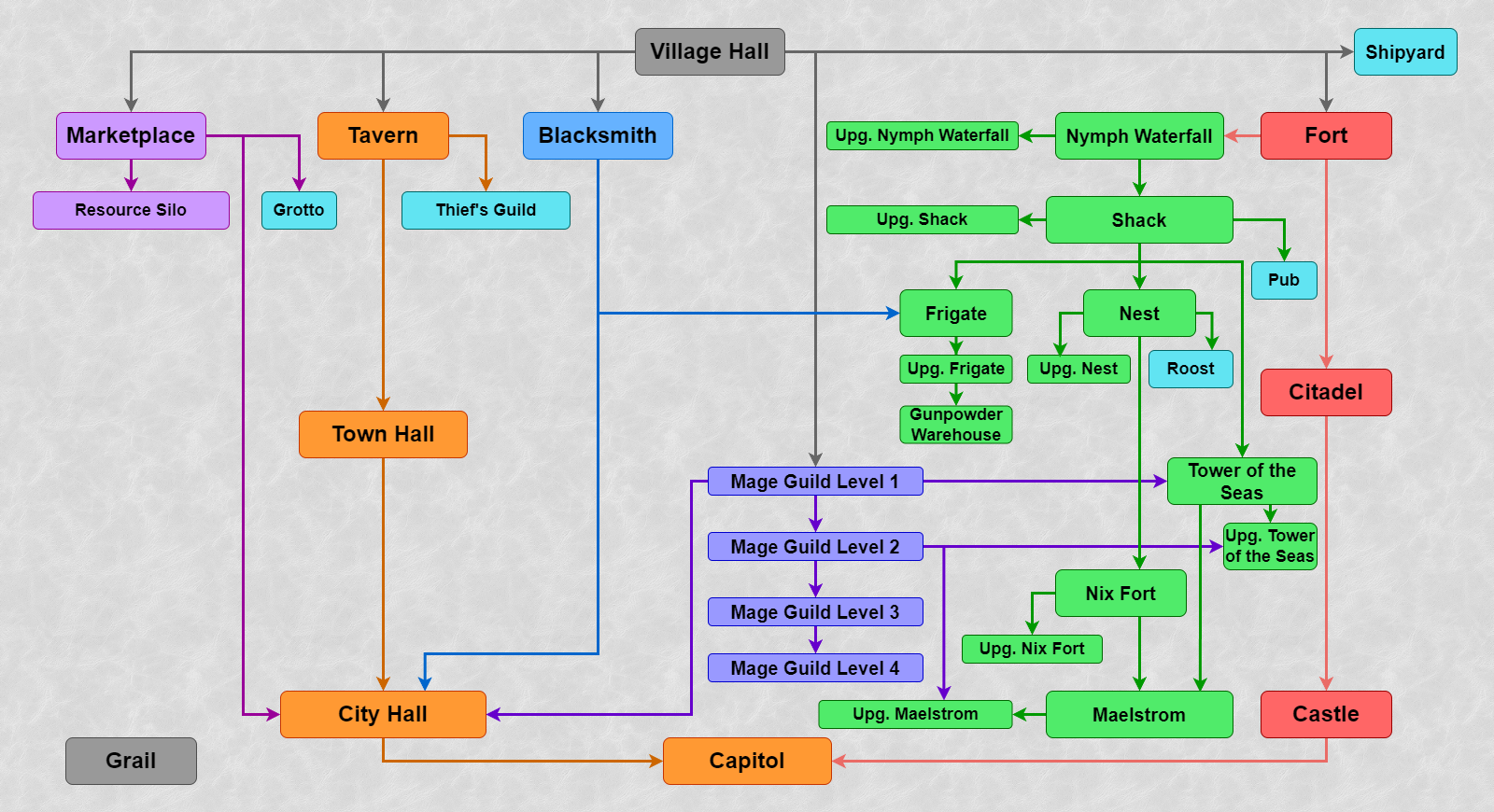
Spells
Level 1–4 spells are available in Bulwark.
A chance of rolling in the Mage Guild
Level 1
- Summon Boat: 5%.
- View Earth: 3%.
- View Air: 3%.
- Magic Arrow: 30%.
- Shield: 3%.
- Protection from Fire: 3%.
- Protection from Water: 3%.
- Dispel: 10%.
- Cure: 5%.
- Bless: 10%.
- Curse: 0%.
- Bloodlust: 5%.
- Stone Skin: 5%.
- Haste: 10%.
- Slow: 5%.
Level 2
- Scuttle Boat: 8%.
- Visions: 2%.
- Disguise: 2%.
- Quicksand: 4%.
- Fire Wall: 4%.
- Ice Bolt: 50%.
- Lightning Bolt: 4%.
- Death Ripple: 0%.
- Protection from Air: 2%.
- Precision: 4%.
- Weakness: 8%.
- Disrupting Ray: 4%.
- Fortune: 4%.
- Blind: 0%.
- Remove Obstacle: 4%.
Level 3
- Land Mine: 4%.
- Force Field: 4%.
- Earthquake: 8%.
- Frost Ring: 30%.
- Fire Ball: 2%.
- Destroy Undead: 2%.
- Air Shield: 2%.
- Protection from Earth: 4%.
- Anti Magic: 10%.
- Animate Dead: 0%.
- Mirth: 8%.
- Misfortune: 4%.
- Hypnotize: 4%.
- Forgetfulness: 8%.
- Teleport: 10%.
Level 4
- Water Walk: 10%.
- Town Portal: 10%.
- Chain Lightning: 10%.
- Inferno: 5%.
- Meteor Shower: 10%.
- Armageddon: 0%.
- Fire Shield: 5%.
- Resurrection: 5%.
- Prayer: 10%.
- Sorrow: 5%.
- Slayer: 5%.
- Frenzy: 5%.
- Counterstrike: 5%.
- Berserk: 5%.
- Clone: 10%.
Factory
General
- Factory is a new type of faction and town with all the necessary elements.
- Rule of availability for a player on original game (RoE/AB/SoD) maps: if Castle, Rampart, Inferno, Dungeon and Stronghold are available, Factory is also available; otherwise, Factory is unavailable.
- On HotA maps Factory availability for a player can be set in map properties, otherwise Factory is available by default.
- Alignment is neutral.
- Native terrain is wasteland. Random map zone without towns can become Factory zone if its terrain is wasteland.
- Factory contains 8 creature types, including 2 level 7 creatures: Couatls and Dreadnoughts. They can be built together. Level 7 Factory random dwellings can generate as both Couatl and Dreadnought dwellings.
Units
Halfling
- Level 1.
- Dwelling: Halfling Adobe.
- Attack: 4.
- Defense: 2.
- Damage: 1–3.
- Health: 4.
- Speed: 5.
- Shots: 24.
- Cost: 40 gold.
- Population growth: 15.
- Amount on map: 20–50.
- AI Value: 75.
- Fight Value: 60.
- Features.
- Shooter.
- Abilities.
- Always have positive luck.
Halfling Grenadier
- Level 1, upgraded.
- Dwelling: Upg. Halfling Adobe.
- Attack: 5.
- Defense: 2.
- Damage: 2–3.
- Health: 4.
- Speed: 6.
- Shots: 24.
- Cost: 60 gold.
- Population growth: 15.
- Amount on map: 20–30.
- AI Value: 95.
- Fight Value: 76.
- Features.
- Shooter.
- Abilities.
- Always have positive luck.
- Ranged attack ignores 20% of enemy’s defense skill.
Mechanic
- Level 2.
- Dwelling: Foundry.
- Attack: 6.
- Defense: 5.
- Damage: 3–4.
- Health: 14.
- Speed: 6.
- Shots: 0.
- Cost: 140 gold.
- Population growth: 8.
- Amount on map: 16–30.
- AI Value: 201.
- Fight Value: 201.
- Abilities.
- Breath attack.
- Repairs mechanical creatures (10 hit points per Mechanic). Can approach a unit or a corpse of friendly mechanical creatures and repair them once per combat. This restores (10 x Mechanic count) hit points and allows healing wounded creatures as well as raising the dead creatures.
Engineer
- Level 2, upgraded.
- Dwelling: Upg. Foundry.
- Attack: 7.
- Defense: 5.
- Damage: 3–5.
- Health: 16.
- Speed: 7.
- Shots: 0.
- Cost: 170 gold.
- Population growth: 8.
- Amount on map: 16–25.
- AI Value: 298.
- Fight Value: 248.
- Abilities.
- Breath attack.
- Repairs mechanical creatures (20 hit points per Engineer). Can approach a unit or a corpse of friendly mechanical creatures and repair them once per combat. This restores (20 x Engineer count) hit points and allows healing wounded creatures as well as raising the dead creatures.
Armadillo
- Level 3.
- Dwelling: Ranch.
- Attack: 5.
- Defense: 10.
- Damage: 3–5.
- Health: 25.
- Speed: 4.
- Shots: 0.
- Cost: 200 gold.
- Population growth (+Pen): 6 (+3).
- Amount on map: 12–25.
- AI Value: 198.
- Fight Value: 248.
- Features.
- Takes 2 hexes.
Bellwether Armadillo
- Level 3, upgraded.
- Dwelling: Upg. Ranch.
- Attack: 6.
- Defense: 11.
- Damage: 3–5.
- Health: 25.
- Speed: 6.
- Shots: 0.
- Cost: 230 gold.
- Population growth (+Pen): 6 (+3).
- Amount on map: 12–20.
- AI Value: 256.
- Fight Value: 256.
- Features.
- Takes 2 hexes.
Automaton
- Level 4.
- Dwelling: Manufactory.
- Attack: 12.
- Defense: 10.
- Damage: 7.
- Health: 30.
- Speed: 8.
- Shots: 0.
- Cost: 350 gold.
- Population growth: 5.
- Amount on map: 10–20.
- AI Value: 669.
- Fight Value: 398.
- Features.
- Takes 2 hexes.
- Mechanical creature. Unaffected by morale. Mind spell immunity. Cannot be raised with Resurrection spell. Can be repaired by Mechanics and Engineers.
- Abilities.
- Detonation at death. The ability can be activated without spending a turn. When Automaton with activated detonation dies, all adjacent units receive (90 + 5 x N) hit points of damage (N is remaining Automaton count before the last damage caused their death). Detonation damage is unaffected by conventional and magic damage modifiers. No Automaton corpse remains after detonation.
Sentinel Automaton
- Level 4, upgraded.
- Dwelling: Upg. Manufactory.
- Attack: 12.
- Defense: 10.
- Damage: 9.
- Health: 30.
- Speed: 9.
- Shots: 0.
- Cost: 450 gold.
- Population growth: 5.
- Amount on map: 10–16.
- AI Value: 947.
- Fight Value: 631.
- Features.
- Takes 2 hexes.
- Mechanical creature. Unaffected by morale. Mind spell immunity. Cannot be raised with Resurrection spell. Can be repaired by Mechanics and Engineers.
- Abilities.
- No enemy retaliation.
- Detonation at death. The ability can be activated without spending a turn. When Sentinel Automaton with activated detonation dies, all adjacent units receive (90 + 5 x N) hit points of damage (N is remaining Sentinel Automaton count before the last damage caused their death). Detonation damage is unaffected by conventional and magic damage modifiers. No Sentinel Automaton corpse remains after detonation.
Sandworm
- Level 5.
- Dwelling: Catacombs.
- Attack: 13.
- Defense: 12.
- Damage: 12–16.
- Health: 50.
- Speed: 8.
- Shots: 0.
- Cost: 575 gold.
- Population growth: 3.
- Amount on map: 8–16.
- AI Value: 991.
- Fight Value: 793.
- Features.
- Moves underground. For most of terrains this is equal to teleportation. On ship or Magic Clouds underground move in impossible and unit moves the usual walk way.
- Abilities.
- Immune to Blind and Stone Gaze.
Olgoi-Khorkhoi
- Level 5, upgraded.
- Dwelling: Upg. Catacombs.
- Attack: 15.
- Defense: 12.
- Damage: 12–16.
- Health: 60.
- Speed: 10.
- Shots: 0.
- Cost: 650 gold.
- Population growth: 3.
- Amount on map: 8–12.
- AI Value: 1220.
- Fight Value: 894.
- Features.
- Moves underground. For most of terrains this is equal to teleportation. On ship or Magic Clouds underground move in impossible and unit moves the usual walk way.
- Abilities.
- Immune to Blind and Stone Gaze.
- Devours corpses for additional strikes. Devours all corpses from head hex after moving (including moving before attack). Each devoured corpse gives +1 additional strike during the next attack. In case enemy dies before all additional strikes performed the remaining strikes are kept for the following attack. Unexpended strikes are kept until the end of the combat.
Gunslinger
- Level 6.
- Dwelling: Watchtower.
- Attack: 17.
- Defense: 12.
- Damage: 14–24.
- Health: 45.
- Speed: 7.
- Shots: 16.
- Cost: 800 gold.
- Population growth: 2.
- Amount on map: 5–12.
- AI Value: 1351.
- Fight Value: 904.
- Features.
- Shooter.
- Abilities.
- Preemptive shot (once per round). Gunslinger performs a preemptive shot to the attacker before their shot once per round. The preemptive shot damage is similar to Gunslinger conventional shot damage. The ability doesn’t work against war machines and area shooters as well as in the cases Gunslinger cannot shoot (e.g. blocked by enemy unit).
Bounty Hunter
- Level 6, upgraded.
- Dwelling: Upg. Watchtower.
- Attack: 18.
- Defense: 14.
- Damage: 14–24.
- Health: 45.
- Speed: 8.
- Shots: 24.
- Cost: 1100 gold.
- Population growth: 2.
- Amount on map: 5–10.
- AI Value: 1454.
- Fight Value: 932.
- Features.
- Shooter.
- Abilities.
- Preemptive shot (unlimited). Bounty Hunter performs a preemptive shot to the attacker before their shot. The preemptive shot damage is similar to Bounty Hunter conventional shot damage. The ability doesn’t work against war machines and area shooters as well as in the cases Bounty Hunter cannot shoot (e.g. blocked by enemy unit).
Couatl
- Level 7.
- Dwelling: Serpentarium.
- Attack: 17.
- Defense: 17.
- Damage: 25–45.
- Health: 160.
- Speed: 11.
- Shots: 0.
- Cost: 2000 gold.
- Population growth: 1.
- Amount on map: 4–10.
- AI Value: 3574.
- Fight Value: 2521.
- Features.
- Takes 2 hexes.
- Flight.
- Stacks with “Slayer” (any level) on them have increased attack against Couatls.
- Turns into a Bone Dragon with Skeleton Transformer.
- Abilities.
- Skips a turn to get temporary invulnerability. Can start “meditation” instead of moving once per combat. In this state Couatl doesn’t receive damage, cannot be targeted with attack, and gets hostile spell immunity. The “meditation” state ends at the beginning of Couatl next turn.
Crimson Couatl
- Level 7, upgraded.
- Dwelling: Upg. Serpentarium.
- Attack: 21.
- Defense: 21.
- Damage: 25–45.
- Health: 200.
- Speed: 15.
- Shots: 0.
- Cost: 3500 gold, 1 crystal.
- Population growth: 1.
- Amount on map: 3–8.
- AI Value: 5341.
- Fight Value: 3815.
- Features.
- Takes 2 hexes.
- Flight.
- Stacks with “Slayer” (any level) on them have increased attack against Crimson Couatls.
- Turns into a Bone Dragon with Skeleton Transformer.
- Abilities.
- Gets temporary invulnerability without skipping a turn. Once per combat can become invulnerable for one turn. Invulnerable Crimson Couatl doesn’t receive damage, cannot be targeted with attack, and gets hostile spell immunity. Enemies don’t retaliate against invulnerable Crimson Couatl. The invulnerability ends at the beginning of Crimson Couatl next turn (except morale additional turns).
Dreadnought
- Level 7.
- Dwelling: Gantry.
- Attack: 18.
- Defense: 20.
- Damage: 40–50.
- Health: 200.
- Speed: 6.
- Shots: 0.
- Cost: 2200 gold, 1 crystal.
- Population growth: 1.
- Amount on map: 4–10.
- AI Value: 3879.
- Fight Value: 3879.
- Features.
- Takes 2 hexes.
- Mechanical creature. Unaffected by morale. Mind spell immunity. Cannot be raised with Resurrection spell. Can be repaired by Mechanics and Engineers.
- Stacks with expert level “Slayer” on them have increased attack against Dreadnoughts.
- Abilities.
- Heat Stroke attack. Can perform Heat Stroke area attack to nearby creatures instead of moving. The Heat Stroke damages both allies and enemies, and no retaliation is possible. Each affected unit gets Dreadnought conventional attack damage. One of 8 Dreadnought adjacent hexes can be selected to direct the stroke. Heat Stroke area is a cone 120 degree width and 2 hex length (total square is 7-8 hexes), see the illustration:
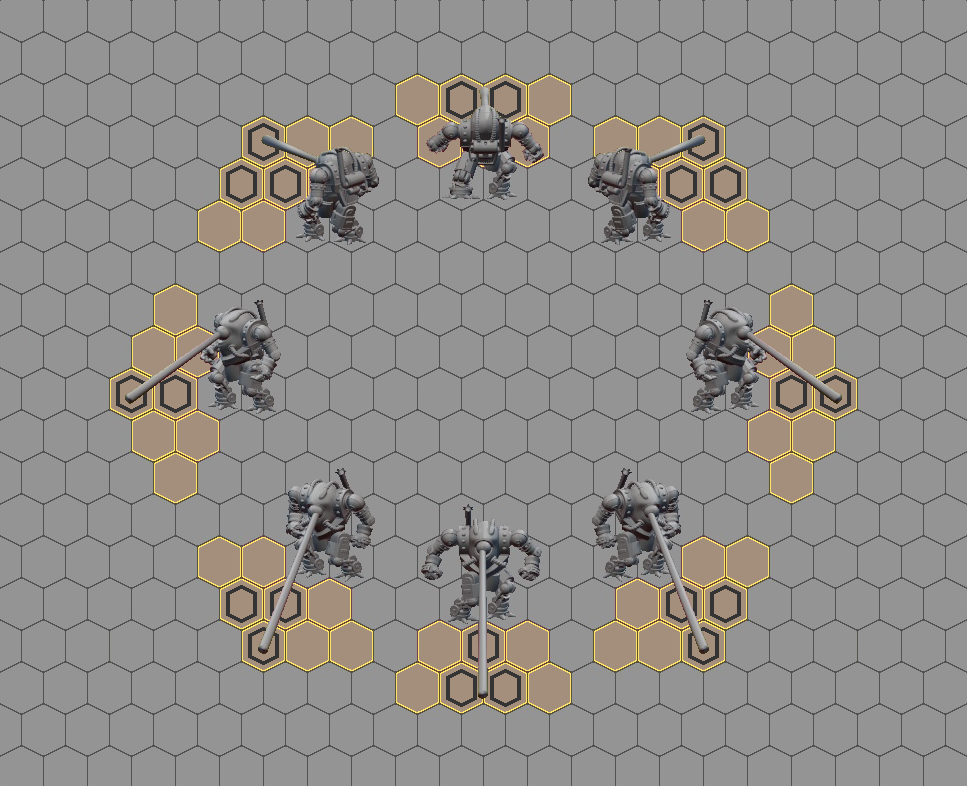
- Heat Stroke attack. Can perform Heat Stroke area attack to nearby creatures instead of moving. The Heat Stroke damages both allies and enemies, and no retaliation is possible. Each affected unit gets Dreadnought conventional attack damage. One of 8 Dreadnought adjacent hexes can be selected to direct the stroke. Heat Stroke area is a cone 120 degree width and 2 hex length (total square is 7-8 hexes), see the illustration:
Juggernaut
- Level 7, upgraded.
- Dwelling: Upg. Gantry.
- Attack: 23.
- Defense: 23.
- Damage: 40–50.
- Health: 300.
- Speed: 7.
- Shots: 0.
- Cost: 3500 gold, 2 crystal.
- Population growth: 1.
- Amount on map: 3–8.
- AI Value: 6433.
- Fight Value: 5361.
- Features.
- Takes 2 hexes.
- Mechanical creature. Unaffected by morale. Mind spell immunity. Cannot be raised with Resurrection spell. Can be repaired by Mechanics and Engineers.
- Stacks with expert level “Slayer” on them have increased attack against Juggernauts.
- Abilities.
- Heat Stroke attack. Can perform Heat Stroke area attack to nearby creatures instead of moving. The Heat Stroke damages both allies and enemies, and no retaliation is possible. Each affected unit gets Juggernaut conventional attack damage. One of 8 Juggernaut adjacent hexes can be selected to direct the stroke. Heat Stroke area is a cone 120 degree width and 2 hex length (total square is 7-8 hexes).
War machine
- Factory war machine is Ammo Cart.
Hero classes
Mercenary
- Might class.
- Town: Factory.
- Starting primary skills.
- Attack: 3.
- Defense: 1.
- Spell power: 1.
- Knowledge: 1.
- Chance of rolling a primary skill before level 10.
- Attack: 35%.
- Defense: 35%.
- Spell power: 15%.
- Knowledge: 15%.
- Chance of rolling a primary skill after level 10.
- Attack: 30%.
- Defense: 30%.
- Spell power: 20%.
- Knowledge: 20%.
- Chance of rolling a secondary skill.
- Pathfinding: 7/112.
- Archery: 7/112.
- Logistics: 7/112.
- Scouting: 5/112.
- Diplomacy: 7/112.
- Navigation: 4/112.
- Leadership: 5/112.
- Wisdom: 3/112.
- Mysticism: 1/112.
- Luck: 5/112.
- Ballistics: 6/112.
- Eagle Eye: 2/112.
- Necromancy: 0/112.
- Estates: 3/112.
- Fire Magic: 3/112.
- Air Magic: 3/112.
- Water Magic: 0/112.
- Earth Magic: 3/112.
- Scholar: 1/112.
- Tactics: 8/112.
- Artillery: 6/112.
- Learning: 4/112.
- Offense: 6/112.
- Armorer: 5/112.
- Intelligence: 2/112.
- Sorcery: 2/112.
- Resistance: 4/112.
- First Aid: 3/112.
- Interference: 4/112.
- Runes: 0/112.
- Restricted secondary skills.
- Necromancy.
- Water Magic.
- Runes.
Artificer
- Magic class.
- Town: Factory.
- Starting primary skills.
- Attack: 0.
- Defense: 1.
- Spell power: 2.
- Knowledge: 2.
- Chance of rolling a primary skill before level 10.
- Attack: 20%.
- Defense: 15%.
- Spell power: 30%.
- Knowledge: 35%.
- Chance of rolling a primary skill after level 10.
- Attack: 20%.
- Defense: 20%.
- Spell power: 30%.
- Knowledge: 30%.
- Chance of rolling a secondary skill.
- Pathfinding: 3/112.
- Archery: 4/112.
- Logistics: 5/112.
- Scouting: 4/112.
- Diplomacy: 3/112.
- Navigation: 4/112.
- Leadership: 2/112.
- Wisdom: 8/112.
- Mysticism: 5/112.
- Luck: 3/112.
- Ballistics: 8/112.
- Eagle Eye: 4/112.
- Necromancy: 0/112.
- Estates: 2/112.
- Fire Magic: 4/112.
- Air Magic: 3/112.
- Water Magic: 3/112.
- Earth Magic: 4/112.
- Scholar: 5/112.
- Tactics: 3/112.
- Artillery: 6/112.
- Learning: 4/112.
- Offense: 2/112.
- Armorer: 3/112.
- Intelligence: 7/112.
- Sorcery: 7/112.
- Resistance: 0/112.
- First Aid: 6/112.
- Interference: 0/112.
- Runes: 0/112.
- Restricted secondary skills.
- Necromancy.
- Resistance.
- Interference.
- Runes.
Heroes
A common rule for the availability of new heroes in original game (RoE, AB and SoD) maps is the following: all non-campaign heroes are always available. Campaign heroes are only available in the scenarios where all original campaign heroes are present.
Henrietta
- Class: Mercenary.
- Gender: Female.
- Specialty: Halflings. Increases Speed of any Halflings or Halfling Grenadiers by 1 and their Attack and Defense skills by 10% for every level (rounded up).
- Secondary skills.
- Leadership: basic.
- Luck: basic.
- Spell Book: none.
- Default unit count.
- Halflings: 15–25.
- Halflings: 15–25.
- Halflings: 15–25.
Sam
- Class: Mercenary.
- Gender: Female.
- Specialty: Mechanics. Increases Speed of any Mechanics or Engineers by 1 and their Attack and Defense skills by 20% for every 2 levels (rounded up).
- Secondary skills.
- Offense: basic.
- Tactics: basic.
- Spell Book: none.
- Default unit count.
- Mechanics: 7–9.
- Mechanics: 7–9.
- Mechanics: 7–9.
Tancred
- Class: Mercenary.
- Gender: Male.
- Specialty: Gunslingers. Increases Speed of any Gunslingers or Bounty Hunters by 1 and their Attack and Defense skills by 20% for every 6 levels (rounded up).
- Secondary skills.
- Archery: advanced.
- Spell Book: none.
- Default unit count.
- Halflings: 15–25.
- Mechanics: 7–9.
- Armadillos: 4–6.
Melchior
- Class: Mercenary.
- Gender: Male.
- Specialty: Diplomacy. Receives a 5% per level bonus to Diplomacy skill percentage when surrendering.
- Secondary skills.
- Leadership: basic.
- Diplomacy: basic.
- Spell Book: none.
- Default unit count.
- Halflings: 15–25.
- Mechanics: 7–9.
- Armadillos: 4–6.
Floribert
- Class: Mercenary.
- Gender: Male.
- Specialty: First Aid. Receives a 5% per level bonus to First Aid Tent health increase efficiency.
- Secondary skills.
- Armorer: basic.
- First Aid: basic.
- Spell Book: none.
- Default unit count.
- Halflings: 15–25.
- First Aid Tent: 1.
- Armadillos: 4–6.
Wynona
- Class: Mercenary.
- Gender: Female.
- Specialty: Scouting. Increases Scouting radius by 1 for every 6 levels.
- Secondary skills.
- Archery: basic.
- Scouting: basic.
- Spell Book: none.
- Default unit count.
- Halflings: 15–25.
- Mechanics: 7–9.
- Armadillos: 4–6.
Dury
- Class: Mercenary.
- Gender: Female.
- Specialty: Armorer. Receives a 5% per level bonus to Armorer skill percentage.
- Secondary skills.
- Offense: basic.
- Armorer: basic.
- Spell Book: none.
- Default unit count.
- Halflings: 15–25.
- Mechanics: 7–9.
- Armadillos: 4–6.
Morton
- Class: Mercenary.
- Gender: Male.
- Specialty: Ballista. Increases the Attack and Defense skills of any Ballista by 30% for every 5 levels (rounded up).
- Secondary skills.
- Artillery: basic.
- Ballistics: basic.
- Spell Book: none.
- Default unit count.
- Halflings: 15–25.
- Ballista: 1.
- Armadillos: 4–6.
Celestine
- Class: Artificer.
- Gender: Female.
- Specialty: Armadillos. Increases Speed of any Armadillos or Bellwether Armadillos by 1 and their Attack and Defense skills by 20% for every 3 levels (rounded up).
- Secondary skills.
- Wisdom: basic.
- Pathfinding: basic.
- Spell Book: present.
- Starting spell: Haste.
- Default unit count.
- Halflings: 15–25.
- Armadillos: 4–6.
- Armadillos: 4–6.
Todd
- Class: Artificer.
- Gender: Male.
- Specialty: Automatons. Increases Speed of any Automatons or Sentinel Automatons by 1 and their Attack and Defense skills by 20% for every 4 levels (rounded up).
- Secondary skills.
- Wisdom: basic.
- Tactics: basic.
- Spell Book: present.
- Starting spell: Shield.
- Default unit count.
- Halflings: 15–25.
- Automatons: 3–5.
- Armadillos: 4–6.
Agar
- Class: Artificer.
- Gender: Male.
- Specialty: Sandworms. Increases Speed of any Sandworms and Olgoi-Khorkhoi by 1 and their Attack and Defense skills by 20% for every 5 levels (rounded up).
- Secondary skills.
- Wisdom: advanced.
- Spell Book: present.
- Starting spell: View Earth.
- Default unit count.
- Halflings: 15–25.
- Mechanics: 7–9.
- Armadillos: 4–6.
Bertram
- Class: Artificer.
- Gender: Male.
- Specialty: +350 gold. Increases kingdom’s income by 350 gold per day.
- Secondary skills.
- Wisdom: basic.
- Scholar: basic.
- Spell Book: present.
- Starting spell: Magic Arrow.
- Default unit count.
- Halflings: 15–25.
- Mechanics: 7–9.
- Armadillos: 4–6.
Wrathmont
- Class: Artificer.
- Gender: Male.
- Specialty: Frenzy. Casts Frenzy with Attack bonus increased by 10% for every n hero levels, where n is the level of the targeted creature.
- Secondary skills.
- Wisdom: basic.
- Intelligence: basic.
- Spell Book: present.
- Starting spell: Frenzy.
- Default unit count.
- Halflings: 15–25.
- Mechanics: 7–9.
- Armadillos: 4–6.
Ziph
- Class: Artificer.
- Gender: Female.
- Specialty: Lightning. Casts Lightning with damage increased by 10% for every n hero levels, where n is the level of the targeted creature.
- Secondary skills.
- Wisdom: basic.
- Sorcery: basic.
- Spell Book: present.
- Starting spell: Lightning Bolt.
- Default unit count.
- Halflings: 15–25.
- Mechanics: 7–9.
- Armadillos: 4–6.
Victoria
- Class: Artificer.
- Gender: Female.
- Specialty: Land Mine. Casts Land Mine with damage increased by 10% for every n hero levels, where n is the level of the targeted creature.
- Secondary skills.
- Wisdom: basic.
- Learning: basic.
- Spell Book: present.
- Starting spell: Land Mine.
- Default unit count.
- Halflings: 15–25.
- Mechanics: 7–9.
- Armadillos: 4–6.
Eanswythe
- Class: Artificer.
- Gender: Female.
- Specialty: Weakness. Casts Weakness with effect increased by 4 for 1-2 level creatures, by 6 for 3-4 level creatures, by 8 for 5-6 level creatures, and by 10 for 7 level creatures.
- Secondary skills.
- Wisdom: basic.
- Estates: basic.
- Spell Book: present.
- Starting spell: Weakness.
- Default unit count.
- Halflings: 15–25.
- Mechanics: 7–9.
- Armadillos: 4–6.
Frederick
- Campaign hero.
- Class: Artificer.
- Gender: Male.
- Specialty: Automatons (detonation). Increases damage dealt by explosion of Automatons and Sentinel Automatons by 5% for every level (rounded up).
- Secondary skills.
- Wisdom: basic.
- Intelligence: basic.
- Spell Book: present.
- Starting spell: Haste.
- Default unit count.
- Automatons: 3–5.
- Automatons: 3–5.
- Automatons: 3–5.
Tavin
- Campaign hero.
- Class: Mercenary.
- Gender: Male.
- Specialty: Offense. Receives a 5% per level bonus to Offense skill percentage.
- Secondary skills.
- Offense: basic.
- Scouting: basic.
- Spell Book: none.
- Default unit count.
- Halflings: 15–25.
- Mechanics: 7–9.
- Armadillos: 4–6.
Murdoch
- Campaign hero.
- Class: Mercenary.
- Gender: Male.
- Specialty: Archery. Receives a 5% per level bonus to Archery skill percentage.
- Secondary skills.
- Archery: basic.
- Tactics: basic.
- Spell Book: none.
- Default unit count.
- Halflings: 15–25.
- Mechanics: 7–9.
- Armadillos: 4–6.
Structures
General Structures
Village Hall
- Cost: None.
- Initially built in every town.
- Requirements: None.
- Makes the construction of buildings possible, brings 500 gold per day.
Town Hall
- Cost: 2500 gold.
- Upgrade of the Village Hall.
- Requirements: Tavern.
- Makes the construction of buildings possible, brings 1000 gold per day.
City Hall
- Cost: 5000 gold.
- Upgrade of the Town Hall.
- Requirements: Tavern, Blacksmith, Marketplace, Mage Guild Level 1.
- Makes the construction of buildings possible, brings 2000 gold per day.
Capitol
- Cost: 10000.
- Upgrade of the City Hall. One player cannot build more than one Capitol. If the city with the capitol is captured, capitol downgrades to City Hall in that city.
- Requirements: Tavern, Blacksmith, Marketplace, Mage Guild Level 1, Castle.
- Makes the construction of buildings possible, brings 4000 gold per day.
Fort
- Cost 5000 gold, 20 wood, 20 ore.
- Can be built by default.
- Requirements: None.
- Allows you to view a general list of creatures available for hiring, provides city with walls during the siege.
Citadel
- Cost: 2500 gold, 5 ore.
- Upgrade of the Fort.
- Requirements: None.
- Allows you to view a general list of creatures available for hiring, provides city with walls, moat and a central tower during the siege. Multiplies the creatures’ gain by 1.5 (rounded down).
Castle
- Cost 5000 gold, 10 wood, 10 ore.
- Upgrade of the Citadel.
- Requirements: None.
- Allows you to view a general list of creatures available for hiring, provides city with walls, the moat, the central and side Shooting Towers during the siege. Multiplies the creatures’ gain by 2.
Tavern
- Cost: 500 gold, 5 wood.
- Built by default, if the city was originally owned by the player.
- Requirements: None.
- Allows the city to hire heroes, hear rumors and gather information in the Thief’s Guild, opens an additional level of information Thief’s Guild towns and garrisons information on enemy towns.
Blacksmith
- Cost: 1000 gold, 5 wood.
- Requirements: None.
- Allows the guest hero to buy a war machine (Ammo Cart) for 1000 gold.
Marketplace
- Cost: 500 gold, 5 wood.
- Requirements: None.
- Allows you to trade one resource for another, send resources to other players, and improves prices in Marketplaces of other towns by 1 level.
Resource Silo
- Cost: 5000 gold, 5 ore.
- Requirements: Marketplace.
- Brings 1 crystal per day.
Mage Guild Level 1
- Cost: 2000 gold, 5 wood, 5 ore.
- Requirements: None.
- Allows you to buy the Spell Book for a hero for 500 gold and offers the study of 5 spells of Level 1.
Mage Guild Level 2
- Cost: 1000 gold, 5 wood, 5 ore, 4 mercury, 4 gems, 4 crystal, 4 sulfur.
- Upgrade of the Mage Guild Level 1.
- Requirements: None.
- Allows you to buy the Spell Book for a hero for 500 gold and offers the study of 5 spells of Level 1 and 4 spells of Level 2.
Mage Guild level 3
- Cost: 1000 gold, 5 wood, 5 ore, 6 mercury, 6 gems, 6 crystals, 6 sulfur.
- Upgrade of the Mage Guild Level 2.
- Requirements: None.
- Allows you to buy the Spell Book for a hero for 500 gold and offers the study of 5 spells of Level 1, 4 spells of Level 2 and 3 spells of Level 3.
Mage Guild level 4
- Cost: 1000 gold, 5 wood, 5 ore, 8 mercury, 8 gems, 8 crystals, 8 sulfur.
- Upgrade of the Mage Guild level 3.
- Requirements: None.
- Allows you to buy the Spell Book for a hero for 500 gold and offers the study of 5 spells of Level 1, 4 spells of Level 2, 3 spells of Level 3 and 2 spells of Level 4.
Mage Guild level 5
- Cost: 1000 gold, 5 wood, 5 ore, 10 mercury, 10 gems, 10 crystals, 10 sulfur.
- Upgrade of the Mage Guild level 4.
- Requirements: None.
- Allows you to buy the Spell Book for a hero for 500 gold and offers the study of 5 spells of Level 1, 4 spells of Level 2, 3 spells of Level 3, 2 spells of Level 4 and 1 spell of Level 5.
Special Structures
Artifact Merchants
- Cost: 10000 gold.
- Requirements: Marketplace.
- Allows you purchase or sell artifacts.
Pen
- Cost: 1000 gold.
- Requirements: Fort, Halfling Adobe, Ranch.
- Increases the gain of the Armadillos and Bellwether Armadillos by 3.
Mana Generator
- Cost: 1000 gold, 5 ore.
- Requirements: Fort.
- The Mana Generator gives a garrison hero 20 additional spell points during any siege defense. Unspent additional mana disappears after combat.
Bank
- Cost: 500 gold, 5 ore.
- Requirements: none.
- Bank allows to get a loan of 2500 gold at once but decreases the gold income from the town on 5 days by 500. When the town is captures, the debt is written off.
Creature dwellings
Halfling Adobe
- Cost: 400 gold, 5 wood, 5 ore.
- Creature dwelling Level 1 (Halflings). Built in a neutral city or town with a fort by default.
- Requirements: Fort.
- Allows you to recruit Halflings.
Upg. Halfling Adobe
- Cost: 1000 gold, 2 mercury, 2 sulfur.
- Halfling Adobe Upgrade. Residence of upgraded level 1 creatures (Halfling Grenadiers).
- Requirements: Fort, Blacksmith, Halfling Adobe.
- Allows you to recruit Halflings and Halfling Grenadiers, upgrade Halflings into Halfling Grenadiers.
Foundry
- Cost: 1000 gold, 5 wood, 5 ore.
- Creature dwelling Level 2 (Mechanics). Built in a neutral city or town with a fort by default.
- Requirements: Fort, Halfling Adobe.
- Allows you to recruit Mechanics.
Upg. Foundry
- Cost: 1000 gold, 5 wood, 5 ore.
- Foundry Upgrade. Residence of upgraded level 2 creatures (Engineers).
- Requirements: Fort, Blacksmith, Halfling Adobe.
- Allows you to recruit Mechanics and Engineers, upgrade Mechanics into Engineers.
Ranch
- Cost: 1000 gold, 5 wood.
- Creature dwelling Level 3 (Armadillos).
- Requirements: Fort, Halfling Adobe.
- Allows you to recruit Armadillos.
Upg. Ranch
- Cost: 1000 gold, 5 wood.
- Upgraded Ranch. Residence of upgraded level 3 creatures (Bellwether Armadillos).
- Requirements: Fort, Halfling Adobe.
- Allows you to recruit Armadillos and Bellwether Armadillos, upgrade Armadillos into Bellwether Armadillos.
Manufactory
- Cost: 2000 gold, 5 wood, 10 ore.
- Creature dwelling Level 4 (Automatons).
- Requirements: Fort, Blacksmith, Halfling Adobe, Foundry.
- Allows you to recruit Automatons.
Upg. Manufactory
- Cost: 2000 gold, 10 ore, 5 mercury.
- Upgraded Manufactory. Residence of upgraded level 4 creatures (Sentinel Automatons).
- Requirements: Fort, Blacksmith, Halfling Adobe, Foundry.
- Allows you to recruit Automatons and Sentinel Automatons, upgrade Automatons into Sentinel Automatons.
Catacombs
- Cost: 3000 gold, 5 wood, 5 ore, 2 gems, 2 crystals.
- Creature dwelling Level 5 (Sandworms).
- Requirements: Fort, Halfling Adobe, Ranch.
- Allow you to recruit Sandworms.
Upg. Catacombs
- Cost: 2000 gold, 5 gems.
- Upgrade to the Catacombs. Residence of upgraded level 5 creatures (Olgoi-Khorkhoi).
- Requirements: Fort, Mage Guild level 1, Halfling Adobe, Ranch.
- Allows you to recruit Sandworms and Olgoi-Khorkhoi, upgrade Sandworms into Olgoi-Khorkhoi.
Watchtower
- Cost: 4000 gold, 5 wood, 5 ore, 5 mercury, 5 sulfur.
- Creature dwelling Level 6 (Gunslingers).
- Requirements: Fort, Blacksmith, Halfling Adobe, Foundry, Manufactory.
- Allows you to recruit Gunslingers.
Upg. Watchtower
- Cost: 3000 gold, 10 wood, 5 mercury, 5 sulfur.
- Upgraded Watchtower. Residence of upgraded level 6 creatures (Bounty Hunters).
- Requirements: Fort, Marketplace, Blacksmith, Halfling Adobe, Foundry, Manufactory.
- Allows you to recruit Gunslingers and Bounty Hunters, upgrade Gunslingers into Bounty Hunters.
Serpentarium
- Cost: 10000 gold, 10 wood, 10 ore, 10 crystals.
- Creature dwelling level 7 (Couatls).
- Requirements: Fort, Mage Guild level 1, Halfling Adobe, Ranch, Catacombs.
- Allows you to recruit Couatls.
Upg. Serpentarium
- Cost: 15000 gold, 10 wood, 10 ore, 20 crystals.
- Upgraded Serpentarium. Residence of upgraded level 7 creatures (Crimson Couatls).
- Requirements: Fort, Mage Guild level 2, Halfling Adobe, Ranch, Catacombs.
- Allows you to recruit Couatls and Crimson Couatls, upgrade Couatls into Crimson Couatls.
Gantry
- Cost: 10000 gold, 20 ore, 20 crystals.
- Creature dwelling level 7 (Dreadnoughts).
- Requirements: Fort, Blacksmith, Halfling Adobe, Foundry, Manufactory, Watchtower.
- Allows you to recruit Dreadnoughts.
Upg. Gantry
- Cost: 15000 gold, 10 ore, 20 crystals.
- Upgraded Gantry. Residence of upgraded level 7 creatures (Juggernauts).
- Requirements: Fort, Marketplace, Blacksmith, Halfling Adobe, Foundry, Manufactory, Watchtower.
- Allows you to recruit Dreadnoughts and Juggernauts, upgrade Dreadnoughts into Juggernauts.
Lightning Rod
Grail structure. Is built for free if the hero possesses the Grail. Grail disappears after construction. Brings 5000 gold per day, multiplies the growth of creatures by 1.5 per week (rounded down). Strikes all enemies of your hero with the lightning at the first round of every battle. The lightning occurs before the first turn of a friendly unit and deals (7 x (4 + town building count)) to each enemy unit. Building count does not include upgrades. The damage of several Lightning Rods is summed up. The lightning damage is electrical: it is affected by creature natural immunities and Pendant of Negation, but is not affected by spell casting restrictions and magic protections. Artifact, hero specialisation and creature ability modifiers are applied to lightning damage. The Lightning Rod does not work in case there is no hero on friendly side of a combat.
Building tree
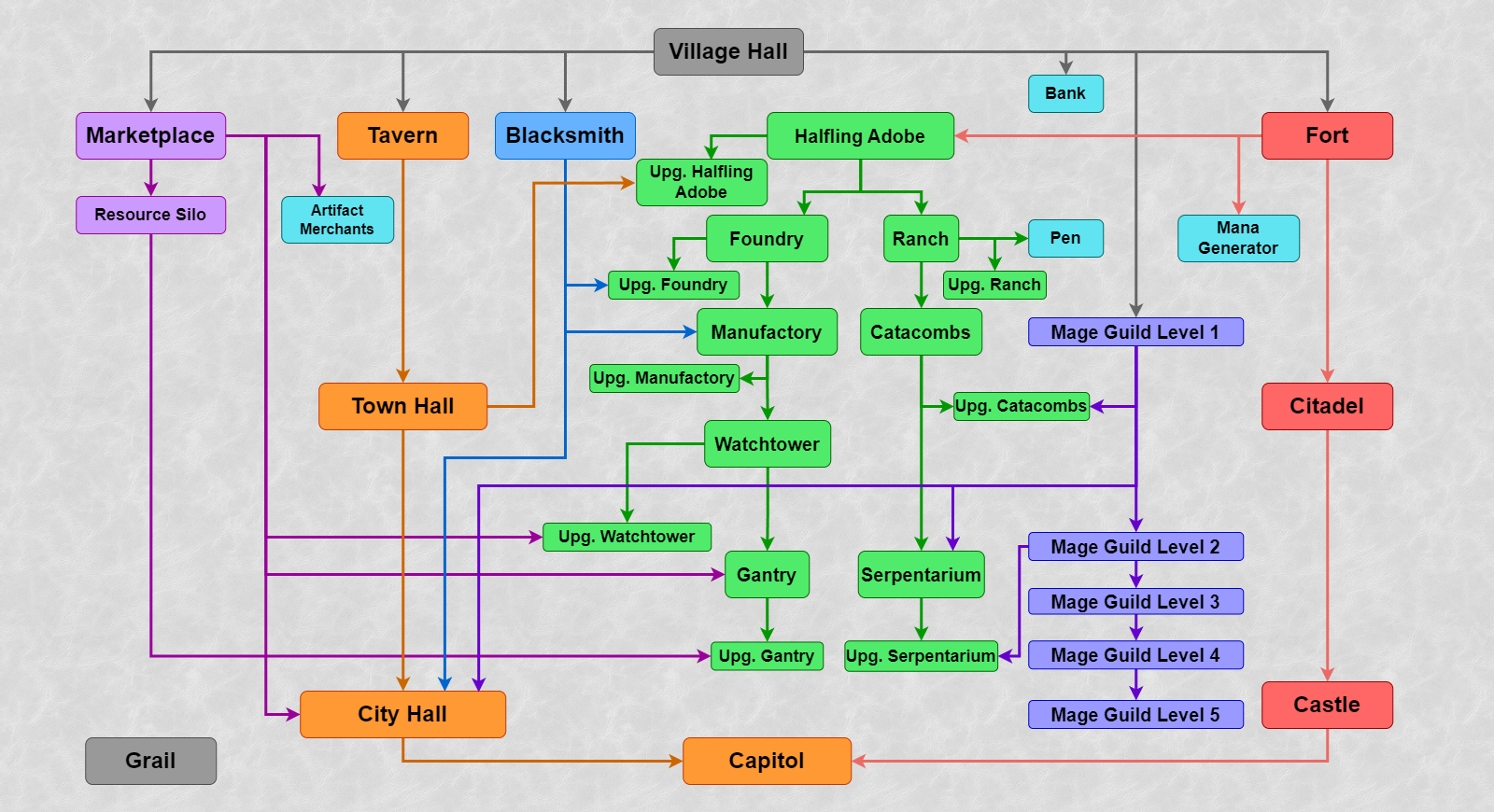
Spells
Level 1–5 spells are available in Factory.
A chance of rolling in the Mage Guild
Level 1
- Summon Boat: 5%.
- View Earth: 3%.
- View Air: 3%.
- Magic Arrow: 30%.
- Shield: 5%.
- Protection from Fire: 3%.
- Prot. from Water: 3%.
- Dispel: 10%.
- Cure: 5%.
- Bless: 3%.
- Curse: 0%.
- Bloodlust: 5%.
- Stone Skin: 10%.
- Haste: 10%.
- Slow: 5%.
Level 2
- Scuttle Boat: 4%.
- Visions: 2%.
- Disguise: 2%.
- Quicksand: 4%.
- Fire Wall: 4%.
- Ice Bolt: 4%.
- Lightning Bolt: 50%.
- Death Ripple: 0%.
- Protection from Air: 2%.
- Precision: 6%.
- Weakness: 4%.
- Disrupting Ray: 4%.
- Fortune: 2%.
- Blind: 8%.
- Remove Obstacle: 4%.
Level 3
- Land Mine: 8%.
- Force Field: 8%.
- Earthquake: 8%.
- Frost Ring: 12%.
- Fireball: 12%.
- Destroy Undead: 4%.
- Air Shield: 8%.
- Prot. from Earth: 4%.
- Anti-Magic: 8%.
- Animate Dead: 0%.
- Mirth: 4%.
- Misfortune: 6%.
- Hypnotize: 4%.
- Forgetfulness: 4%.
- Teleport: 10%.
Level 4
- Water Walk: 10%.
- Town Portal: 10%.
- Chain Lightning: 10%.
- Inferno: 10%.
- Meteor Shower: 10%.
- Armageddon: 0%.
- Fire Shield: 5%.
- Resurrection: 10%.
- Prayer: 5%.
- Sorrow: 5%.
- Slayer: 5%.
- Frenzy: 5%.
- Counterstrike: 5%.
- Berserk: 5%.
- Clone: 5%.
Level 5
- Fly: 20%.
- Dimension Door: 16%.
- Implosion: 16%.
- Magic Mirror: 16%.
- Sacrifice: 0%.
- Titan’s Lightning Bolt: 0%.
- Fire Elemental: 0%.
- Earth Elemental: 16%.
- Water Elemental: 0%.
- Air Elemental: 16%.
Bulwark
General
- Bulwark is a new type of faction and town with all the necessary elements as well as the fractional secondary skill runes.
- Rule of availability for a player on original game (RoE/AB/SoD) maps: if Castle, Rampart, Inferno, Dungeon and Stronghold are available, Bulwark is also available; otherwise, Bulwark is unavailable.
- On HotA maps Bulwark availability for a player can be set in map properties, otherwise Bulwark is available by default.
- Alignment is neutral.
- Native terrain is snow. On random maps zone without towns can be a Bulwark zone, if its terrain type is snow.
- Special property of siege: walls, gate and towers of Bulwark has +1 durability. Therefore:
- Walls of Bulwark has durability 3 with Fort and Citadel, 4 with Castle.
- Towers and gate of Bulwark has durability 3.
Units
Kobold
- Level 1.
- Dwelling: Colliery.
- Attack: 3.
- Defense: 4.
- Damage: 1–2.
- Health: 8.
- Speed: 3.
- Shots: 0.
- Cost: 40 gold.
- Population growth: 15.
- Amount on map: 20–50.
- AI Value: 54.
- Fight Value: 74.
- Abilities.
- Generates 1 gold each day.
Kobold Foreman
- Level 1, upgraded.
- Dwelling: Upg. Colliery.
- Attack: 5.
- Defense: 6.
- Damage: 1–2.
- Health: 8.
- Speed: 5.
- Shots: 0.
- Cost: 60 gold.
- Population growth: 15.
- Amount on map: 20–30.
- AI Value: 84.
- Fight Value: 80.
- Abilities.
- Generates 1 gold each day.
Mountain Ram
- Level 2.
- Dwelling: Frigid Spur.
- Attack: 7.
- Defense: 6.
- Damage: 3–4.
- Health: 18.
- Speed: 7.
- Shots: 0.
- Cost: 135 gold.
- Population growth: 9.
- Amount on map: 16–30.
- AI Value: 228.
- Fight Value: 190.
- Features.
- Takes 2 hexes.
Argali
- Level 2, upgraded.
- Dwelling: Upg. Frigid Spur.
- Attack: 8
- Defense: 6.
- Damage: 3–4.
- Health: 18.
- Speed: 8.
- Shots: 0.
- Cost: 170 gold.
- Population growth: 9.
- Amount on map: 16–25.
- AI Value: 250.
- Fight Value: 208.
- Features.
- Takes 2 hexes.
- Immune to ice (Ice Bolt, Frost Ring).
- Abilities.
- Adjacent enemies receive +20% spell damage.
Snow Elf
- Level 3.
- Dwelling: Hall of the Bold.
- Attack: 9.
- Defense: 8.
- Damage: 4–6.
- Health: 21.
- Speed: 6.
- Shots: 4.
- Cost: 230 gold.
- Population growth: 7.
- Amount on map: 12–25.
- AI Value: 370.
- Fight Value: 264.
- Features.
- Shooter.
- Abilities.
- No melee penalty.
Steel Elf
- Level 3, upgraded.
- Dwelling: Upg. Hall of the Bold.
- Attack: 9.
- Defense: 10.
- Damage: 4–6.
- Health: 24.
- Speed: 7.
- Shots: 8.
- Cost: 260 gold.
- Population growth: 7.
- Amount on map: 12–20.
- AI Value: 526.
- Fight Value: 292.
- Features.
- Shooter.
- No melee penalty.
- Abilities.
- Can shoot while adjacent to an enemy creature.. Steel Elf can shoot at non-adjacent enemies, even being blocked by an adjacent enemy. Adjacent enemies can only be attacked melee.
Yeti
- Level 4.
- Dwelling: Mountain Embassy.
- Attack: 10.
- Defense: 8.
- Damage: 7–9.
- Health: 40.
- Speed: 6.
- Shots: 0.
- Cost: 325 gold.
- Population growth: 4.
- Amount on map: 10–20.
- AI Value: 504.
- Fight Value: 504.
- Features.
- Takes 2 hexes.
- Abilities.
- Recovers from negative effects in one round. All negative spells and effects with finite duration are active on Yeti only for one round.
Yeti Runemaster
- Level 4, upgraded.
- Dwelling: Upg. Nest.
- Attack: 11.
- Defense: 9.
- Damage: 7–9.
- Health: 45.
- Speed: 7.
- Shots: 0.
- Cost: 400 gold.
- Population growth: 4.
- Amount on map: 10–16.
- AI Value: 751.
- Fight Value: 626.
- Features.
- Takes 2 hexes.
- Abilities.
- Recovers from negative effects in one round. All negative spells and effects with finite duration are active on Yeti Runemaster only for one round.
- Posseses runes. Yeti Runemasters accumulates up to 9 rune levels and receives bonuses same as for Expert Runes. If the hero possesses runes as well, the bonuses will stack.
Shaman
- Level 5.
- Dwelling: Shaman Fane.
- Attack: 11.
- Defense: 8.
- Damage: 11–13.
- Health: 35.
- Speed: 5.
- Shots: 12.
- Cost: 450 gold.
- Population growth: 3.
- Amount on map: 8–16.
- AI Value: 685.
- Fight Value: 571.
- Features.
- Shooter.
- Abilities.
- Casts Air Shield. 3 times per battle can cast Advanced Air Shield on allied unit. Spell lasts 6 turns.
Great Shaman
- Level 5, upgraded.
- Dwelling: Upg. Shaman Fane.
- Attack: 12.
- Defense: 11.
- Damage: 11–13.
- Health: 35.
- Speed: 6.
- Shots: 24.
- Cost: 600 gold.
- Population growth: 3.
- Amount on map: 8–12.
- AI Value: 818.
- Fight Value: 682.
- Features.
- Shooter.
- Abilities.
- Casts Air Shield. 3 times per battle can cast Advanced Air Shield on allied unit. Spell lasts 6 turns.
- Freezing Shot. Shot will freeze target with 20% chance, for 3 rounds. Creatures with ice immunity are immune to this effect. Freezed target loses the ability to move and act, and receives 25% more damage from creature attacks. Once creature receives damage, the freezing is removed.
Mammoth
- Level 6.
- Dwelling: Mammoth Stalls.
- Attack: 12.
- Defense: 16.
- Damage: 14–20.
- Health: 120.
- Speed: 5.
- Shots: 0.
- Cost: 850 gold.
- Population growth (+Hay Shed): 2 (+1).
- Amount on map: 5–12.
- AI Value: 1359.
- Fight Value: 1359.
- Features.
- Takes 2 hexes.
War Mammoth
- Level 6, upgraded.
- Dwelling: Upg. Mammoth Stalls.
- Attack: 14.
- Defense: 18.
- Damage: 14–20.
- Health: 135.
- Speed: 6.
- Shots: 0.
- Cost: 1000 gold.
- Population growth (+Hay Shed): 2 (+1).
- Amount on map: 5–10.
- AI Value: 1672.
- Fight Value: 1672.
- Features.
- Takes 2 hexes.
- Abilities.
- Receives +100% Defence in the defensive stance.. Standard bonus of Defend stance is +20% Defence. War Mammoth receives +100% Defence instead.
Jotunn
- Level 7.
- Dwelling: Frosthome.
- Attack: 18.
- Defense: 18.
- Damage: 40–50.
- Health: 165.
- Speed: 8.
- Shots: 0.
- Cost: 2000 gold.
- Population growth: 1.
- Amount on map: 4–10.
- AI Value: 4180.
- Fight Value: 3483.
- Features.
- Takes 2 hexes.
- Stacks with “Slayer” (Expert level) on them have increased attack against Jotunn.
- Abilities.
- Teleports allies (once per combat). Once per combat can cast Teleport spell (Expert level) on an allied stack.
- -1 to enemy flying units’ speed. Change of speed remains even after the death of Jotunns, but the creatures able to teleport or move underground are not affected. The effect from abilities of Jotunns and Jotunn Warlords is not cumulative.
Jotunn Warlord
- Level 7, upgraded.
- Dwelling: Upg. Frosthome.
- Attack: 20.
- Defense: 20.
- Damage: 40–50.
- Health: 300.
- Speed: 10.
- Shots: 0.
- Cost: 3500 gold + 1 gem.
- Population growth: 1.
- Amount on map: 3–8.
- AI Value: 6694.
- Fight Value: 5355.
- Features.
- Takes 2 hexes.
- Stacks with “Slayer” (Expert level) on them have increased attack against Jotunn Warlord.
- Abilities.
- Teleports allies (unlimited). Can cast Teleport spell (Expert level) on allied stack any number of times per combat.
- -2 to enemy flying units’ speed. Change of speed remains even after the death of Jotunn Warlord, but the creatures able to teleport or move underground are not affected. The effect from abilities of Jotunns and Jotunn Warlords is not cumulative.
War machine
- Bulwark war machine is First Aid Tent.
Hero classes
Chieftain
- Might class.
- Town: Bulwark.
- Starting primary skills.
- Attack: 0.
- Defense: 4.
- Spell power: 1.
- Knowledge: 1.
- Chance of rolling a primary skill before level 10.
- Attack: 35%.
- Defense: 55%.
- Spell power: 5%.
- Knowledge: 5%.
- Chance of rolling a primary skill after level 10.
- Attack: 30%.
- Defense: 30%.
- Spell power: 20%.
- Knowledge: 20%.
- Chance of rolling a secondary skill.
- Pathfinding: 8/112.
- Archery: 8/112.
- Logistics: 8/112.
- Scouting: 4/112.
- Diplomacy: 4/112.
- Navigation: 7/112.
- Leadership: 6/112.
- Wisdom: 2/112.
- Mysticism: 2/112.
- Luck: 5/112.
- Ballistics: 4/112.
- Eagle Eye: 1/112.
- Necromancy: 0/112.
- Estates: 1/112.
- Fire Magic: 1/112.
- Air Magic: 3/112.
- Water Magic: 3/112.
- Earth Magic: 3/112.
- Scholar: 1/112.
- Tactics: 5/112.
- Artillery: 5/112.
- Learning: 4/112.
- Offense: 5/112.
- Armorer: 8/112.
- Intelligence: 1/112.
- Sorcery: 1/112.
- Resistance: 4/112.
- First Aid: 4/112.
- Interference: 4/112.
- Runes: 4/112.
- Restricted secondary skills.
- Necromancy.
Elder
- Magic class.
- Town: Bulwark.
- Starting primary skills.
- Attack: 0.
- Defense: 1.
- Spell power: 1.
- Knowledge: 3.
- Chance of rolling a primary skill before level 10.
- Attack: 5%.
- Defense: 15%.
- Spell power: 30%.
- Knowledge: 50%.
- Chance of rolling a primary skill after level 10.
- Attack: 20%.
- Defense: 20%.
- Spell power: 30%.
- Knowledge: 30%.
- Chance of rolling a secondary skill.
- Pathfinding: 4/112.
- Archery: 4/112.
- Logistics: 4/112.
- Scouting: 2/112.
- Diplomacy: 4/112.
- Navigation: 5/112
- Leadership: 2/112.
- Wisdom: 8/112.
- Mysticism: 6/112.
- Luck: 4/112.
- Ballistics: 4/112.
- Eagle Eye: 6/112.
- Necromancy: 0/112.
- Estates: 1/112.
- Fire Magic: 1/112.
- Air Magic: 4/112.
- Water Magic: 5/112.
- Earth Magic: 3/112.
- Scholar: 6/112.
- Tactics: 1/112.
- Artillery: 1/112.
- Learning: 4/112.
- Offense: 1/112.
- Armorer: 4/112.
- Intelligence: 8/112.
- Sorcery: 8/112.
- Resistance: 0/112.
- First Aid: 8/112.
- Interference: 0/112.
- Runes: 4/112
- Restricted secondary skills.
- Necromancy.
- Resistance.
- Interference.
Heroes
A common rule for the availability of new heroes in original game (RoE, AB and SoD) maps is the following: all non-campaign heroes are always available. Campaign heroes are only available in the scenarios where all original campaign heroes are present.
Dhuin
- Class: Chieftain.
- Gender: Male.
- Specialty: Snow Elves. Increases Speed of any Snow Elves or Steel Elves by 1 and their Attack and Defense skills by 20% for every 3 levels (rounded up).
- Secondary skills.
- Archery: basic.
- Pathfinding: basic.
- Spell Book: none.
- Default unit count.
- Kobolds: 20–30.
- Snow Elves: 3–5.
- Snow Elves: 3–5.
Oidana
- Class: Chieftain.
- Gender: Female.
- Specialty: Diplomacy. Receives a 5% per level bonus to Diplomacy skill percentage when surrendering.
- Secondary skills.
- Archery: basic.
- Diplomacy: basic.
- Spell Book: none.
- Default unit count.
- Kobolds: 20–30.
- Mountain Rams: 6–8.
- Snow Elves: 3–5.
Neia
- Class: Chieftain.
- Gender: Female.
- Specialty: Archery. Receives a 5% per level bonus to Archery skill percentage.
- Secondary skills.
- Archery: advanced.
- Spell Book: none.
- Default unit count.
- Kobolds: 20–30.
- Mountain Rams: 6–8.
- Snow Elves: 3–5.
Eikthurn
- Class: Chieftain.
- Gender: Male.
- Specialty: Mountain Rams. Increases Speed of any Mountain Rams or Argali by 1 and their Attack and Defense skills by 20% for every 2 levels (rounded up).
- Secondary skills.
- Armorer: basic.
- Logistics: basic.
- Spell Book: none.
- Default unit count.
- Mountain Rams: 6–8.
- Mountain Rams: 6–8.
- Mountain Rams: 6–8.
Creyle
- Class: Chieftain.
- Gender: Female.
- Specialty: Mammoths. Increases the Speed of any Mammoths or War Mammoths by 1 and their Attack and Defense skills by 20% for every 6 levels (rounded up).
- Secondary skills.
- Armorer: advanced.
- Spell Book: none.
- Default unit count.
- Kobolds: 20–30.
- Mountain Rams: 6–8.
- Snow Elves: 3–5.
Spadum
- Class: Chieftain.
- Gender: Male.
- Specialty: Yeti. Increases the Speed of any Yeti or Yeti Runemasters by 1 and their Attack and Defense skills by 20% for every 4 levels (rounded up).
- Secondary skills.
- Pathfinding: basic.
- Leadership: basic.
- Spell Book: none.
- Default unit count.
- Kobolds: 20–30.
- Mountain Rams: 6–8.
- Snow Elves: 3–5.
Kynr
- Class: Chieftain.
- Gender: Male.
- Specialty: Kobolds. Increases the Speed of any Kobold or Kobold Foremen by 1 and their Attack and Defense skills by 10% for every level (rounded up).
- Secondary skills.
- Estates: basic.
- Tactics: basic.
- Spell Book: none.
- Default unit count.
- Kobolds: 20–30.
- Kobolds: 20–30.
- Kobolds: 20–30.
Ergon
- Class: Chieftain.
- Gender: Male.
- Specialty: Pathfinding. Enhances the effect of the Pathfinding skill, reducing the cost of moving on rough terrain by additional 10%.
- Secondary skills.
- Pathfinding: basic.
- Scouting: basic.
- Spell Book: none.
- Default unit count.
- Kobolds: 20–30.
- Mountain Rams: 6–8.
- Snow Elves: 3–5.
Kriv
- Class: Elder.
- Gender: Male.
- Specialty: Shamans. Increases Speed of any Shamans or Great Shamans by 1 and their Attack and Defense skills by 20% for every 5 levels (rounded up).
- Secondary skills.
- Wisdom: advanced.
- Spell Book: present.
- Starting spell: View Air.
- Default unit count.
- Kobolds: 20–30.
- Mountain Rams: 6–8.
- Snow Elves: 3–5.
Glacius
- Class: Elder.
- Gender: Male.
- Specialty: Frost Ring. Casts Frost Ring with Damage increased by 10% for every n hero levels, where n is the level of the targeted creature.
- Secondary skills.
- Wisdom: basic.
- Learning: basic.
- Spell Book: present.
- Starting spell: Frost Ring.
- Default unit count.
- Kobolds: 20–30.
- Mountain Rams: 6–8.
- Snow Elves: 3–5.
Sial
- Class: Elder.
- Gender: Female.
- Specialty: Ice Bolt. Casts Ice Bolt with Damage increased by 10% for every n hero levels, where n is the level of the targeted creature.
- Secondary skills.
- Wisdom: basic.
- Intelligence: basic.
- Spell Book: present.
- Starting spell: Ice Bolt.
- Default unit count.
- Kobolds: 20–30.
- Mountain Rams: 6–8.
- Snow Elves: 3–5.
Dalton
- Class: Elder.
- Gender: Male.
- Specialty: Shield. Casts Shield with effect increased by 5% for every n hero levels, where n is the level of the targeted creature.
- Secondary skills.
- Wisdom: basic.
- Armorer: basic.
- Spell Book: present.
- Starting spell: Shield.
- Default unit count.
- Kobolds: 20–30.
- Mountain Rams: 6–8.
- Snow Elves: 3–5.
Biarma
- Unavailable on random maps with water (replaced with Haugir).
- Class: Elder.
- Gender: Female.
- Specialty: First Aid. Receives a 5% per level bonus to bonus Health provided by the First Aid Tent.
- Secondary skills.
- Wisdom: basic.
- First Aid: basic.
- Spell Book: present.
- Starting spell: Dispel.
- Default unit count.
- Kobolds: 20–30.
- First Aid Tent: 1.
- Snow Elves: 3–5.
Haugir
- Unavailable on random maps without water (replaced with Biarma).
- Class: Elder.
- Gender: Male.
- Specialty: Navigation. In the presence of Navigation skill hero receives a bonus of 5% extra movement points at sea per level.
- Secondary skills.
- Wisdom: basic.
- Navigation: basic.
- Spell Book: present.
- Starting spell: Dispel.
- Default unit count.
- Kobolds: 20–30.
- Mountain Rams: 6–8.
- Snow Elves: 3–5.
Akka
- Class: Elder.
- Gender: Female.
- Specialty: Bloodlust. Casts Bloodlust with effect increased by 10 for 1-2 level creatures, by 8 for 3-4 level creatures, by 6 for 5-6 level creatures, and by 4 for 7 level creatures.
- Secondary skills.
- Wisdom: basic.
- Mysticism: basic.
- Spell Book: present.
- Starting spell: Bloodlust.
- Default unit count.
- Kobolds: 20–30.
- Mountain Rams: 6–8.
- Snow Elves: 3–5.
Vehr
- Class: Elder.
- Gender: Female.
- Specialty: +350 gold. Increases kingdom’s income by 350 gold per day.
- Secondary skills.
- Wisdom: basic.
- Eagle Eye: basic.
- Spell Book: present.
- Starting spell: View Earth.
- Default unit count.
- Kobolds: 20–30.
- Mountain Rams: 6–8.
- Snow Elves: 3–5.
Allora
- Class: Elder.
- Gender: Female.
- Specialty: Sorcery. Receives a 5% per level bonus to Sorcery skill percentage.
- Secondary skills.
- Wisdom: basic.
- Sorcery: basic.
- Spell Book: present.
- Starting spell: Haste.
- Default unit count.
- Kobolds: 20–30.
- Mountain Rams: 6–8.
- Snow Elves: 3–5.
Structures
General Structures
Village Hall
- Cost: None.
- Initially built in every town.
- Requirements: None.
- Makes the construction of buildings possible, brings 500 gold per day.
Town Hall
- Cost: 2500 gold.
- Upgrade of the Village Hall.
- Requirements: Tavern.
- Makes the construction of buildings possible, brings 1000 gold per day.
City Hall
- Cost: 5000 gold.
- Upgrade of the Town Hall.
- Requirements: Tavern, Blacksmith, Marketplace, Mage Guild Level 1.
- Makes the construction of buildings possible, brings 2000 gold per day.
Capitol
- Cost: 10000.
- Upgrade of the City Hall. One player cannot build more than one Capitol. If the city with the capitol is captured, capitol downgrades to City Hall in that city.
- Requirements: Tavern, Blacksmith, Marketplace, Mage Guild Level 1, Castle.
- Makes the construction of buildings possible, brings 4000 gold per day.
Fort
- Cost 5000 gold, 20 wood, 20 ore.
- Can be built by default.
- Requirements: None.
- Allows you to view a general list of creatures available for hiring, provides city with walls during the siege.
Citadel
- Cost: 2500 gold, 5 ore.
- Upgrade of the Fort.
- Requirements: None.
- Allows you to view a general list of creatures available for hiring, provides city with walls, moat and a central tower during the siege. Multiplies the creatures’ gain by 1.5 (rounded down).
Castle
- Cost 5000 gold, 10 wood, 10 ore.
- Upgrade of the Citadel.
- Requirements: None.
- Allows you to view a general list of creatures available for hiring, provides city with walls, the moat, the central and side Shooting Towers during the siege. Multiplies the creatures’ gain by 2.
Tavern
- Cost: 500 gold, 5 wood.
- Built by default, if the city was originally owned by the player.
- Requirements: None.
- Allows the city to hire heroes, hear rumors and gather information in the Thief’s Guild, opens an additional level of information Thief’s Guild towns and garrisons information on enemy towns.
Blacksmith
- Cost: 1000 gold, 5 wood.
- Requirements: None.
- Allows the guest hero to buy a war machine (First Aid Tent) for 750 gold.
Marketplace
- Cost: 500 gold, 5 wood.
- Requirements: None.
- Allows you to trade one resource for another, send resources to other players, and improves prices in Marketplaces of other towns by 1 level.
Resource Silo
- Cost: 5000 gold, 5 ore.
- Requirements: Marketplace.
- Brings 1 wood and 1 ore per day.
Mage Guild Level 1
- Cost: 2000 gold, 5 wood, 5 ore.
- Requirements: None.
- Allows you to buy the Spell Book for a hero for 500 gold and offers the study of 5 spells of Level 1.
Mage Guild Level 2
- Cost: 1000 gold, 5 wood, 5 ore, 4 mercury, 4 gems, 4 crystal, 4 sulfur.
- Upgrade of the Mage Guild Level 1.
- Requirements: None.
- Allows you to buy the Spell Book for a hero for 500 gold and offers the study of 5 spells of Level 1 and 4 spells of Level 2.
Mage Guild level 3
- Cost: 1000 gold, 5 wood, 5 ore, 6 mercury, 6 gems, 6 crystals, 6 sulfur.
- Upgrade of the Mage Guild Level 2.
- Requirements: None.
- Allows you to buy the Spell Book for a hero for 500 gold and offers the study of 5 spells of Level 1, 4 spells of Level 2 and 3 spells of Level 3.
Mage Guild level 4
- Cost: 1000 gold, 5 wood, 5 ore, 8 mercury, 8 gems, 8 crystals, 8 sulfur.
- Upgrade of the Mage Guild level 3.
- Requirements: None.
- Allows you to buy the Spell Book for a hero for 500 gold and offers the study of 5 spells of Level 1, 4 spells of Level 2, 3 spells of Level 3 and 2 spells of Level 4.
Special Structures
Shipyard
- Cost: 2000 gold, 20 wood.
- Can only be built in the city that is located next to water.
- Requirements: None.
- Allows you to buy a Bulwark boat for 1000 gold and 10 wood, next to the city if there is an unoccupied slot.
Hay Bins
- Cost: 2000 gold.
- Requirements: Fort, Colliery, Frigid Spur, Mammoth Stalls.
- Increases the gain of the Mammoths and War Mammoths by 1.
Fair
- Cost: 2000 gold, 10 wood.
- Requirements: Town Hall, Marketplace.
- The Fair increases the market rate of Marketplace (effect same as two Marketplaces).
Sieidi of the Runes
- Cost: 1000 gold, 5 ore, 2 gems, 2 crystals.
- Requirements: None.
- Allows local heroes to learn Runes secondary skill. It is free, but accessible only to Bulwark heroes (Chieftains and Elders), and also to heroes with Scholar secondary skill.
Altar of the Runes
- Cost: 1000 gold, 2 gems, 2 crystals.
- Upgrade of Sieidi of the Runes.
- Requirements: None.
- Adds 1 Rune Level to the player’s units at the beginning of the combat. Works only for heroes with Runes skills, and also for Yeti Runemasters. Effect of multiple Altars of the Runes is cumulative.
Creature dwellings
Colliery
- Cost: 400 gold, 10 ore.
- Creature dwelling Level 1 (Kobolds). Built in a neutral city or town with a fort by default.
- Requirements: Fort.
- Allows you to recruit Kobolds.
Upg. Colliery
- Cost: 1000 gold.
- Colliery Upgrade. Residence of upgraded level 1 creatures (Kobold Foremen).
- Requirements: Fort.
- Allows you to recruit Kobolds and Kobold Foremen, upgrade Kobolds into Kobold Foremen.
Frigid Spur
- Cost: 1000 gold, 5 ore.
- Creature dwelling Level 2 (Mountain Rams). Built in a neutral city or town with a fort by default.
- Requirements: Fort, Colliery.
- Allows you to recruit Mountain Rams.
Upg. Frigid Spur
- Cost: 1000 gold, 2 crystals, 2 gems.
- Frigid Spur Upgrade. Residence of upgraded level 2 creatures (Argali).
- Requirements: Fort, Colliery.
- Allows you to recruit Mountain Rams and Argali, upgrade Mountain Rams into Argali.
Hall of the Bold
- Cost: 1500 gold, 5 wood, 5 ore.
- Creature dwelling Level 3 (Snow Elves).
- Requirements: Fort, Colliery, Frigid Spur.
- Allows you to recruit Snow Elves.
Upg. Hall of the Bold
- Cost: 1000 Gold, 5 wood, 5 ore.
- Upgraded Hall of the Bold. Residence of upgraded level 3 creatures (Steel Elves).
- Requirements: Fort, Colliery, Frigid Spur.
- Allows you to recruit Snow Elves and Steel Elves, upgrade Snow Elves into Steel Elves.
Mountain Embassy
- Cost: 2000 gold, 10 ore.
- Creature dwelling Level 4 (Yeti).
- Requirements: Fort, Colliery, Frigid Spur, Hall of the Bold.
- Allows you to recruit Yeti.
Upg. Mountain Embassy
- Cost: 2000 gold, 5 ore, 5 crystals.
- Upgraded Mountain Embassy. Residence of upgraded level 4 creatures (Yeti Runemasters).
- Requirements: Fort, Colliery, Frigid Spur, Hall of the Bold, Sieidi of the Runes.
- Allows you to recruit Yeti and Yeti Runemasters, upgrade Yeti into Yeti Runemasters.
Shaman Fane
- Cost: 3000 gold, 5 wood, 5 ore, 1 crystal, 1 gem, 1 mercury, 1 sulfur.
- Creature dwelling Level 5 (Shamans).
- Requirements: Fort, Mage Guild Level 1, Colliery, Frigid Spur, Hall of the Bold.
- Allows you to recruit Shamans.
Upg. Shaman Fane
- Cost: 2000 gold, 5 ore, 2 crystals, 2 gems.
- Upgrade to the Shaman Fane. Residence of upgraded level 5 creatures (Great Shamans).
- Requirements: Fort, the Mage Guild level 2, Colliery, Frigid Spur, Hall of the Bold.
- Allows you to recruit Shamans and Great Shamans, upgrade Shamans into Great Shamans.
Mammoth Stalls
- Cost: 4000 gold, 15 wood.
- Creature dwelling Level 6 (Mammoths).
- Requirements: Fort, Colliery, Frigid Spur, Hall of the Bold.
- Allows you to recruit Mammoths.
Upg. Mammoth Stalls
- Cost: 3000 gold, 10 wood.
- Upgraded Mammoth Stalls. Residence of upgraded level 6 creatures (War Mammoths).
- Requirements: Fort, Colliery, Frigid Spur, Hall of the Bold.
- Allows you to recruit Mammoths and War Mammoths, upgrade Mammoths into War Mammoths.
Frosthome
- Cost: 10000 gold, 10 wood, 10 ore, 10 gems.
- Creature dwelling level 7 (Jotunns).
- Requirements: Fort, Mage Guild Level 1, Colliery, Frigid Spur, Hall of the Bold, Shaman Fane.
- Allows you to recruit Jotunns.
Upg. Frosthome
- Cost: 15000 gold, 10 wood, 10 ore, 20 gems.
- Upgraded Frosthome. Residence of upgraded level 7 creatures (Jotunn Warlords).
- Requirements: Fort, Mage Guild Level 1, Colliery, Frigid Spur, Hall of the Bold, Shaman Fane, Sieidi of the Runes.
- Allows you to recruit Jotunns and Jotunn Warlords, upgrade Jotunns into Jotunn Warlords.
Spirits of the Forebears
Grail structure. Is built for free if the hero possesses the Grail. Grail disappears after construction. Brings 5000 gold per day, multiplies the growth of creatures by 1.5 per week (rounded down). Increases the defense of defending hero during siege by 20.
Building tree
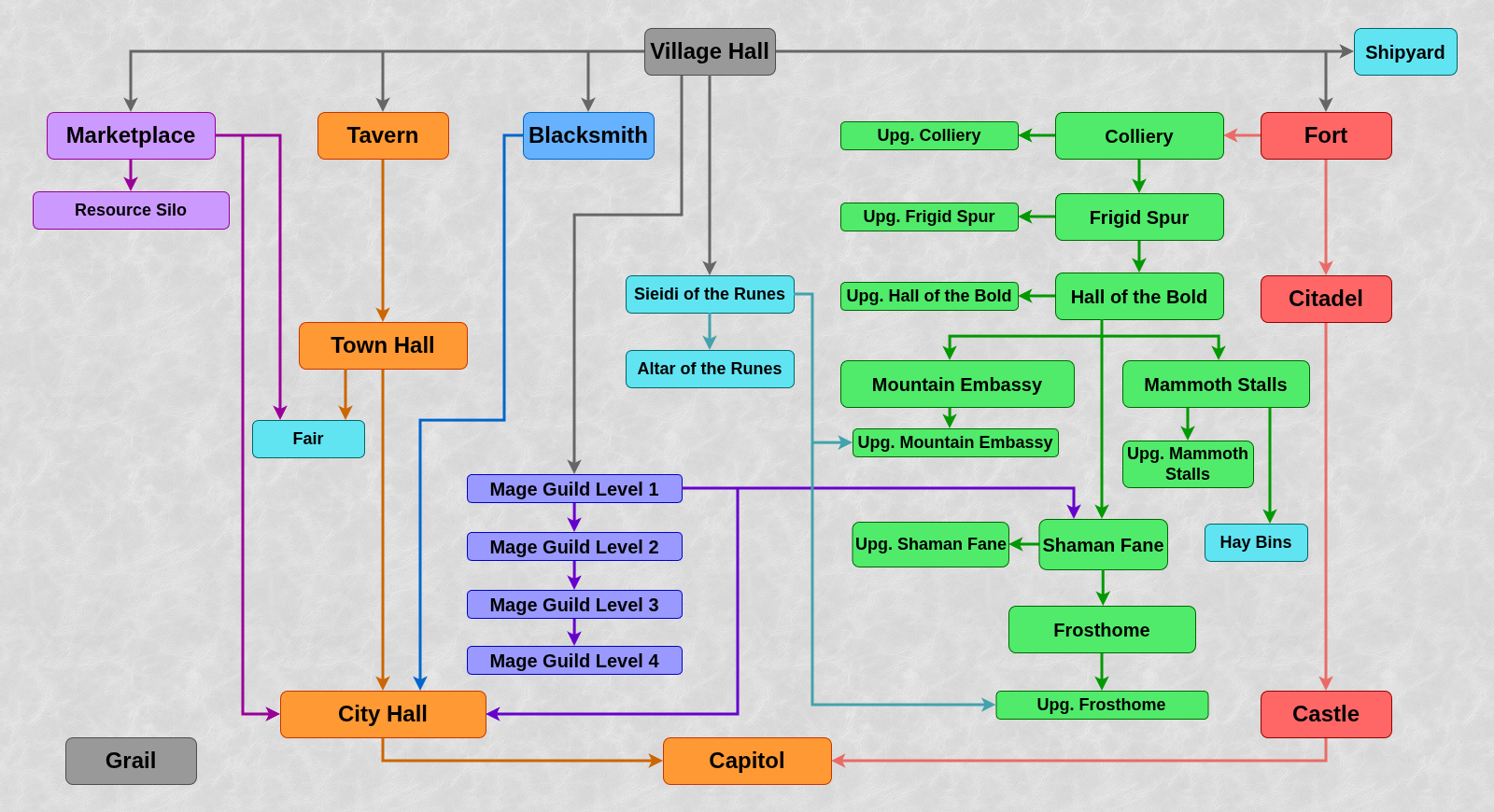
Spells
Level 1–4 spells are available in Cove.
A chance of rolling in the Mage Guild
Level 1
- Summon Boat: 5%.
- View Earth: 3%.
- View Air: 3%.
- Magic Arrow: 30%.
- Shield: 3%.
- Protection from Fire: 3%.
- Protection frmo Water: 3%.
- Dispel: 10%.
- Cure: 10%.
- Bless: 10%.
- Curse: 0%.
- Bloodlust: 5%.
- Stone Skin: 5%.
- Haste: 5%.
- Slow: 5%.
Level 2
- Scuttle Ship: 6%.
- Visions: 2%.
- Disguise: 2%.
- Quicksand: 4%.
- Fire Wall: 4%.
- Ice Bolt: 50%.
- Lightning Bolt: 4%.
- Death Ripple: 0%.
- Protection from Air: 2%.
- Precision: 6%.
- Weakness: 4%.
- Disrupting Ray: 6%.
- Fortune: 4%.
- Blind: 2%.
- Remove Obstacle: 4%.
Level 3
- Land Mine: 2%.
- Force Field: 8%.
- Earthquake: 8%.
- Frost Ring: 16%.
- Fire Ball: 2%.
- Destroy Unded: 4%.
- Air Shield: 8%.
- Protection from Earth: 2%.
- Anti Magic: 12%.
- Animate Dead: 0%.
- Mirth: 12%.
- Misfortune: 4%.
- Hypnotize: 4%.
- Forgetfulness: 8%.
- Teleport: 10%.
Level 4
- Water Walk: 10%.
- Town Portal: 10%.
- Chain Lightning: 10%.
- Inferno: 5%.
- Meteor Shower: 10%.
- Armageddon: 0%.
- Fire Shield: 5%.
- Resurrection: 5%.
- Prayer: 10%.
- Sorrow: 5%.
- Slayer: 5%.
- Frenzy: 5%.
- Counterstrike: 5%.
- Berserk: 5%.
- Clone: 10%.
General gameplay
Adventure map
- Introducing the spell research mechanic.
- It’s now possible to carry out research in the Mage Guild screen, replacing spells in the slots.
- The cost is (2*spell level) of mercury, sulfur, crystals, gems, and 1000 gold. Research is limited to one per day, per town (doesn’t prevent construction).
- The research removes the old spell from the slot and offers a choice of two random new spells (one new spell at level 5, no choice). It’s possible to do further research in the same spell slot, but the heroes won’t be able to learn the spell until the research is finalized. New spells will be generated according to the base certainty value by town type. Old spells (that ones that were in town or were not chosen after research) won’t be generated again before every potential new one is cycled through.
- You may finalize the research at any point. From that point your heroes will be able to learn the spell you selected, but the spell slot will become permanent.
- A town’s mandatory spells can’t be replaced. Only one instance of research may be carried out in a town at any time. You’ll have to finalize the research before working on a different spell slot.
- A special mechanics for Town Portal and Dimension Door spells.
- If spell research is enabled in a town, Town Portal and Dimension Door spells do not appear in the Mage Guild without research. In Library slots, Town Portal and Dimension Door spells may appear with standard chances.
- After a spell research or building a Library, a Town Portal spell will obligatorily appear if 2 level 4 spell researches were completed before, and a Town Portal spell haven’t appeared (this means a Town Portal is guaranteed at 3-rd spell research).
- After a spell research or building a Library, a Dimension Door spell will obligatorily appear if 2 level 5 spell researches were completed before, and a Dimension Door spell haven’t appeared (this means a Dimension Door is guaranteed at 3-rd spell research).
- In any other cases (in particular, after a spell research or building a Library, and 1 to 2 spell researches were completed before or if spell research is disabled in a town), Town Portal and Dimension Door spells may appear with standard chances.
- Towns with Fort always have level 2 dwelling built by default.
- Heroes with a starting army always have all troops (and a war machine), without the possibility of absence of any of them.
- Dwellings belonged to players accumulate creatures on a by-week basis. Number of creatures in dwellings without owner is set to one creature growth each week.
- On standard random map templates monsters join hero only for money and only half of group is joined for the cost of the whole group.
- Stables add 300 movement points instead of 400.
- On standard maps and random map templates strong heroes may only appear in tavern if no other heroes are available.
- Every hero has a power rate which depends on their stats.
- Each Primary Skills point: +500.
- Each Secondary Skills level: +500.
- Each spell: +80/160/240/1600/2000 (depending on the spell level).
- Each artifact (except war machines): +(artifact price in gold).
- Depending on power rate, a hero is granted with index from 0 to 5.
- 0: power rate not exceeding 10 000. Usually heroes level 5 or lower.
- 1: power rate not exceeding 15 000. Usually heroes level 10 or lower.
- 2: power rate not exceeding 25 000. Usually heroes level 20 or lower.
- 3: power rate not exceeding 35 000. Usually heroes level 30 or lower.
- 4: power rate not exceeding 100 000. Usually a dismissed secondary hero with several valuable artifacts.
- 5: power rate over 100 000. Usually a dismissed main hero with all artifacts.
- In an usual game, only heroes with the lowest power index available may appear in tavern. In the majority of situations, only heroes with 0 index will appear in tavern.
- During simultaneous turns in any game and at the beginning of a week on mirror templates, only heroes with index 0 or 1 may appear (not depending on what free heroes are left).
- Every hero has a power rate which depends on their stats.
- Movement points of heroes appearing in tavern are set by their current army (in particular, heroes defeated earlier no more have 2000 movement points).
- Heroes who were defeated (without retreating or surrendering), were fired, or left the tavern (on a new week or because of freeing a slot for a fled hero) always have spell and movement points refilled and all temporary modificators reset.
- Retreated or surrendered hero always appear in an empty slot of the player tavern if there is any.
- Now, when teleporting through multi-sided monoliths and Whirlpools, the hero arrives to a random previously unvisited monolith of this type (or Whirlpool). After visiting all monoliths of this type (or Whirlpools), the order of teleportation through them becomes the same as the order of the first visits.
- For Whirlpools, this mechanism affects the choice of the Whirlpool to which the hero arrives. The choice of a specific Whirlpool cell remains random.
- For two way monoliths and Whirlpools, both entering an object and teleporting to it is considered a visit.
- For one way monoliths, this mechanism affect the order of teleportation to the various exits. Only teleportation to the one way monolith exit is considered a visit.
- The order of monolith and Whirlpool visits is formed and used independently for each player.
Combat
- On most of random map templates works the combat round limit: 100 rounds. Any battle involving a player and lasting more than 100 rounds will be forcibly terminated. The attacking player will be invited to retreat, surrender, or end with quick combat. The availability of retreat and surrender depends on whether they were available in the first place (except Shackles of War are now ignored). Quick combat is only available in a battle against AI. During finishing with the quick combat a hero of the human player does not cast spells.
- An attacking hero can’t flee or surrender in the first round of battle of two heroes if they cast a spell. The Diplomat’s Cloak allows to surrender in such a situation.
- Some creatures can perform alternative action. Use interface button or Alt key for switch.
- Shooting creatures can perform melee attack instead of shot.
- Cyclopes and Cyclops Kings can move to the opened castle bridge instead of shooting it during a siege.
- Harpies and Harpy Hags can attack without return.
- Faerie Dragons can attack instead to spell cast.
- Archangels, Pit Lords, Mechanics and Engineers can move to a hex instead of resurrecting corpse from it.
- Olgoi-Khorkhois can move to a hex without devouring corpses on it.
- Added the possibility for 2 hex wide creatures to move hex back. Cyclopes and Cyclops Kings also can shoot the castle bridge with a friendly unit on it.
- Negative luck was introduced. While under effects of negative luck the stack has a chance (-1: 1/12 -2: 1/6, -3: 1/4) to cause half the damage. Hourglass of the Evil Hour neutralizes luck only if it is positive.
- Luck triggered in combat now increases damage by exactly 2 times. Original game luck added +100% to base damage, counting all negative modifiers, but no positive ones.
- Triggered luck or bad luck now changes the damage inflicted on every hit target. Originally in case hit damages several targets, luck increased damage only for one of them.
- The creatures in battle without a hero can now be subjected to the effect of good and bad luck. Originally luck never worked for creatures with no hero, even if it was positive (or negative) for them.
Artificial intelligence
- AI now takes less time to complete its turns, as it doesn’t calculate magic usage for battles where it’s not needed for the win.
- AI allies don’t use Mana Vortex in player’s town.
- Bugfix: AI didn’t know that getting into a boat doesn’t trigger a combat with nearby monster.
- Fixed a bug of AI determining Grail position with puzzle map incorrectly.
- The AI now ignores the limits on the number of heroes it can hire when rebuying its own heroes who have fled from combat. This affects the special restrictions imposed on AI in game, rather than the general limit of 8 heroes per player.
- Patrol mechanic for AI heroes is reworked.
- AI hero can no more leave their patrol area even if the intended target is inside the patrol area.
- Hero might accidentally (e.g. when visiting multi-sided monolith) exit the patrol area. In this case they cannot step on cells outside the patrol area anyway, but can visit the monolith again trying to return to the area.
- Patrol starting cell now cannot change when hero accidentally appears on another map level.
- AI no more ignores the desire to step from object trigger to the neighboring cell when patrol mechanic is active.
- Fire Wall / Danger area AI bug is fixed.
- Two hex wide AI unit no more considers target inappropriate in case the attack requires going to a position where head is placed on more dangerous hex than tail.
- E.g. two hex wide units no more ignore targets behind a close single Fire Wall.
- AI units also won’t move close to enemy without an attack in case of some specific player troop arrangements.
- AI now can use Berserk spell in combat.
- The AI now accounts for the Forgetfulness effect when calculating damage.
- Fixed a bug: now the AI takes the effect of the Sharpshooter Bow into account when trying to block shooters.
- AI no more tries blocking shooters by hypnotised units (such units cannot prevent enemy shooting).
- Fixed a bug: a coefficient of damage reduction (from the Armorer skill, Shield, Air Shield or Stone Gaze) could reduce combat unit value for AI down to 0. Now this coefficient can reduce unit value at most twice.
- AI continues defending a castle after a wall is broken if there is a moat. During a town siege, if it has a moat, a defending AI no more considers a broken wall a reason to stop staying inside the walls (except the case when any enemy’s not flying creatures may enter the castle from a moat).
- AI doesn’t retreat when its Catapult is broken while castle walls still stay if it can continue fighting using magic.
- AI avoids opening gate during the siege when attacking enemy creatures inside its castle.
- Fixed AI bug that made it keeping its unit inside its castle near the enemy unit outside the castle and not attacking that enemy.
Terrains
- New highlands terrain added.
- No movement penalty.
- Highlands is native terrain for Conflux creatures.
- Objects that appear on highlands on random maps (besides all-terrain ones):
- Trading Post
- Garden of Revelation
- Medusa Stores
- Faerie Ring
- Mineral Spring
- Ruins
- Hermit’s Shack
- Gazebo
- Junkman
- New wasteland terrain added.
- Movement penalty 125%.
- Objects that appear on wasteland on random maps (besides all-terrain ones):
- Medusa Stores
- Derrick
- Warlock’s Lab
- Prospector
- Trailblazer
- Grave
- Native terrain bonus on the underground depends on the particular terrain (originally it was always considered subterranean).
Creatures
- Increased the AI Value of Monk (Random Map Generator was underestimating them when placing). Thus, Pandora Boxes and Seer Huts on random map will give 25 Monks, instead of 30.
- Increased the AI Value of Scorpicore (Random Map Generator was underestimating them when placing). Thus, Pandora Boxes and Seer Huts on random map will give 12 Scorpicores, instead of 15.
- Increased the AI Value of Red Dragon (Random Map Generator was underestimating them when placing).
- Increased the AI Value of Lizardman (Random Map Generator was underestimating them when placing). Thus, Pandora Boxes and Seer Huts on random map will give 45 Lizardmen, instead of 60.
- Increased the AI Value of Lizard Warrior (Random Map Generator was underestimating them when placing). Thus, Pandora Boxes and Seer Huts on random map will give 35 Lizard Warriors, instead of 45.
- Decreased the AI Value of Naga (for increasing their count in guards on random maps). Thus, Pandora Boxes and Seer Huts on random map will give 12 Nagas, instead of 10.
- Increased the AI Value of Ghost Dragon (for decreasing their count in guards on random maps).
- Increased the AI Value of Efreet Sultan (for decreasing their count in guards on random maps). Thus, Pandora Boxes and Seer Huts on random map will give 8 Efreet Sultans, instead of 12.
- Increased the AI Value of Cyclops King (for decreasing their count in guards on random maps).
- Fire immunity of Firebirds replaced with 50% Fire Resist. Thus, slightly decreased their AI Value (Pandora Boxes and Seer Huts on random map will give 6 Firebirds, instead of 5).
- Largely increased the AI Value of Fairy Dragon. Their amount on random maps is now about 1.5 times lower.
- Default map count of Sharpshooters increased to 10–16, instead of 5–12. This also increases the minimum Sharpshooter count in random map guards, preventing them from appearing as low value guard.
- Ballista damage formula changed from (2–3 * (attack + 1)) to (2–3 * (attack + 5)). Ballista price reduced from 2500 to 1500.
- First Aid Tent healing power is increased from 1–25 / 1–50 / 1–75 / 1–100 to 20–25 / 40–50 / 60–75 / 80–100 (depending on the First Aid skill presence and level).
- Arrow Towers ignores the target’s defense completely (also, fixed various bugs with incorrect damage calculation). Attention: the Arrow Tower attack is 10 and defending hero attack and archery skill work for Arrow Tower. That is why the result damage of Arrow Tower is significantly greater than in original game, is which the Arrow Tower attack was counted as 0 and hero skills did not affected its damage.
Artifacts
- Cloak of the Undead King is not allowed to be assembled by default.
- Orb of Inhibition and Recanter’s Cloak are banned by default.
- Garniture of Interference, Surcoat of Counterpoise, and Boots of Polarity are disabled by default.
- Shackles of War effect applies only when both sides in the battle have heroes.
- Movement points given by Equestrian’s Gloves, are reduced from 300 to 200.
- Movement points given by Boots of Speed, are reduced from 600 to 400.
Spells
- Advanced and Expert Slow reduces the speed by the formula (old speed x 0.5 + 1), rounding down.
- The number of elementals summoned with Earth Elemental and Fire Elemental spells reduced from (2/2/3/4)*(spell power) to (2/2/2.5/3)*(spell power).
- The restriction on summoning different elemental types in a single combat is removed.
- The damage of Fire Wall spell increased form 10*(spell power) + 10/10/20/50 to 15*(spell power) + 10/10/20/50.
- The damage of Armageddon spell reduced form 50*(spell power) + 30/30/60/120 to 40*(spell power) + 30/30/60/120.
- The effect of Protection from Air, Protection from Fire, Protection from Water, and Protection from Earth spells increased from 30%–30%–50%–50% to 50%–50–%75–%75%.
- Fly, Water Walk and Dimension Door spell changes which make it impossible to trigger objects without alerting the guard even while using these spells (if take into account fix of object guard tilting bug).
- To trigger a guarded object while flying or water walking (if the object in question is not a freely passable one, like a friendly Garrison), you will now have to first land on an adjacent tile and fight the guardians.
- If a hero moves to a guarded tile after casting the Dimension Door, combat will start. Casting cursor will change its appearance if that’s the case.
- Fixed bugs with interruption the flight on forbidden cells. Interrupting the flight above a guarded tile will now trigger combat.
- Fly cast works when hero wears Angel Wings or has lower level Fly effect.
- The Disguise spell effect now lasts until the next turn of the player who cast it begins, instead of the end of the day.
- View Earth and View Air effects are now saved until the end of the player’s turn. Information is available through the World View screen.
Secondary skills
The Eagle Eye skill gives the hero a 30%–40%–50% chance to learn any spell of corresponding level from the enemy hero at the start of combat and 100% chance of learning it as soon as the spell is used by enemy in combat. The skill allows to view the opposing hero’s spellbook. Affected spell level increased to 3–4–5 instead of 2–3–4.
- At the beginning of the combat, the hero with Eagle Eye has a 30%–40%–50% chance to learn each spell in the opposing hero’s spellbook, up to and including level 3–4–5.
- The success of learning is determined independently for each spell.
- Any spell from the opposing hero’s spellbook can be learned, thus including adventure spells and spells obtained from artifacts (except the Titan’s Thunder).
- If the opposing hero does not have a spellbook, then only their adventure spells can be learned.
- When a spell of level (up to and including) 3–4–5 is being cast by the opposing hero in combat, the hero with Eagle Eye is guaranteed to learn it immediately.
- Spells autocast by artifacts are not learned.
- Titan’s Lightning Bolt cannot be learned through Eagle Eye.
- Learning spells during combat is accompanied by animations and log entries visible to both players.
- Eagle Eye allows for viewing the opposing hero’s spellbook during combat, displaying all spells up to and including Level 3–4–5.
- In the enemy’s spellbook, both combat and adventure spells may be viewed.
- If the opposing hero does not have a spellbook, then their combat spells will not be displayed.
- The current levels of elemental schools and spell costs for the opposing hero are displayed.
- The enemy’s spellbook can be opened by clicking on their hero or by pressing E.
- Inside the spellbook, you can switch between your own and enemy spellbooks using special bookmarks. Press P to switch to your own spellbook and press E to switch to your opponent’s spellbook.
- Eagle Eye blocks levels 1–2–3 of the opponent’s Eagle Eye skill (mutual blocking works similarly to the Tactics skill).
- Heroes who specialise in Eagle Eye enjoy an increased chance of learning spells prior to combat.
- At the beginning of the combat, the hero with Eagle Eye has a 30%–40%–50% chance to learn each spell in the opposing hero’s spellbook, up to and including level 3–4–5.
The Learning skill now increases the experience gained by the hero by 20%–40%–60% instead of 5%–10%–15%, and immediately gives the hero an additional level-up when first picking or upgrading the Learning skill.
- To gain an additional level-up, the hero gains the experience difference between the next and current levels (regardless of the hero’s current experience value).
- If the hero receives the Learning skill from a map object (for example, from a Scholar), then they receive a level-up immediately after receiving or upgrading the skill.
- If the hero first picks or upgrades the Learning skill during the level-up sequence, they will receive new level-ups after they finish receiving the level-ups they were supposed to receive before.
- If the hero starts the game with the Learning skill (including coming to a Tavern or being in a Prison), then they get all the necessary experience to receive the appropriate number of level-ups. The actual level-ups will be received as soon as the hero wins a battle or otherwise gains at least one experience point.
- At the level-up that happens after gaining/advancing Learning, upgrading the skill again will not be offered if the hero has other skills that can be upgraded. If the hero has Learning as a starting skill, its upgrade will not be offered at the 2nd level.
War machine skills (Ballistics for the Catapult, Artillery for the Ballista and Cannon, and First Aid for the First Aid Tent) now prevent their respective war machines from losing more than 40% of their hit points in a single strike.
- The percentage is calculated based on the machine’s total Hit Points at the beginning of the combat, factoring in all modifiers.
- Protection applies to all types of damage (physical, magical, etc.)
- If the attack deals damage multiple times, then each instance of damage taken counts as a separate strike.
The Expert Ballistics skill now allows the Catapult to hit any target with 100% accuracy, be it a wall, a gate, or an arrow tower.
The First Aid skill, in addition to its standard effect, now grants the First Aid Tent the ability to increase the Hit Points of all creatures in the hero’s army by 5%–10%–15%.
- The Hit Point bonus is calculated based on the creature’s standard Hit Points (excluding artifact bonuses) and rounded down.
- The Aging and Poison effects affect the creature’s total Hit Points, including extra Hit Points from the First Aid Tent.
- Additional Hit Points are lost when the First Aid Tent is destroyed. The amount of Hit Points lost by the top creature in the stack is retained, but it cannot be left with less than 1 remained Hit Point.
- In creature banks, the First Aid Tent is not present on the battlefield, but still increases the Hit Points of creatures being an artifact held by the hero.
- Heroes who specialise in First Aid increase the amount of Hit Points added by the First Aid Tent by 5% per hero level, instead of increasing the First Aid Tent’s healing power.
The Pathfinding skill now reduces the cost of a step over rough terrain down to 95%–90%–85% instead of 100%.
- Pathfinding reduces the cost of a straight (non-diagonal) step over rough terrain by 25–50–75 movement points. If the step cost falls below 95–90–85 movement points, it is set to 95–90–85 movement points.
- Like before, the cost of a diagonal step is calculated by the following formula: ((cost of a straight step) x 1.41).
- The skill’s effect is not cumulative with the effects of moving over native terrain, Fly, and Wayfarer’s Boots: only the most movement-efficient effect is applied.
Mysticism refills 10%–20%–30% of hero maximum spell points per day, but not less than 5–10–15 spell points.
Sorcery increases hero spell damage by 10%–20%–30% instead of 5%–10%–15%.
Estates gives 250–500–1000 gold every day instead of 125–250–500.
Scouting skill now adds +1/+3/+5 cells to hero sight radius instead of +1/+2+/3.
Logistics increases hero movement points by 5%–10%–20% instead of 10%–20%–30%.
Necromancy raises 5%–10%–15% enemy’s dead as Skeletons instead of 10%–20%–30%.
Intelligence increases hero spell points by 20%–35%–50% instead of 25%–50%–100%.
Resistance skill is disabled by default.
Added Interference skill: reduces enemy hero spell power during combat by 10%–20%–30%. Enemy spell power is rounded down, but cannot become less than 1. Chances to gain for hero classes:
- Knight: 5/112
- Cleric: 0/112
- Ranger: 9/112
- Druid: 0/112
- Alchemist: 5/112
- Wizard: 0/112
- Demoniac: 6/112
- Heretic: 0/112
- Death Knight: 5/112
- Necromancer: 0/112
- Overlord: 6/112
- Warlock: 0/112
- Barbarian: 6/112
- Battle Mage: 1/112
- Beastmaster: 5/112
- Witch: 0/112
- Planeswalker: 2/112
- Elementalist: 0/112
- Captain: 3/112
- Navigator: 1/112
- Mercenary: 4/112
- Artificer: 0/112
- Chieftain: 4/112
- Elder: 0/112
Added Runes skill, affiliated with Bulwark town. This skill allows creatures in hero’s army to accumulate up to 3–6–9 rune levels in combat, receiving bonuses to stats.
Runes allow hero’s units to accumulate up to 3–6–9 Rune Levels in combat. Each Rune Level gives bonuses to the creature stats:
1: +2 Attack, 2: +2 Defense, 3: +1 Speed;
4: +2 Attack, 5: +2 Defense, 6: +1 Speed;
7: +2 Attack, 8: +2 Defense, 9: +1 Speed.The bonuses of all achieved Rune Levels are cumulative. The unit gains +1 Rune Level when it attacks; +2 Rune Levels when it takes damage; +3 Rune Levels when it takes a defensive stance.
Each achieved Rune Level includes bonuses of previous levels. At maximum, 9th level, creature gains +6 to Attack, +6 to Defense, and +3 to Speed.
Units achieve new Rune Levels after each completed action in combat (unit’s move, hero’s spellcasting etc.) For each action the Rune Level of several units can increase.
- When taking defensive stance, unit receives +3 rune levels.
- If unit takes damage during action, it receives +2 rune levels.
- If unit attacks during action, it receives +1 rune level.
- The use of abilities that spend a unit’s turn (for example, unit spellcasting or attacking walls during a siege) is counted in the same way as attacking, that is, it gives +1 rune level.
Runes do not affect War Machines.
Runes skill can be learned in Sieidi of the Runes of Bulwark towns. Runes can be learned in this building by Bulwark heroes (Chieftains and Elders), and also by any heroes with Scholar secondary skill.
By default the Runes skill is disabled in Witch Huts and Universities.
Runes can appear on level-up only for Bulwarwk heroes. Chances to gain:
- Chieftain: 4/112
- Elder: 4/112
Hero specialties
In secondary skills
- Specialty in First Aid increases the amount of health added by the First Aid Tent by 5% for each hero level, instead of increasing the First Aid Tent’s healing power.
In spells
- Specialties in Bloodlust, Stone Skin and Precision now add +10/8/6/4 to the spell’s effect for Level 1-2/3-4/5-6/7 creatures. In the original game, they added +3/2/1 to the spell’s effect for Level 1-2/3-4/5-6 creatures.
- Specialty in Weakness now adds +4/6/8/10 to the spell’s effect for Level 1-2/3-4/5-6/7 creatures (stronger effect on stronger creatures). In the original game, it added +3/2/1 to the spell’s effect for Level 1-2/3-4/5-6 creatures.
- Specialties in Haste and Prayer now add +3/2/1 to the spell’s effect for Level 1-4/5-6/7 creatures. In the original game, they added +3/2/1 to the spell’s effect for Level 1-2/3-4/5-6 creatures.
- Specialty in Slayer now adds +20/16/12/8 to the spell’s effect for Level 1-2/3-4/5-6/7 creatures. In the original game, it added +4/3/2/1 to the spell’s effect for Level 1/2/3/4 creatures.
- Specialty in Disrupting Ray increases the spell’s effect by 10. In the original game, it increased the spell’s effect by 2.
- Specialty in Cure now adds +10% to the spell’s effect per (8 – n) hero levels, where n is the target’s Level (stronger effect on stronger creatures). In the original game, it added +3% to the spell’s effect per n hero levels, where n was the target’s Level.
- Specialties in Meteorite Shower, Chain Lightning, Resurrection and Animate Dead now add +5% to the spell’s effect per n hero levels, where n is the target’s Level. In the original game, the value was 3% instead of 5%.
- Specialties in Bless, Death Ripple, Ice Bolt, Frost Ring, Fireball, Hypnotize and Inferno now add +10% to the spell’s effect per n hero levels, where n is the target’s Level. In the original game, the value was 3% instead of 10%.
In creatures
- Specialties in Level 1 creatures now add +1 to Speed and +10% (rounded up) to Attack and Defence per hero level. In the original game, the value was 5% instead of 10%.
- Specialties in Level 2–6 creatures now add +1 to Speed and +20% to Attack and Defence (rounded up) per n hero levels, where n is the creature’s Level. In the original game, the value was %5 instead of 20%.
- Specialty in Ballista now adds +30% to Attack and Defence (rounded up) per 5 hero levels. In the original game, the value was 5% instead of 30%.
- Specialty in Cannon now adds +20% to Attack and Defence (rounded up) per 6 hero levels. In the original game, the value was 5% instead of 20%.
- Specialty in Water Elementals now adds +12 to Attack, instead of +2.
- Specialty in Fire Elementals now adds +3 to Attack, +4 to Defence and +2 to Damage, instead of +1 to Attack, +2 to Defence, and +2 to Damage.
- Specialty in Earth Elementals now adds +3 to Attack, +2 to Defence, and +5 to Damage, instead of +2 to Attack, +1 to Defence, and +5 to Damage.
- Specialty in Psychic Elementals now adds +5 to Attack and +5 to Defence, instead of +3 to Attack and +3 to Defence.
For campaign-only heroes
- Specialty in Fire Magic (Adrienne) now increases the Damage dealt by Fire spells by 50%. In the original game, her specialty had no effect. The hero’s only unique trait was starting with the Expert Fire Magic skill.
- Specialty in Black Knights (Haart Lich) now adds +10 to Attack, +10 to Defence, and +10 to Damage, instead of +5 to Attack, +5 to Defence, and +10 to Damage.
- Specialty in Devils (Xeron) now adds +10 to Attack, +10 to Defence, and +1 to Speed, instead of +4 to Attack, +2 to Defence, and +1 to Speed.
- Specialty in Behemoths (Kilgor) now adds +10 to Attack, +10 to Defence, and +10 to Damage, instead of +5 to Attack, +5 to Defence, and +10 to Damage.
- Specialty in Dragons (Mutare and Mutare Drake) now adds +10 to Attack and +10 to Defence, instead of +5 to Attack, and +5 to Defence.
Town gameplay
Castle
Heroes’ starting armies
- Amount of Griffins increased from 2–3 to 4–5.
Heroes
- Sir Mullich is banned by default. Lord Haart available instead.
- Sylvia is banned on maps without water. New hero — Beatrice available instead.
- Available on random maps only without water (replaces Sylvia).
- Class: Knight.
- Gender: Female.
- Specialty: Scouting. Increases the scouting range by 1 for every 6 levels of the hero (works only if hero has Scouting secondary skill).
- Secondary skills.
- Leadership: basic.
- Scouting: basic.
- Spell Book: none.
- Default unit count.
- Pikemen: 10–20.
- Crossbowmen: 4–7.
- Griffins: 4–5.
Rampart
Building tree
- Dragon Cliffs and Upg. Dragon Cliffs no longer require Enchanted Spring and Unicorn Glade.
Heroes’ starting armies
- Amount of Dwarves increased from 3–5 to 5–7.
- Amount of Elves decreased from 3–6 to 2–4.
Heroes
- Ufretin starting skill was changed from Resistance to Interference.
- Clancy starting skill was changed from Resistance to Interference.
- Thorgrim is banned by default. New hero — Giselle available instead.
- Available by default (replaces Thorgrim).
- Class: Ranger.
- Gender: Female.
- Specialty: Interference. Receives a 5% per level bonus to Interference skill.
- Secondary skills.
- Interference: advanced.
- Spell Book: none.
- Default unit count.
- Centaurs: 12–24.
- Dwarves: 5–7.
- Wood Elves: 2–4.
- Gem has the starting Spell changed on random maps without water from Summon Boat to Bless.
Tower
Building tree
- Altar of Wishes, Golden Pavilion, Upg. Golden Pavilion, Cloud Temple and Upg. Cloud Temple no longer require Mage Guild level 1 and Mage Tower.
- Golden Pavilion and Upg. Golden Pavilion now require Altar of Wishes.
- Upg. Altar of Wishes no longer requires Mage Tower (Mage Guild level one is still required).
Building prices
- Golem Factory price in gold is decreased from 2000 to 1500.
- Upg. Golem Factory price in gold is decreased from 2000 to 1500.
- Mage Tower price in gold is decreased from 2500 to 2000.
- Altar of Wishes price in gold is decreased from 3000 to 2500.
- Upg. Cloud Temple price in gold is decreased from 25000 to 20000.
Heroes’ starting armies
- Amount of Stone Gargoyles increased from 3–5 to 5–7.
- Amount of Stone Golems increased from 2–3 (or 2 in Josephine’s second slot) to 4–5.
Heroes
- Fafner starting skill was changed from Resistance to Interference.
Inferno
Building tree
- Upg. Hell Hole no longer requires Mage Guild level 2 (still requires Mage Guild level 1).
Building prices
- Brimstone Stormclouds price in sulfur decreased from 5 to 4.
- Upg. Hall of Sins price in mercury decreased from 5 to 4.
- Upg. Kennels price in sulfur decreased from 5 to 4.
Building properties
- Castle Gate allow teleportation to ally towns with Castle Gate (instead of just player own towns).
Creatures
- Magogs can shoot fireball at any hex of the battlefield except for its own hex and adjascent ones (unless sniper bow is present). Targeting dialogue is called by pressing G. However, creatures immune to fire can be damaged only by a central hex.
- Arch Devil decreases Luck by 2 (instead of 1 from the original).
Heroes’ starting armies
- Amount of Imps increased from 15–25 to 20–30.
- Amount of Gogs increased from 4–7 to 5–7.
- Amount of Hell Hounds increased from 3–4 to 4–5.
Heroes
- Ignatius starting skill was changed from Resistance to Interference.
Necropolis
Necromancy
- The amount of skeletons raised by necromancy is halved.
- Necromancy raise 5%–10%–15% enemy’s dead as Skeletons instead of 10%–20%–30%.
- Necromancy Amplifier increases Necromancy skill by 5% instead of 10%.
- Number of Skeletons raised by the Necromancy skill is now dependent on total number of slain creatures in an enemy army, rather than on numbers of each individual slain stack.
- The amount of skeletons raised by necromancy is halved.
Building prices
- Upg. Tomb of Souls price in mercury decreased from 5 to 4.
- Mausoleum price in ore decreased from 10 to 5, and in sulfur from 10 to 4.
- Upg. Mausoleum price in sulfur decreased from 5 to 4.
Building properties
- Skeleton Transformer transforms Bone Dragons and Ghost Dragons into Bone Dragons (instead of Skeletons).
Creatures
- Liches and Power Liches can shoot death cloud at any hex of the battlefield except for its own hex and adjascent ones (unless sniper bow is present). Targeting dialogue is called by pressing G.
Heroes’ starting armies
- Amount of Walking Dead increased from 4–6 to 6–8.
Heroes
- Straker starting skill was changed from Resistance to Interference.
- Galthran is banned by default. New hero — Ranloo is available instead.
- Available by default (replaces Galthran).
- Class: Death Knight.
- Gender: Male.
- Specialty: Ballista. Increases the Attack and Defense skills of any Ballista by 30% for every 5 levels (rounded up).
- Secondary skills.
- Necromancy: basic.
- Artillery: basic.
- Spell Book: present.
- Starting spell: Haste.
- Default unit count.
- Skeletons: 20–30.
- Ballista: 1.
- Wraiths: 4–6.
Dungeon
Building tree
- Dragon Cave and Upg. Dragon Cave no longer require Labyrinth and Manticore Lair.
Heroes’ starting armies
- Amount of Troglodytes decreased from 30–40 to 20–30.
- Amount of Harpies increased from 4–6 to 6–8.
Heroes
- Ajit starting skill was changed from Resistance to Interference.
Stronghold
Building prices
- Cyclops Cave price does not include crystals. Upg. Cyclops Cave price in crystals increased from 0 to 10.
Heroes’ starting armies
- Amount of Goblins increased from 15–25 to 20–30.
- Amount of Orcs increased from 4–6 to 5–6.
Heroes
- Krellion starting skill was changed from Resistance to Interference.
- Saurug starting skill was changed from Resistance to Interference.
Fortress
Heroes’ starting armies
- Amount of Gnolls increased from 10–20 to 15–25.
- Amount of Serpent Flies increased from 2–4 to 3–4.
Heroes
- Bron starting skill was changed from Resistance to Interference.
- Voy banned on maps without water. New hero — Kinkeria available instead.
- Available on random maps only without water (replaces Voy).
- Class: Witch.
- Sex: Female.
- Specialty: Learning. Receives a 5% per level bonus to Learning skill.
- Secondary skills.
- Wisdom: basic.
- Learning: basic.
- Spell Book: present.
- Starting spell: Slow.
- Default unit count.
- Gnolls: 15–25.
- Lizardmen: 4–7.
- Serpent Flies: 3–4
Conflux
Growth of Firebirds and Phoenixes decreased to 1 (2 after the construction of Castle).
Building tree
- Constructing Upg. Magic Lantern now requires Mage Guild level 1 and Garden of Life beforehand.
- New structure Vault of Ashes
- Cost: 5000 gold, 5 mercury.
- Requirements: Fort, Mage Guild Level 1, Magic Lantern, Altar of Air, Altar of Water, Altar of Fire, Altar of Earth, Altar of Thought, Pyre.
- Increases the growth of the Firebird and Phoenix by 1.
Building prices
- Cost of constructing the Pyre went up from 10 to 20 mercury and from 10000 to 15000 gold.
Building properties
- Purchasing a skill from the University of Magic now costs resources in addition to 2000 gold: Air — 5 Gems, Water — 5 Crystals, Fire — 5 Mercury, Earth — 5 Sulfur.
- Aurora Borealis (Grail structure of Conflux) allows learning spells up to according level of the Mage Guild in the city only and doesn’t allow learning spells not available for this town.
Creatures
- Fire immunity of Firebirds replaced with 50% Fire Resist. Slightly decreased AI Value (thus, Pandora Boxes and Seer Huts on random map will give 6 Firebirds, instead of 5).
Creature prices
- Cost of Psychic Elementals increased from 750 to 950 gold.
- Cost of Magic Elementals increased from 800 to 1200 gold.
- Cost of Firebirds increased from 1500 to 2000.
- Cost of Phoenixes increased from 2000 gold + 1 mercury to 3000 gold + 1 mercury.
Heroes’ starting armies
- Amount of Water Elementals increased from 2–3 to 3–5 for common heroes, and from 3–5 + 1–2 to 3–5 + 2–3 for Water Elemental specialists.
Heroes
- Luna specialisation effect (Fire Wall damage increase) was reduced from +100% to +25% (while spell power factor of the Fire Wall spell itself is increased from 10 to 15). AI bug of two hex wide units ignoring targets behind a close single Fire Wall is also fixed.
Other
- Native terrain changed to highlands.
New neutral creatures
Leprechaun
- Level 2.
- Dwelling: Alehouse.
- Attack: 8.
- Defense: 5.
- Damage: 3–5.
- Health: 15.
- Speed: 5.
- Shots: 0.
- Cost: 100 gold.
- Population growth: 9.
- Amount on map: 16–25.
- AI Value: 190.
- Fight Value: 190.
- Abilities.
- Doubles friendly unit Luck chance.
- Casts Fortune. 3 times per battle can cast Advanced Fortune on allied unit. Spell lasts 6 turns.
Satyr
- Level 4.
- Dwelling: Wineyard.
- Attack: 10.
- Defense: 11.
- Damage: 6–10.
- Health: 35.
- Speed: 7.
- Shots: 0.
- Cost: 300 gold.
- Population growth: 4.
- Amount on map: 10–20.
- AI Value: 518.
- Fight Value: 471.
- Abilities.
- Casts Mirth. 3 times per battle can cast Advanced Mirth on allied unit. Spell lasts 6 turns.
Steel Golem
- Level: 4.
- Dwelling: none.
- Attack: 10.
- Defense: 11.
- Damage: 6–8.
- Health: 45.
- Speed: 6.
- Shots: 0.
- Cost: 400 gold.
- Population growth: 4.
- Amount on map: 10–16.
- AI Value: 597.
- Fight Value: 597.
- Abilities.
- Golem. Damage from spells reduced by 80%.
Fangarm
- Level 5.
- Dwelling: Ziggurat.
- Attack: 12.
- Defense: 12.
- Damage: 8–12.
- Health: 50.
- Speed: 6.
- Shots: 0.
- Cost: 600 gold.
- Population growth: 3.
- Amount on map: 8–16.
- AI Value: 929.
- Fight Value: 929.
- Features.
- Flight.
- Abilities.
- Mind spell immunity.
- Unlimited retaliations.
- Hypnotize. Casts Advanced Hypnotize for 3 rounds on an attacked stack. Spell Power is equal to number of creatures in Fangarm squad while checking possibility of applying Hypnotize (this means it affects a squad with total health (counting damage of current attack) not greater than 20 + 25*(Fangarm count)). In case of successful cast of Hypnotize attacked stack won’t relatiate (or won’t attack twice if Fangarms are counterattacking).
New artifacts
Diplomats Cloak
- Class: Relic.
- Combination Artifact. Componentry: Stateman’s Medal, Diplomat’s Ring, Ambassador’s Sash. Component effects: reduce the cost of surrendering by 30%.
- Worn on shoulders (also blocks neck slot and one ring slot).
- Cost: 15000.
- Counting component effects this cloak reduces the cost of surrendering by 30% and allows your hero to surrender when battling enemy without a hero. Allows to retreat or surrender when defending a town or attacking and casting a spell in the first round of a combat. Multiplies your hero army strength by 3 for neutral armies (when determining their desire to join hero or run away) and Thieves Guild.
Ironfist of the Ogre
- Class: Relic.
- Combination Artifact. Componentry: Ogre’s Club of Havoc, Targ of the Rampaging Ogre, Tunic of the Cyclops King, Crown of the Supreme Magi. Component effects: increase your Attack and Defence skills by 5 and your Spell Power and Knowledge skills by 4.
- Carried in right hand (also blocks left hand slot, head slot and body slot).
- Cost: 20000.
- Counting component effects the Ironfist of the Ogre gives hero +5 Attack, +5 Defence, +4 Power, and +4 Knowledge. Casts these spells on expert level at the beginning of combat on all of your creatures for 50 rounds: Haste, Bloodlust, Fire Shield, and Counterstrike.
Golden Goose
- Class: Relic.
- Combination artifact. Componentry: Endless Purse of Gold, Endless Bag of Gold, Endless Sack of Gold. Component effects: bring 2250 gold/day.
- Worn in “Other” slot (also blocks another two “Other” slots).
- Cost: 22500.
- Counting component effects the Golden Goose increases your income by 7000 gold per day.
Trident of Dominion
- Class: Major.
- Carried in right hand.
- Cost: 7000.
- Increases your Attack skill by 7.
Shield of Naval Glory
- Class: Major.
- Carried in left hand.
- Cost: 7000.
- Increases your Defence skill by 7.
Royal Armor of Nix
- Class: Major.
- Worn on body.
- Cost: 7000.
- Increases your Spellpower skill by 6.
Crown of the Five Seas
- Class: Major.
- Worn on head.
- Cost: 7000.
- Increases your Knowledge skill by 6.
Wayfarer’s Boots
- Class: Major.
- Worn on foot.
- Cost: 5000.
- Remove movement penalty on rough terrains, allowing to move at 100% cost on any terrain.
Ring of Supression
- Class: Treasure.
- Worn on finger.
- Cost: 4000.
- Decreases enemy’s Morale by 1.
Hideous Mask
- Class: Minor.
- Worn in “Other” slot.
- Cost: 4000.
- Decreases enemy’s Morale by 1.
Pendant of Downfall
- Class: Major.
- Worn on neck.
- Cost: 7000.
- Decreases enemy’s Morale by 2.
Runes of Imminency
- Class: Treasure.
- Worn in “Other” slot.
- Cost: 2000.
- Decrease enemy’s Luck by 1.
Demon’s Horseshoe
- Class: Treasure.
- Worn in “Other” slot.
- Cost: 2000.
- Decreases enemy’s Luck by 1.
Shaman’s Puppet
- Class: Minor.
- Worn in “Other” slot.
- Cost: 4000.
- Decreases enemy’s Luck by 2.
Ring of Oblivion
- Class: Major.
- Worn on finger.
- Cost: 7500.
- When worn, makes all losses in the battle irrevocable: corpses disappear right after unit’s death; Resurrection, Animate Dead and Sacriface are banned for use; repair and vampirism abilities only restores health, but does not bring back dead units; undead cannot be raised using necromancy after battle.
Cape of Silence
- Class: Major.
- Worn on shoulders.
- Cost: 7500.
- Bans all level 1 and 2 spells in battle.
Charm of Eclipse
- Class: Minor.
- Worn in “Other” slot.
- Cost: 5000.
- Reduces the Power skill of enemy hero by 10% during combat.
Seal of Sunset
- Class: Minor.
- Worn on finger.
- Cost: 5000.
- Reduces the Power skill of enemy hero by 10% during combat.
Plate of Dying Light
- Class: Relic.
- Worn on body.
- Cost: 10000.
- Reduces the Power skill of enemy hero by 25% during combat.
Not for random maps
These artifacts do not appear on random maps until they are enabled in the template settings.
Sleepkeeper
- Class: Relic.
- Worn in “Other” slot.
- Cost: 10000.
- Gives hero units mind spell immunity. The effect can be negated with the Orb of Vulnerability.
Pendant of Reflection
- Class: Relic.
- Combination artifact. Componentry: Garniture of Interference, Surcoat of Counterpoise, Boots of Polarity. Component effects: increase your chance to resist a hostile spell by 30%.
- Worn on the neck (also blocks slots of shoulders and legs).
- Cost: 12000.
- Counting component effects this item increases your chance to resist a hostile spell by 50%.
Horn of the Abyss
- Class: Relic.
- Worn in “Other” slot.
- Cost: 50000.
- After a stack of living creatures is slain, a stack of Fangarms will rise in their stead and will stay loyal to the hero after the battle concludes. Total Hit Points of this stack will be equal to half of the slain stack’s total Hit Points, but quantity of the Fangarms summoned thus should not exceed half of quantity of creatures in the slain stack. Slaying Fangarms will not trigger the Horn effect.*
Objects on the map
Changes to original objects
- Player can refuse to learn Witch Hut or Scholar secondary skill.
- If a creature has multiple external dwellings (not counting multi-dwellings), each of the succeeding ones will be generated less frequently.
- Cartographer Maps cost 10000 instead of the former 1000. Cartographers are not generated on random maps.
- Keymaster Tents were removed from random generation.
- Seer Huts cannot require artifacts that are part of a combination artifact.
- Sanctuary now will not be spawning on randomly generated maps.
- Imp Cache value is reduced from 5000 to 1500.
- Trading Post value is increased from 100 to 3000.
- The value of the Obelisk is reduced from 3500 to 350. Added a restriction of no more than 1 Obelisk in the zone.
- Only 1 Den of Thieves and only 1 Tavern now allowed per zone.
- Density of Lean To is decreased from 100 to 50.
- Density of Shrine of Magic Incantation and Shrine of Magic Thought is reduced from 100 to 50.
- Changes to Spell Scrolls.
- The value of the scroll level 4 increased from 4000 to 8000. Removed Town Portal and Waterwalk spells.
- The value of the scroll level 5 increased from 5000 to 10000. Removed Fly and Dimesion Door spells.
- Added srcoll with Town Portal, Fly, Dimesion Door and (in case of water map) Waterwalk. Value 20000, frequency of occurrence 30, maximum 1 in the zone.
- Added restrictions on the maximum number of scrolls in the zone.
- Scroll Level 1: 6.
- Scroll Level 2: 5.
- Scroll Level 3: 4.
- Scroll Level 4: 3.
- Scroll Level 5: 2.
- The mechanism of a uniform distribution of spells in the scrolls: Map will always have about the same number of scrolls with all the spells of the same level, and scrolls with the same spells are less likely to be near each other.
- Elemental Conflux (multi-dwelling on map) gives +1 to the increase in air, water, fire and earth elementals in all towns, not just the air elementals.
- Following objects from original game are now generated on random maps:
- Golem Factory. Allows to recruit Stone, Iron, Gold and Diamond Golems. Value around 4500, density 20, generated both in Neutral zones and in Tower zones.
- Elemental Conflux. Allows to recruit Air, Water, Fire and Earth Elementals. Value around 6000, density 20.
- Freelancer’s Guild. Allows to trade units for resources. Value 100, density 50, all dry land terrains, limit of 1 per zone.
- The Crypt, Derelict Ship and Shipwreck shows the approximate number of foes after the visit. When you visit any of these objects, morale is reduced immediately if it was previously looted, without a window.
- The number of Peasants in Pandora Boxes and Seer Huts decreased to 150 (the value is unchanged).
- Value of Estate (Vampires outer dwell) multiplied by 3 (from around 3000 to around 9000).
- Value of Hovel (Peasant outer dwell) multiplied by 3, so they will not appear more often than another level 1 Dwellings.
- The image of every town depends on its Fort level (no Fort — Fort — Citadel — Castle — Castle+Capitol).
New creature banks
Experimental Shop
- In 30% of cases.
- Guards: 20 Steel Golems.
- Reward: 1 Giant.
- In 30% of cases.
- Guards: 40 Steel Golems.
- Reward: 2 Giants.
- In 30% of cases.
- Guards: 60 Steel Golems.
- Reward: 3 Giants.
- In 10% of cases.
- Guards: 80 Steel Golems.
- Reward: 4 Giants.
- Features:
- Random 1-hex size obstacles appear in combat: no obstacles in 10% of cases, 1 obstacle in 50% of cases, 2 obstacles in 20% of cases, 3 obstacles in 20% of cases.
- Obstacles cannot appear near the stack starting positions, as well as next to or one cell from each other.
- No obstacles appear on the water or magic terrains.
- For Random Map Generator:
- Terrain: any dry land.
- Value: 3500.
- Density: 80.
Wolf Raider Picket
- In 30% of cases.
- Guards: 50 Wolf Raiders.
- Reward: 4 Cyclopes.
- In 30% of cases.
- Guards: 75 Wolf Raiders.
- Reward: 6 Cyclopes.
- In 30% of cases.
- Guards: 100 Wolf Raiders.
- Reward: 8 Cyclopes.
- In 10% of cases.
- Guards: 150 Wolf Raiders.
- Reward: 12 Cyclopes.
- For Random Map Generator:
- Terrain: any dry land.
- Value: 9500.
- Density: 70.
Red Tower
- In 30% of cases.
- Guards: 35 Fire Elementals, 50% chance of having an upgraded stack.
- Reward: 1 Firebird.
- In 30% of cases.
- Guards: 70 Fire Elementals, 50% chance of having an upgraded stack.
- Reward: 2 Firebirds.
- In 30% of cases.
- Guards: 105 Fire Elementals, 50% chance of having an upgraded stack.
- Reward: 3 Firebirds.
- In 10% of cases.
- Guards: 140 Fire Elementals, 50% chance of having an upgraded stack.
- Reward: 4 Firebirds.
- For Random Map Generator:
- Limit per zone: 1.
- Terrain: any dry land.
- Value: 4000.
- Density: 20.
Black Tower
- The alignment of the armies is standard, on the opposite sides of the battlefield.
- In 30% of cases.
- Guards: 1 Green Dragon.
- Reward: 2000 gold, 1 minor artifact.
- In 30% of cases.
- Guards: 1 Red Dragon.
- Reward: 2250 gold, 1 minor artifact.
- In 30% of cases.
- Guards: 1 Gold Dragon.
- Reward: 3500 gold, 1 minor artifact.
- In 10% of cases.
- Guards: 1 Black Dragon.
- Reward: 3750 gold, 1 minor artifact.
- For Random Map Generator:
- Terrain: any dry land.
- Value: 1500.
- Density: 100.
Churchyard
- Guards are divided into 6 groups.
- In 100% of cases.
- Guards: 90 Zombies.
- Reward: 2500 gold, 1 minor artifact. Visiting a previously plundered Churchyard inflicts a -1 penalty to Morale.
- For Random Map Generator:
- Terrain: any dry land.
- Value: 1500.
- Density: 100.
Mansion
- In 30% of cases.
- Guards: 40 Vampire Lords.
- Reward: 2500 gold, 2 mercury, 2 sulfur, 2 crystals, 2 gems, 1 major artifact.
- In 30% of cases.
- Guards: 60 Vampire Lords.
- Reward: 5000 gold, 3 mercury, 3 sulfur, 3 crystals, 3 gems, 1 major artifact.
- In 30% of cases.
- Guards: 80 Vampire Lords.
- Reward: 7500 gold, 4 mercury, 4 sulfur, 4 crystals, 4 gems, 1 major artifact.
- In 10% of cases.
- Guards: 100 Vampire Lords.
- Reward: 10000 gold, 5 mercury, 5 sulfur, 5 crystals, 5 gems, 1 major artifact.
- For Random Map Generator:
- Terrain: any dry land.
- Value: 5000.
- Density: 50.
Ruins
- In 30% of cases.
- Guards: 20 Skeletons, 3 Wights, 3 Wraiths, 10 Skeleton Warriors, 1 Power Lich.
- Reward: 1000 gold, shroud is removed from all tiles within 12 tiles from Ruins. If Ruins are already visited, shroud is removed anyway.
- In 30% of cases.
- Guards: 30 Skeletons, 5 Wights, 5 Wraiths, 10 Skeleton Warriors, 1 Power Lich.
- Reward: 2000 gold, shroud is removed from all tiles within 12 tiles from Ruins. If Ruins are already visited, shroud is removed anyway.
- In 30% of cases.
- Guards: 40 Skeletons, 7 Wights, 7 Wraiths, 20 Skeleton Warriors, 2 Power Liches.
- Reward: 3000 gold, shroud is removed from all tiles within 12 tiles from Ruins. If Ruins are already visited, shroud is removed anyway.
- In 10% of cases.
- Guards: 50 Skeletons, 9 Wights, 9 Wraiths, 20 Skeleton Warriors, 3 Power Liches.
- Reward: 4000 gold, shroud is removed from all tiles within 12 tiles from Ruins. If Ruins are already visited, shroud is removed anyway.
- For Random Map Generator:
- Terrain: highlands.
- Value: 1000.
- Density: 100.
Sea objects
Beholders’ Sanctuary
- In 30% of cases.
- Guards: 50 Beholders, 50% chance of having an upgraded stack.
- Reward: 3000 gold, 1 minor artifact.
- In 30% of cases.
- Guards: 75 Beholders, 50% chance of having an upgraded stack.
- Reward: 5000 gold, 1 minor artifact.
- In 30% of cases.
- Guards: 100 Beholders, 50% chance of having an upgraded stack.
- Reward: 6000 gold, 1 major artifact.
- In 10% of cases.
- Guards: 150 Beholders, 50% chance of having an upgraded stack.
- Reward: 9000 gold, 1 major artifact.
- For Random Map Generator:
- Terrain: water.
- Value: 2500.
- Density: 100.
Temple of the Sea
- In 30% of cases.
- Guards: 8 Hydras, 6 Sea Serpents, 3 Chaos Hydras, 2 Haspids.
- Reward: 10000 gold, 2 treasure artifacts, 1 minor artifact, 1 relic.
- In 30% of cases.
- Guards: 8 Hydras, 7 Sea Serpents, 4 Chaos Hydras, 3 Haspids.
- Reward: 15000 gold, 1 treasure artifact, 1 minor artifact, 1 major artifact, 1 relic.
- In 30% of cases.
- Guards: 8 Hydras, 7 Sea Serpents, 5 Chaos Hydras, 4 Haspids.
- Reward: 20000 gold, 1 minor artifact, 2 major artifacts, 1 relic.
- In 10% of cases.
- Guards: 10 Hydras, 9 Sea Serpents, 6 Chaos Hydras, 5 Haspids.
- Reward: 30000 gold, 2 major artifacts, 2 relic.
- For Random Map Generator:
- Terrain: water.
- Value: 10000.
- Density: 100.
Not for random maps
These objects do not appear on random maps until they are enabled in the template settings.
Pirate Cavern
- The guards are divided into 4 stacks.
- In 30% of cases.
- Guards: 20 Pirates, 20 Corsairs, 50% chance of having an upgraded stack (Pirates into Corsairs).
- Reward: 1 Sea Serpent.
- In 30% of cases.
- Guards: 40 Pirates, 40 Corsairs, 50% chance of having an upgraded stack (Pirates into Corsairs).
- Reward: 2 Sea Serpents.
- In 30% of cases.
- Guards: 60 Pirates, 60 Corsairs, 50% chance of having an upgraded stack (Pirates into Corsairs).
- Reward: 3 Sea Serpents.
- In 10% of cases.
- Guards: 80 Pirates, 80 Corsairs, 50% chance of having an upgraded stack (Pirates into Corsairs).
- Reward: 4 Sea Serpents.
Ivory Tower
- In 30% of cases.
- Guards: 35 Archmages.
- Reward: 3 Enchanters.
- In 30% of cases.
- Guards: 50 Archmages.
- Reward: 6 Enchanters.
- In 30% of cases.
- Guards: 65 Archmages.
- Reward: 9 Enchanters.
- In 10% of cases.
- Guards: 80 Archmages.
- Reward: 12 Enchanters.
Spit
- Garrison is split in 4 squads dislocated on the sides of the battlefield.
- In 30% of cases.
- Guards: 16 Basilisks.
- Reward: 3000 gold.
- In 30% of cases.
- Guards: 24 Basilisks.
- Reward: 4500 gold.
- In 30% of cases.
- Guards: 32 Basilisks.
- Reward: 6000 gold.
- In 10% of cases.
- Guards: 48 Basilisks.
- Reward: 9000 gold.
Warehouses
Warehouse of Wood
- Brings 10 wood when visited once a week.
- Limit per zone: 1.
- Terrain: any dry land.
- Value: 2250.
- Density: 30.
Warehouse of Mercury
- Brings 6 mercury when visited once a week.
- Limit per zone: 1.
- Terrain: any dry land.
- Value: 2500.
- Density: 25.
Warehouse of Ore
- Brings 10 ore when visited once a week.
- Limit per zone: 1.
- Terrain: any dry land.
- Value: 2250.
- Density: 30.
Warehouse of Sulfur
- Brings 6 sulfur when visited once a week.
- Limit per zone: 1.
- Terrain: any dry land.
- Value: 2500.
- Density: 25.
Warehouse of Crystals
- Brings 6 crystals when visited once a week.
- Limit per zone: 1.
- Terrain: any dry land.
- Value: 2500.
- Density: 25.
Warehouse of Gems
- Brings 6 gems when visited once a week.
- Limit per zone: 1.
- Terrain: any dry land.
- Value: 2500.
- Density: 25.
Warehouse of Gold
- Brings 2000 gold when visited once a week.
- Limit per zone: 1.
- Terrain: any dry land.
- Value: 6000.
- Density: 15.
New Hill Fort
- Allows you to upgrade present creatures of only 1–5 levels (old Hill Fort does not persist on random maps anymore).
- Limit per zone: 1.
- Terrain: any dry land.
- Value: 7000.
- Frequency of occurrence: 20.
Cannon Yard
- Allows to buy a cannon for 3000 gold.
- Limit per zone: 1 (together with the War Machine Factory).
- Terrain: any dry land.
- Value: 3000.
- Frequency of occurrence: 25.
Temple of Loyalty
- A visiting hero will have all Morale penalties for having creatures of varied alignment in his army removed until the next turn.
- Limit per zone: 1.
- Terrain: any dry land.
- Value: 100.
- Frequency of occurrence: 20.
Skeleton Transformer
- A visiting hero will be allowed to turn any creatures into Skeletons.
- Limit per zone: 1.
- Terrain: subterranean.
Value: 500. - Frequency of occurrence: 15.
Colosseum of the Magi
- Player’s choice to add +2 to the visiting hero’s Spell Power or Knowledge (once per hero).
- Limit per map: 32.
- Terrain: any dry land.
- Value: 3000.
- Frequency of occurrence: 50.
Watering Place
- Allows hero to lose all current movement and get +1000 Movement next day.
- Limit per zone: 1.
- Terrain: rough.
- Value: 500.
- Frequency of occurrence: 50.
Town Gate
- Allows visiting hero to teleport to any allied town. This does not cost any additional movement points.
- Limit per zone: 1.
- Terrain: any dry land.
- Value: 10000.
- Frequency of occurrence: 20.
Mineral Spring
- Hero receives +1 Luck until next battle and +600 movement points until the end of the day.
- Limit per zone: 1.
- Terrain: highlands.
- Value: 500.
- Frequency of occurrence: 50.
Hermit’s Shack
- Improves a random secondary skill of the visiting hero.
- Limit per map: 32.
- Limit per zone: 1.
- Terrain: highlands.
- Value: 1500.
- Frequency of occurrence: 80.
Gazebo
- Hero receives 2000 experience points for 1000 gold.
- Limit per map: 32.
- Terrain: highlands.
- Value: 1500.
- Frequency of occurrence: 50.
Junkman
- Allows selling artifacts at the efficiency of 7 markets (for the half of base cost). Does not accept Spell Scrolls.
- Limit per zone: 1.
- Terrain: highlands.
- Value: 200.
- Frequency of occurrence: 40.
Derrick
- Yields 500 gold in the first week and 1000 gold in any other.
- Terrain: wasteland.
- Value: 750.
- Frequency of occurrence: 30.
Warlock’s Lab
- Allows players to transmute mercury, sulfur, crystals and gems into each other at the ratio of 1 to 1.
- Limit per zone: 1.
- Terrain: snow, wasteland.
- Value: 10000.
- Frequency of occurrence: 100.
Prospector
- Yields 500 gold or 5 sulfur once a week.
- Terrain: wasteland.
- Value: 500.
- Frequency of occurrence: 30.
Trailblazer
- Removes wasteland movement penalty and reduces the cost of moving on wastelands down to 75% until the end of the week.
- Limit per zone: 1.
- Terrain: wasteland.
- Value: 200.
- Frequency of occurrence: 40.
Grave
- When dug up, it yields 1500–4000 gold, or a random treasure/minor class artifact, and gives -3 to morale until the next battle.
- Terrain: wasteland.
- Value: 500.
- Frequency of occurrence: 30.
Trapper Lodge
- Once visited, randomly gives the hero 300–500 gold, or 3–5 Gremlins or Kobolds.
- Terrain: snow.
- Value: 500.
- Frequency of occurrence: 50.
Shrine of Magic Mystery
- Allows you to learn a level 4 spell.
- This object is banned on the most of built-in multiplayer RMG templates.
- Limit per zone: 1.
- Terrain: any.
- Value: 7000.
- Frequency of occurrence: 100.
Monoliths
Added 12 new Two Way Monoliths. There are now total of 20 Two Way Monoliths. Therefore, generation of One Way Monoliths is almost excluded (for all generations where there was not more than 4 of Monoliths with 4 copies).
Sea objects
Sea Barrel
- 20% chance of getting nothing. 80% chance of getting 3–6 Mercury, Sulfur, Crystal, or Gems once.
- Terrain: water.
- Value: 500.
- Frequency of occurrence: 400.
Jetsam
- 25% chance of getting nothing. 75% chance of getting 5 Ore, 5 Ore and 200 Gold, or 10 Ore and 500 Gold once (equiprobably).
- Terrain: water.
- Value: 500.
- Frequency of occurrence: 600.
Vial of Mana
- Grants 30, 40, 50 or 60 spell points. If resulting amount of mana points is to exceed normal cap for the hero, only half the extra points will be granted.
- Terrain: water.
- Value: 3000.
- Frequency of occurrence: 50.
Seafaring Academy
- Allows to pay 2000 Gold for studying or improving Secondary Skill of three taught. Navigation is always one of these three.
- Limit per zone: 1.
- Terrain: water.
- Value: 8000.
- Frequency of occurrence: 20.
Altar of Mana
- Heroes may sacrifice creatures for spell points, up to 4x the normal cap. Each sacrificed creature gives (AI Value)/80 mana points.
- Limit per zone: 1.
- Terrain: water.
- Value: 100.
- Frequency of occurrence: 20.
Observatory
- Gives each visiting hero +2 scouting radius until the end of the week.
- Limit per zone: 1.
- Terrain: water.
- Value: 500.
- Frequency of occurrence: 20.
Not for random maps
These objects do not appear on random maps until they are enabled in the template settings.
Airship
- Airship is a transport to move by air.
- A hero in an airship can fly over any obstacles, stop on free tiles of land and water and also stop near monsters without fight.
- A hero in an airship cannot enter objects, attack monsters or other heroes, exchange with other heroes. Other heroes can attack a hero in an airship or exchange with him.
- A hero in an airship has 2000 movements. No modificators increasing the speed of moving either by land or water influence this quantity.
- Embarkment on airship or disembarkment from airship requires all movement points. Admiral’s Hat doesn’t influence either embarkment on airship or disembarkment from airship. Disembarkment from airship can be done at any moment to any free tile of land, even if no movement points are left.
- Airship can be situated either on land or water. A hero can embark on an airship situated on a near water tile and can disembark from airship situated on a water tile to a land tile.
- Summon Boat and Scuttle Boat don’t affect airships.
- Airship Yard allows building airships.
- The price of an airship is 20 wood and 5000 gold.
- Airship Yard can be captured. A player can build airships in a captured Airship Yard without visiting it by a hero.
- Airship Yard has a value of 12000 when using it on random maps.
- Airship Yard is used in some zones of huge (H, XH, G) random maps (8XM8 Huge, 8XM12 Huge, Doubled 8MM6) from the default pack (Original template pack).
Ancient Lamp
- Allows you to recruit 4–6 Master Genie once.
- Enabled in starting zones of Jebus Cross template. Terrain: any dry land; only for zones with Tower faction; value 5000; Frequency 200.
Ancient Altar
- Battle against 25 Haspids. In case of victory, a hero obtains the Horn of the Abyss, and the Ancient Altar becomes deactivated.
- The troops positioning is standard, by different sides of the battlefield. Haspids are divided to stacks like any monsters on a map.
- In case of hero’s defeat, the number of Haspids returns to 25.
Hero Camp
- A hero from the camp joins player for free.
- The object mechanic is identical to the Prison, only decoration is different.
Interface
In-battle interface
- The choice of battle speed is widened up to 5 options.
- Fixed interface for selecting spell target for hero and creatures.
- Cast activation button changed for Fairy Dragons from F to G.
- Information about current spell duration is added into view creature window and creature mouse-over statistics.
- In the header of the window of a stack in battle, the number of creatures at the beginning of the combat is now shown.
- In descriptions of war machines, the effects of Artillery, First Aid and Ballistics skills of the hero owning them are now displayed.
- In the tooltip shown when right-clicking arrow towers, the information on their current and overall durability and ignoring the target’s defence is now shown.
- Additional hints has been introduced to be displayed when targeting a stack.
- Information about possible number of killed creatures added to possible damage.
- The effect of damage spells, healing and resurrection spells (both for hero and caster creatures) is shown.
- In tooltips for resurrection actions, the number of all dead units in the target stack is shown.
- The effect of First Aid Tent healing is shown.
- The number of remaining shots for caster creatures is shown.
- The number of attacks is shown for the creatures that can perform multiple attacks.
- The number of attacks, chance of hitting the target, possible damage, current and overall durability of the target is now shown when shooting at walls.
- Surrender cost and player gold amount are added to surrender button tip. The tip is shown even for disabled surrender button.
- Hero sprites now depend on their class and gender.
- Clones and summoned elementals now do not count to casualties in the Battle Results window.
Map interface
- In online play, it is now possible to plan your heroes’ movement during your enemy’s turn (like during your turn).
- Hold Alt and hover over an adventure map square to see a hint stating how long it will take your selected hero to arrive there.
- Hold Shift and click a hero on the map to select him, even if another hero has already been selected.
- Various fixes of path length and hero maximum movement point calculation.
- Added a button for visiting current object (works like clicking Space bar). This button is also used for airship disembarking.
- The Shipyard and Airship Yard dialog now opens despite not having enough resources, now you can always see Boat and Airship prices.
- Information about creature level and attack type (melee or ranged) added to the monster view window on the adventure map.
- When visiting creature banks, information about the guards was added, if it can be seen by clicking the right mouse or via dragging the mouse over the information window.
- Added display of creatures available for hire in the window by clicking the right mouse button, the hint by pointing mouse and an external window when visiting the dwelling, owned by yourself or an ally.
- Last player to visit the Black Market can review its inventory.
- The player can review the creatures of the Refugee Camp the week it was last visited.
- In the tooltip shown by clicking and hovering over Border Guards and Border Gates, it is now noted whether the corresponding Keymaster’s Tent has been visited.
Hero route
Added a new route color (dark-red) that shows where the player would not arrive even with full movement pool (Meaning that if the hero ends the move on the cell of his current position, he will be able to reach any cell that has a green or light-red arrow above it. He will not be able to reach cells with dark-red arrows above them).
Other
- An extended Quest Log has been added (originally available in HoMM 3 HD).
- The Quest Log displays the name and appearance of each object that issued a quest, the pictures of the quest’s requirements, as well as a more detailed quest hint.
- The log allows you to view the object that issued the quest on the map.
- For defeat monster quests, the log allows you to view the target of the quest on the map.
- Added dynamically calculated effect summary in many spell descriptions.
- Visions show their effect radius.
- Fire Wall and Land Mine show their damage.
- Cure shows the amount of healed points.
- Resurrection and Animate Dead now shows the maximum amount of restored hitpoints.
- Sacrifice shows how much extra HP will be added for every sacrificed creature.
- Hypnotize shows the maximum health of the controlled stack.
- Summon Air/Water/Earth/Fire Elemental shows the amount of summoned elementals.
- Effect on current level is displayed for hero specialties which depend on hero level.
- In artifact description, it is noted a component of which combination artifact it is, and whether this combination artifact is allowed for assembly on the current map.
- Added numeric descriptions of armies’ approximate size.
- Heroes can be dismissed in towns and in Kingdom Overview screen.
- Added the hero exchange button on a city screen (hotkey E).
- Added a hint with the creature upgrade cost for the upgrade button in creature window, even if the button is inactive.
- When visiting a Blacksmith, the war machine’s properties window can now be opened open by right-clicking it.
- In the properties window of Ballista and Cannon when buying one, its damage formula is now displayed.
- Added a possibility of opening war machine creature window and dismissing a war machine in hero window and Kingdom Overview.
- Mana Vortex is now activated manually with mouse click on the building. Only a guest hero can use Mana Vortex.
- The dialog to buy a Spellbook is now displayed on the Mage Guild screen.
- Added the option to disable background sounds in the adventure map (System Options Menu): the sounds of a new day, week and month, the sound of the battle, the background sounds and the sounds of site visits.
- Text in scroll-able messages is now center aligned.
- Added support of new map sizes: H (180x180), XH (216x216), G (252x252).
- Various fixes of map select dialogue, Dockyard maintaining, view world, opponent turn replaying and on-line synchronization.
- Completed campaign checkmarks are no longer dismissed while traveling in the main menu. The checkmarks are reset only when you exit the game. When loading any campaign save, the checkmarks are restored to the state of that save.
- The way of map winning score calculation was changed. Now it is harder to get higher ranks.
- The nwczion cheat code no longer builds the Grail structure. Added a new nwcarchitect cheat code that gives the Grail to the current hero.
Random map generator
- Water elements were excluded from random maps without water.
- When generating a random map with the “none” water level, The following items are not generated in the sites and are prohibited in the map settings (i.e., completely removed from the game).
- Artifacts: Sea Captain’s Hat, Necklace of Ocean Guidance, Boots of Levitation.
- Spells: Summon Boat, Scuttle Boat, Water Walk.
- Navigation secondary skill.
- On random maps without water available (including the starting ones) heroes Beatrice, Kinkeria, Derek, and Biarma, but the following heroes are not available: Sylvia, Voy, Elmore, and Haugir.
- Sylvia, Voy, Elmore, and Haugir are available on random maps with water (including as starters), but Beatrice, Kinkeria, Derek, and Biarma are unavailable.
- On random maps without water Gem has the starting Spell changed from “Summon Boat” to “Bless”.
- When you click on a random water level in the random map settings, selection will be made immediately because available starting heroes depend on it.
- When generating a random map with the “none” water level, The following items are not generated in the sites and are prohibited in the map settings (i.e., completely removed from the game).
- Fixed a bug where sunk areas and water tiles could still be spawned on waterless maps and where a rectangular area of the map could be isolated and filled with water.
- Fixed a bug where the Random Map Generator would create a portion of a zone as a narrow plot of land hugging the map edge.
- Zone size now matches the settings defined by template more accurately.
- Vast zone plots cannot now be completely filled with obstacles or left empty.
- Random Map Generator object and passage guard tilting bug fixed. It’s now impossible to trigger said objects or go through passage without alerting the guard. Faulty passages are also fixed.
- Doubled and multiple land connection guard fixed.
- Fixed an incorrect the multi-path connections (too many paths were generated).
- Blocked objects and passages are fixed in the couple of situations.
- Removed the possibility for a road to be blocked by a Prison on random map. Roads in one zone are interconnected by default. Roads are shorter now.
- Strength of treasure object guards that can block the road now is limited to one third of zone maximum treasure value.
- Unpickable objects now can’t be spawned on roads.
- Changed the list of possible factions to set the one for dwellings, Pandora’s boxes and Seer’s huts for the zone without town, depending on the type of area.
- How it was.
- Every mention of factions has 25 % chance have the territory in the area to be its type.
- Dirt: Castle, Rampart, Necropolis, neutrals
- Sand: Stronhold, neutrals, Castle, Castle.
- Grass: Castle, Rampart, neutral, Castle.
- Snow: Tower, neutral, Castle, Castle.
- Swamp: Fortress, Necropolis, neutrals, Castle.
- Rough: Stronghold, Conflux, neutral, Castle.
- Subterrain: Inferno, Necropolis, Dungeon, neutral.
- Lava: Inferno, neutral, Castle, Castle.
- How it is now.
- 25% chance that neutrals will be picked for any terrain, otherwise faction is randomly selected from the list corresponding to the type area with equal chances.
- Dirt: Castle, Rampart, Necropolis.
- Sand: Stronghold, Cove.
- Grass: Castle, Rampart.
- Snow: Tower, Bulwark.
- Swamp: Fortress, Necropolis, Cove.
- Rough: Stronghold.
- Dungeon: Inferno, Necropolis, Dungeon.
- Lava: Inferno.
- Highlands: Conflux.
- Wasteland: Factory.
- How it was.
- Various obstacle and decoration placing improvements.
Orignal game bug fixing
Fixes introduced in HD/HD+
- Naga Bank gives gems instead of sulfur as a reward (as it was originally planned by NWC, original game developer team).
- Fixed bug of starting with hero above 1st level
- Fixed various quick combat bugs
- Fixed bug of selling artifacts by higher prices.
- Fixed some “not me” bugs.
- Fixed the object reading tips for another player.
- Fixed the “next hero” button during the enemy turn.
- Fixed the ability to view the enemy city and a related crash.
- Fixed viewing window built on behalf of another player.
- Fixed a miscalculation bug that allowed to buy a maximum unit count according to another player’s resources.*
- Fixed some bugs of army slit dialogue. Including the possibility to leave a hero without army
- Fixed the false appearing of Pikemen in the Refugee Camp.
- Fixed creature bugs while under the “Berserk” spell.
- The shooting squad shoots at the closest hex of the closest squad possible (if there are several equidistant squads, one is chosen randomly).
- In melee combat, a squad always chooses the closest enemy and hex that is easiest to reach. If there are several equidistant squads, one is chosen randomly. The squad does not pass a turn if it is possible to reach the target.
- Fixed a bug of hero remaining with no army after winning a combat with basic Resurrection. Now hero keeps at least one creature in at least one unit anyway.
- Fixed random number generator bugs that caused creature week and month looping and allowed manipulating heroes appearance in player’s tavern.
- Fixed a Russian localization bug that prevented AI from attacking monsters or players with Clerics, Druids, Beastmasters, or Planeswalkers.
Fixes not persist in HD/HD+
- When flying over a guarded tile when said tile is the final destination of the flight, the combat will now not be triggered before the tile in question is in fact reached. Thus, incorrect positioning of a hero performing the flight is fixed.
- Fixed last step cost bug.
- Now, if the hero does not have enough movement points for a diagonal step, but has enough units of movement for a horizontal step (with the same modifiers), then the hero can always take a diagonal step at the cost of the horizontal one.
- In other cases, making a diagonal move at the cost of a horizontal one is excluded.
- In the original game, this mechanic compares the remaining movement points of the hero not with the real step cost, but with a special cost that takes into account only the standard terrain penalty, pathfinding skill, and the presence of Nomads in the army (not taking into account roads, native terrain of creatures, and other modifiers).
- Fixed the “neutrals carrying” bug.
- Now if there are neutrals in the army, even if in first slots, the hero cannot ignore the terrain penalty due to the fact that this terrain is home terrain for some creature. The hero moves across any terrain without penalty if it he has no creatures.
- Fly moving penalty for water is removed in case Water Walk of better skill is active.
- Fixed a bug that allowed hero dig after moving (using manipulations with max movement points).
- Fixed limited ammo incorrect behavior.
- War Machines cannot shoot with a zero or negative ammunition. If the war machine cannot shoot it skips a turn in the same manner as First Aid Tent when it has nobody to heal. Arrow Towers have unlimited ammo.
- Added a shot cost for shooting at the wall.
- Fixed a bug with double shooting with a single remaining shot.
- Fixed gate bugs in the siege.
- Clone can no more appear above closed gate.
- Now, when castle defender unit teleports to the gate, it opens.
- Force Field on gate hex no more becomes passable.
- Fixed an incorrect calculation of bonus damage for Arrow Towers.
- Now the additional damage of Towers is correctly calculated with all the modifiers. Attention: the Arrow Tower attack is 10 and defending hero attack and archery skill work for Arrow Tower. That is why the result damage of Arrow Tower is significantly greater than in original game, is which the Arrow Tower attack was counted as 0 and hero skills did not affected its damage.
- Fixed a bug with incorrect consideration of the position of the central Arrow Tower when calculating the misses of Catapult shots.
- The Catapult, upon firing the second shot at the destroyed designated target, selects another target closest to the designated one (random if there are two such targets). In case of a miss, the Catapult selects the target in the same way, but only among simple sections of the wall.
- In the original game, the central Arrow Tower is considered to be located below the lower Arrow Tower in these calculations.
- In HotA, all Arrow Towers are considered to be very close to each other, and the central Arrow Tower is considered to be located near upper and lower walls (and far away from the gate).
- Now Mirth, Sorrow, Fortune and Misfortune spells give their effect right after they are cast, not during the turn of the next stack.
- The resurrecting part of the Sacrifice spell is now correctly considered a 5 level spell. For example, Gold Dragons may be resurrected with Sacrifice spell.
- Magic Clouds, Lucid Pools, Fiery Fields and Rocklands now affect the creatures’ spells.
- The bug that diminished the bonus of Frenzy spell during the hit on the creatures ignoring defence (like Behemoths and Ancient Behemoths) is corrected.
- Now the most effective of protections from magic cast on a stack diminishes the damage of Magic Arrow spell.
- Magic Mirror spell bugs corrected.
- Now the AI heroes’ spells can be reflected by Magic Mirror spell.
- Now AI correctly considers Magic Mirror for Faerie Dragons and while casting Chain Lightning spell.
- Fixed a bug with determining the possibility of casting Slayer by Master Genies. Now it correctly accounts for the enemy having living units susceptible to the advanced Slayer effect.
- Fixed incorrect intervals between offers to take Wisdom and Air/Water/Fire/Earth Magic for Elementalist.
- Earlier Elementalist was offered Wisdom no later than 6 levels after the previous offer, and the all types of Magic were offered every 4 as for all Might heroes. Now Wisdom and all types of Magic are offered no later than level 3, as for all Magic Heroes.
- Fixed the overflow of hero primary skills, experience, spell points, movement points, resources, damage in combat and (partially) hero army unit numbers. Maximum possible hero level is now 74 (in the Map Editor it is possible to setup larger hero level, up to 30000, but such hero cannot gain experience).
- Fixed the overflow of the number of objects on the map. If there are 65,000 objects on the map, new week monsters will no longer appear; if there are 65,534, Holes will no longer appear during excavations.
- Fixed a bug where AI could fly using the Water Walk spell.
- Water events now can be trigger only by hero on boat.
- Fixed a bug where creatures could be granted multiple times from a one-time local event.
- Fixed a bug of local event triggered for hero defeated by nearby monsters after stepping to the cell of this local event.
- Fixed a bug where an upgraded unit of monsters vanished after a battle.
- Lighthouse in Castle now adds bonus only to its owner heroes.
- An unsuccessful attempt to move with the Dimension Door from land to water and vice versa no longer cost spell points.
- Fixed a bug where stacks could be slain using the Earthquake spell.
- Fixed a bug where a stack start turn initialization in battle was incorrect in case at this round it gets turn for the first time only in wait phase. This bug could cause AI freeze.
- Fixed a bug bug where a hero’s last stack could be disbanded in the Kingdom Overview screen.
- Fixed a bug when war machines were included in the cost of surrender.
- Fixed a bug when buying a hero out, improving the Scouting skill, or using an artifact regarding the view radius. Previously, the view radius was updating after the move.
- Fixed an AI bug in Tactics phase that moved a two-hex creature 1 hex closer to the enemy than the skill permitted.
- Badge of Courage no more gives mind spell immunity.
- Fixed a bug with Harpy return after the Dendroid attack.
- Fixed a bug with Forgetfulness being mass effective already at an advanced water magic.
- Fixed a bug when summoned and sacrificed creatures could be raised using necromancy. It also worked on raised demons (not counting the original demon creature).
- Fixed a bug with the negative morale triggering for Demons raised by the Pit Lords and having a positive morale.
- Fixed a bug with the inability to summon creatures after reaching the limit of 20 units, even when destroying part of that units.
- Fixed a bug with the passive abilities of creature clones (Devils, Azure Dragons) continued working after their death from the expiration of time.
- Vampire Lords no longer drain health from clones.
- Crystal Dragons now generate crystals while being in mines or garrisons.
- Starting skills: Uland’s Wisdom and Deemer’s Scouting — downgraded from Adv. to Basic (each of them has 2 starting skills).
- Roland’s specialty now affects Swordsmen and not only Crusaders.
- University does not offer necromancy anymore.
- The damage for spell shown in the spell description now accounts for the hero specialization if the damage is not dependant on the target parameters (as for Luna and Ciele).
- Fixed an incorrect display of Arrow Tower damage in the description.
- When Artillery skill guarantees increased Ballista and Cannon damage, it will now be displayed when checking potential damage.
- Fixed a bug when a player could once again visit the Sirens after a combat.
- Fixed a bug where a player could abuse the Admiral’s Hat for endless movement points. Absence of recalculation of movement points after hero fled in naval battle is also fixed.
- Fixed a bug that allowed listening object sounds in undiscovered area after closing the puzzle map.
- Fixed non-centered images of monsters on map.
- Fixed bugs concerning Abandoned Mines: added correct flags and icons in View World.
Map Editor
- Some map object count limits removed or relaxed:
- Map object maximum count is increased from 32767 to 64500. Exceeding this amount is restricted by the editor.
- Limit removed: max 144 creature generators on map.
- Limit removed: max 144 Mines on map.
- Limit removed: max 48 Seer Huts on map.
- Limit removed: max 32 Black Markets on map.
- Limit removed: max 256 Monsters with message and prize on map.
- Limit removed: max 200 Pandora’s Boxes and 200 local Events on map. Map Pandora’s Box / local Event combined maximum count is 20000.
- Map Sign / Ocean Bottle maximum count is increased from 128 to 255.
- Most of objects can be placed on any terrain. Exceptions: it is forbidden to place any triggers on Rock, to place Town, Subterranean Gate, and dry land Monolith triggers on water, to place Ship and water Monolith triggers on land.
- Added the option to prevent starting a map on newer versions of HotA. The option can be relevant for the maps made for a specific version of HotA that may not work properly in the newer versions due to gameplay updates.
- Users can set up available Player Difficulty levels, from which a player is allowed to choose at game start.
- Users can enable or disable monster weeks and months (except in the case of an existing Deity of Fire) and plague months. They’re on by default.
- It is possible to allow coming of leveled heroes to tavern. By default, leveled (most often dead) heroes cannot enter the tavern until the pool of regular heroes is exhausted. Turning on this option removes this mechanism, allowing all heroes to come to the tavern equally.
- Users can set a restriction on the combat duration. If this option is enabled, any combat involving a player that lasts longer than the specified number of rounds will be forcibly terminated. The attacking player will be required to flee, surrender or initiate quick combat. The availability of retreat and surrender is subject to the usual rules (but the Shackles of War are ignored). Quick combat can only be initiated against AI. This option is disabled by default.
- It is possible to ban combination artifacts. Banned combination artifact cannot be assembled from the components (or disassembled to them). This doesn’t affect the possibility of combination artifact to appear on map already assembled (this can be controlled via Artifacts tab).
- Users can forbid hiring heroes in player specifications.
- Scrolls with user-specified spells can be set as artifacts of heroes, Pandora’s Boxes, Events, Seer Hut rewards and as a requirements for a quest in Seer Huts and other objects.
- Users can customize many objects of random content.
- Creature bank: bank level, reward artifacts, and the presence or absence of an upgraded monster stack.
- Pyramid: 5-th level spell in the reward.
- Warrior’s Tomb: contained artifact.
- Treasure Chest: content type or treasure artifact.
- Campfire: gold amount, resource type and amount.
- Ancient Lamp: number of Master Genies.
- Wagon: resource type and amount, treasure or minor artifact.
- Lean To: resource type and amount.
- Sea Chest: content type and treasure artifact.
- Flotsam: content type.
- Jetsam: content type.
- Sea Barrel: rare resource type and amount.
- Shipwreck Survivor: contained artifact.
- Vial of Mana: content type.
- Tree of Knowledge: type of level gaining condition.
- University: available skills.
- Seafaring Academy: available skills.
- Abandoned Mine: guard monster type, possible monster count range.
- Extra settings for monsters:
- User can set up guard value instead of monster count.
- Monster count matches the average monster count for the connection guard of the specified value on a random map with ‘strong monsters’ setting (protection index is 4: avg + strong).
- For random monsters, the lower limit on the monster count is an average between the standard minimum and maximum numbers on map (rounded down). The top limit is 4000. The choice is made only among monsters, the number of which satisfies these restrictions.
- If no allowed monsters fit the specified limits, then the limits expand to 1–4000.
- If all the allowed monsters are too strong to put at least 1 creature, then one weakest monster is put.
- If all the allowed monsters are too weak to put even 4000 creatures, then 4000 strongest monsters will be put.
- Fine tuning of the mood in addition to the standard settings; a range of randomly selected moods can be specified.
- Specifying whether monsters join for money only or can join for free.
- Specifying the percentage of monsters joining: users can set what percentage of the monster group will be added to the player’s army if they join. The remaining monsters will disband. If monsters join for money, the full price for the group will be paid anyway.
- Specifying the number of stacks into which monsters are divided in combat.
- Specifying the presence or absence of an upgraded monster stack in combat.
- User can set up guard value instead of monster count.
- Extra settings for heroes:
- An arbitrary level and experience (up to max 74-th level) can be set up for a hero.
- Additional primary and secondary skills given from hero starting level can be disabled. In this case additional starting experience from Learning secondary skill is also disabled.
- It is possible to disable getting experience for a hero. In this case an arbitrary level up to 30000 can be set up for this hero, but this level won’t grow in the game (the level influences hero specialisation strength).
- An arbitrary patrol radius up to 99 can be set up for a hero.
- Users can setup special pick up conditions for an artifact from RoE version.
- When random requirement option is used the artifact works like artifacts in RoE version. One of the requirements below is selected for every artifact.
- No requirements. Chance: 48%.
- Combat with monsters. Chance: 20%.
A combat against some amount of random monsters of a single type with summary AI Value roughly equal to artifact cost in gold). In case of hero defeat the artifact guards are restored. - Payment requirement. Chance: 20%.
- Treasure artifact: 2000 gold.
- Minor artifact: 2500 gold and 3 random resource.
- Major or Relic artifact: 3000 gold and 5 random resource.
- The requirement of Leadership. Chance: 6%.
- The requirement of Wisdom. Chance: 6%.
- Users can set up available requirements for the artifact. In this case the three listed types of payment are present as individual requirements (with 7%, 7%, and 6% chances) and don’t depend on artifact class.
- When random requirement option is used the artifact works like artifacts in RoE version. One of the requirements below is selected for every artifact.
- Local Events can be independently configured for triggering by human and AI-controlled players.
- A new type of Event and Pandora’s Box content: movement points. They can be given, taken, set to a specific value, or replenished (i.e. increased not above hero common max movement points value).
- Users can set up Difficulty levels for global, town, or local Event or Pandora’s Box. In this case the event/object only appears when the player selects one of the specified difficulty levels.
- A new option of town events, which allows to create events that will affect neutral towns, is added.
- A new object, the Quest Gate, that requires completing a quest to pass and does not disappear after the quest is completed.
- The quests “Bring Resources”, “Bring Creatures” and “Bring Artifacts” must be completed for each pass through the gate (each time, the corresponding objects will be taken away).
- The quests “Defeat Hero” and “Defeat Monster”: after completing the quest, the gate will stay open for the player who completed the quest and stay closed for all other players. The player does not need to complete the quest again after the first pass.
- The remaining quests open the gate to any eligible heroes without requiring a separate fee for each pass.
- New quests for the Seer Hut, Quest Guard and Quest Gate:
- Belong to a class: the quest can be completed by a hero belonging to any of the specified classes.
- Return no earlier than the date: the quest can be completed by any hero who has visited the object no earlier than the specified date (the Quest Gate becomes open to everyone starting from the specified date).
- Difficulty Level: the quest can be completed by any hero if the game difficulty level is among the specified ones. In other case the quest cannot be completed.
- Users can set multiple quests for one Seer Hut: a sequence of one-off quests or a recurring quest sequence.
- Users can set the post-expiration visit text for the Seer Hut, Quest Guard and Quest Gate.
- Users can set the Seer Hut name.
- Users can setup special buildings of all town types in a random town. Special building settings of a specific town type become active when this town type replaces the random town in the game.
- Users can setup starting artifacts and creatures for Hero Placeholders (i.e. for crossover heroes in the campaign).
- Interface innovations.
- Object panel count increased. Miscellaneous decorations, creature generators, teleporters, garrisons / border guards / keymaster tents, magic terrains are moved to the new panels.
- Number of object panel columns is increased to 4. This number (as well as the column width) can be changed in Tools > Options… window.
- The “Miscellaneous” tab has been added to the Map Specifications window, which contains some of the new options.
- New hotkeys added:
- Terrain selection: 1234567890-=.
- Terrain object panel selection: qwertyuiop[.
- Miscellaneous decoration panel selection: ].
- Miscellaneous object, town, monster, hero, artifact, treasure, creature generator, teleporter, border guard, magic terrain panel selection: asdfghjkl;.
- River selection: Alt+12345.
- Road selection: Shift+1234.
- Tile brush size: zxcv.
- Eraser: Shift+zxcv.
- Obstacle brush: Shift+qwer.
- Fuzzy obstacle brush: Shift+Alt+qwer.
- Obstacle brush eraser: Shift+asdf.
- Fuzzy obstacle brush eraser: Shift+Alt+asdf.
- Decorations are removed from search list, but it is possible to search Monoliths, Border Guards, Keymaster Tents, and Border Gates of any specific color.
- The indication of color is added to the names and tips of Monoliths, Border Guards, Keymaster’s Tents, and Border Gates.
- Disabled buildings are colored gray in town options. Buttons “Allow all” and “Forbid all” are added.
- In the army settings dialogs, changing the creature type no longer resets the creature count.
Extended Event System
General
- Extended Event System is a new tool for the Map Editor. It allows you to create events and quests whose execution is directed by complex conditions and interaction with stored variables.
- Menu item Tools — Event System (hotkey Ctrl+E) opens the Extended Event System window. There you can add, edit, and view the map’s Extended Events.
- Extended Events are one of the following types, which define the contexts in which an event can be used and its capabilities:
- Hero Events can be executed by activating a Local Event during hero movement or by a hero visiting a Pandora’s Box. Effects affecting a hero visiting a Local Event or a Pandora’s Box are available for events of this type.
- Player Events can be executed by triggering a Global Event (at the player’s turn start). For such events, only effects that affect the current player are available.
- Town Events can be executed by triggering a Town Event (at the owner-player’s turn start). For such events, only effects that affect the current town are available.
- Quest Events can be used as quests in Seer’s Huts, Quest Guards, and Quest Gates. Effects affecting a visiting hero, and special functions to organize giving quests are available. The Finish Quest action should generally be invoked at the event’s end.
- Please note! If you only create an Extended Event in the Event System window, it will never execute in the game. To make an event execute in the game, you need to assign it to an object.
Assigning events to objects
- Extended Events can be assigned to the following objects:
- Local Event on the map: a Hero Event can be assigned.
- Pandora’s Box on the map: a Hero Event can be assigned. It will replace both the Box’s effect and the “Do you wish to open the box?” prompt prior to opening.
- Town Event on the map: a Town Event can be assigned.
- Global Event in Map Specifications: a Player Event can be assigned.
- Seer’s Hut on the map: a Quest Event can be assigned for each individual quest. It will replace both quest objectives and rewards.
- Quest Guard on the map: a Quest Event can be assigned.
- Quest Gate on the map: a Quest Event can be assigned.
- To assign an Extended Event, open the properties editing window for the chosen object and select the Extended Event option. While selected, Extended Event settings will appear instead of Standard Event settings.
- You can choose an Extended Event from the list of existing events on the map of the corresponding type. Please note! The same Extended Event can be assigned to multiple objects at once.
- The Create New button creates a new empty event and opens the Event System window for editing.
- The Edit… button opens the Event System window for editing the selected event. Please note! If an event is assigned to multiple objects, editing it will change its behavior for all those objects.
- The Create Copy… button creates a copy of the selected event and opens the Event System window for editing.
- Local, Global, and Town Events, as well as Pandora’s Boxes, have the option Synchronize with other objects with same event.
- When enabled, all objects with the same assigned event will execute the same copy of the event, that is, they effectively function as multiple entry points to the same object. Otherwise, each object gets its own (automatically instantiated) copy of the event, executed independently from the other objects.
- In practice, it means that once the Disable event action is executed on any of the synchronized objects, it will disable the event across all synchronized objects with the same event. If the event is disabled for an unsynchronized object, it will be disabled only for that particular object and won’t affect other objects.
- This option should generally be used to create Local Events spanning across multiple cells:
- To accomplish that, you need to create multiple copies of a Local Event with synchronization enabled and place them on target cells. Then, when a hero triggers any of those cell events and the event is disabled, it will be disabled automatically on all other remaining cells.
- If you create multiple copies of an event with synchronization disabled, then each of them will be disabled individually, not affecting other copies.
- In Seer’s Huts, Quest Guards, and Quest Gates, events cannot be synchronized: each object always has its own unique copy of the event.
- Synchronization is enabled by default for all Local Events (that is, multiple copies of a Local Event work as a singular event spanning across multiple cells), and synchronization is disabled for Pandora’s Boxes, Global Events, and Town Events. In most cases, there’s no need to alter those settings.
Event System window
- The Event System window can be invoked from the menu Tools — Event System (hotkey Ctrl+E), or from the object properties editing dialog, if an event can be assigned to the object.
- On the left is the Event list for the currently selected event type. Below the list are buttons for adding, duplicating, ordering, and removing events.
- When you select or create an event, the event editing area appears in the middle. An event’s actions are represented in the area as a tree-list with icons and short descriptions.
- Above the editing area are event action control buttons:
- Add a new action: a new action will appear under the currently selected action.
- Insert If-Then Branch: the button can be used when the Condition (If / Then / Else If…) action is selected. It adds an additional branch of execution for the action.
- Duplicate: creates a duplicate of the current action (along with all child sub-actions), placed below the currently selected action.
- Other buttons allow ordering actions, removing them, and also undoing and redoing last edits.
- Ordering actions inside an event can be performed by dragging using the mouse cursor.
- Above the action control buttons are fields for the event name and type:
- Event Name is used to uniquely identify events during map creation and when assigning them to objects. The name may only contain Latin letters, numbers, and underscores.
- Event Type affects which actions are allowed and to which objects the event can be assigned. Please note! Changing the event type will remove unsupported actions for the newly selected type, and such an edit cannot be undone. It is recommended to perform type changes only for empty events or when absolutely necessary.
- Below the event editing area is the action editing area. In this area, you can choose a type of action, condition, or expression; view a short hint; and specify additional settings.
- Specifics for deleting events and changing event type:
- Upon event deletion or changing its type, the event is automatically reset across all objects where it was assigned.
- If the Event System window is opened from the object properties editing window, deleting and changing an event’s type will not be available.
- It is not allowed to delete or change the type of an event that is executed in an Execute Event action. To delete or change the type of such an event, you need to remove all instances where it is executed by other events first.
Variables
- Variables can be used to store data during one event execution, and then retrieve and use the data during the execution of other events (or a new execution of the same event). Thanks to this feature, events can influence one another.
- Each variable can store any integer (ranging from -2 billion to 2 billion).
- It is usually most convenient to create and edit variables via an event’s attributes that make use of them: the actions panel Modify variable, Set variable based on condition, Cycle, or the expression panel Variable value.
- Variables have the following parameters:
- Variable Name is required to distinguish it from other variables when creating a map and to reference it in actions and expressions. The name may only contain Latin letters, numbers, and underscores.
- Initial value of a variable is the number stored in it at the start of the map.
- Save in campaign option is used for variables that need to retain their value not only within a single map but across an entire campaign. When enabled, the variable’s value will be saved after winning a scenario for use in subsequent campaign scenarios.
- When using the “Save in campaign” option, you can choose the Import from previous maps option instead of setting an initial value. In this case, at the start of the scenario, a search for a variable saved from previous scenarios with the same name will be performed. The found value will be set as the initial value. If no such variable is found, the initial value is set to 0.
- All variables used on the map can be viewed and edited via the Event System window: Event list — Variables.
- The list on the left displays the variables, and the panel in the middle of the window allows editing them.
- In the window, you can remove variables. If a variable is used in any event, its removal is prohibited. Before removing a variable, you need to delete all actions and expressions in the events that use the variable.
- In the Campaign Editor, you can view the usages of saved Event System variables across a campaign: Edit — Event System Variables (hotkey Ctrl+V).
- The opened window will list all saved variables in the campaign and show how their initial values are determined in each scenario.
- It is recommended to use this window to verify if campaign-saved variables became out of sync across scenarios due to errors in their names.
Actions
Each event consists of a sequence of actions. An action can have gameplay and visual effects, or control the execution of other actions.
Quest Actions
These actions are available in Quest Events, that is in Seer’s Huts, Quest Guards, and Quest Gates. They control giving quests to players, checking their completion, providing hints about the quest-giver object, and Quest Log entry contents.
Quest Stage. This action automatically sets up a quest for a visiting hero, which functions almost identically to a standard quest from a Seer’s Hut, but may have more complex conditions and rewards.
- A Quest Stage is not hard to configure; it automatically creates an entry in the Quest Log and chooses images for messages. Therefore, it is recommended to use Quest Stages for quests with relatively simple logic.
- A Quest Stage contains a condition block (that checks for quest completion, and may contain a condition of any complexity inside, which may check variables and parameters of a player or hero) and a completion block (any number of actions that will be performed upon quest completion).
- A completion block is only intended for applying gameplay effects and cannot contain other Quest Stages, cycles, execution of other events, battles, or display of messages.
- Visiting a Quest Stage.
- Upon a player’s first visit to a Quest Stage, they will see a Proposal with automatically selected images illustrating the quest condition. If the condition is not met, the quest execution is interrupted, and the player must visit the object again to attempt completing the Quest Stage once more.
- On subsequent visits, if the player has not yet fulfilled the condition, they will be presented with a Progress message with automatically selected images illustrating the incomplete part of the quest conditions.
- If a quest condition is met, the player is presented with a Completion message with a Yes/No prompt. Automatically selected images in the message display the reward received in case the player agrees to complete the quest (up to four images).
- If the player agrees, the Completion block is executed, which awards the reward to the player. After that, the Quest Stage is disabled, and the next configured event actions are performed.
- If a Completion block grants experience to the hero, the experience will be added not instantly, but only after all Completion block actions have been executed.
- If the player declines, the event execution is interrupted, and the player must visit the object to attempt completing the Quest Stage once more.
- Please note! Completing a Quest Stage does not automatically take the required items from the player; it only checks whether the player has the necessary resources, artifacts, or other items. If you need to take something from the player when completing a Quest Stage, the corresponding actions should be added to the completion block of the Quest Stage.
- How Quest Stages function after completion.
- Once a Quest Stage is completed, it is disabled for all players and will be skipped during subsequent event activations. Thus, completing a Quest Stage removes the block preventing the event from continuing its execution.
- A single event may contain multiple Quest Stages. In accordance with the logic described above, they will function as a series of consecutive quests in the Seer’s Hut.
- After completing a quest by using a Finish Quest action, all Quest Stages will be restarted (i.e., they will be considered uncompleted once again). Thus, when restarting a repeatable quest in a Seer’s Hut or passing through a Quest Gate again, all stages of the task will need to be completed again.
- Hint text.
- Hint text is shown when hovering the cursor over or right-clicking the Seer’s Hut (or another object) with this quest on the map, and also when hovering the cursor over the quest in the Quest Log.
- If the hint text is empty, the previously set hint will not be changed. If no hint text was set previously, the hint will remain empty.
- Please note! You should always set the object’s hint after the player visits it, using the Quest Stage or Set quest hint and log entry. An object without a hint will look incorrect in the game.
- Creating an entry in the Quest Log.
- If the Set quest log entry checkbox is enabled, then when the Quest Stage is visited, a quest log entry will be created for the player with automatically selected images, depending on the Quest Stage condition.
- If a log entry for this object already exists, it will be replaced with a new one.
- If the Set quest log entry checkbox is enabled, then after completion of the Quest Stage, the log entry will be automatically removed (except for the entry for Quest Gates, which will be kept even after the stage is completed).
- If the Set quest log entry checkbox is disabled, the current quest log entry will not be changed (it also will not be removed after completing the Quest Stage). If a log entry was not previously configured, there will be no quest log entry for the object.
- Automatic selection of images.
- The main advantage of Quest Stages is the automatic selection of images depending on the quest condition and reward.
- Certain conditions cannot be represented via images. Images for such conditions will be omitted. For example, the condition “Number of Red Dragons greater than or equal to 10” or “Number of Gems greater than 99” can be represented, but “The city of Burton is controlled by the player” or “Number of Dreadnoughts less than 5” cannot.
- The game has limits on the number of images: 8 images in the offer or completion window, 7 medium or 8 small images in the Quest Log, and 4 images in the quest completion confirmation window. If there are more conditions or rewards, images for the last ones will not be displayed.
- If all conditions cannot be represented as images in the Quest Log, the quest’s hint text is shown instead of images.
- If the automatically selected images in the Quest Log are inappropriate for your quest, you can omit creating a log entry inside the Quest Stage and use the Set quest hint and log entry action before the Quest Stage.
- If the automatically selected images in messages are inappropriate for your quest, you should refrain from using the Quest Stage mechanism and configure event actions manually, manually checking conditions and showing messages.
Set quest hint and log entry. Sets the hint for a quest object and its entry in the Quest Log.
- Please note!
- If you need to implement a quest with simple execution logic, similar to standard quests in Seer’s Huts, it is recommended to use the Quest Stage, which implements hint setup and automatically manages a quest log entry.
- The Set quest hint and log entry action is used for manual control of the hint and log entry contents in cases where the Quest Stage is insufficient for some reasons.
- Hint text.
- The hint text is shown when hovering the cursor over or right-clicking the Seer’s Hut (or another object) with this quest on the map, and also when hovering the cursor over the quest in the Quest Log.
- If the hint text is empty, the previously set hint will not be changed. If no hint was set before, the hint will remain empty.
- Please note! You should always set an object’s hint after it is visited by a player, using the Quest Stage or Set quest hint and log entry action. An object without a hint will look incorrect in the game.
- Displaying in the Quest Log.
- If the Show quest in log checkbox is enabled, an entry will be created in the player’s Quest Log.
- If a quest log entry for this object already exists, it will be replaced with a new one.
- If the Show quest in log checkbox is disabled, the quest log entry for this object will be removed.
- Text and images in the Quest Log.
- By default, the Quest Log displays the quest hint text.
- Instead of hint text, you can configure a set of images for the log entry (up to 8 small-sized, or 7 if at least one medium-sized is present).
- Available small-sized images: Artifact, Spell Scroll, Primary skill (with amount), Secondary skill (with level).
- Available medium-sized images: Creature (with amount), Resource (with amount), Hero level, Player flag, Hero (hero portrait), Hero on map (portrait image will be shown with a cross for “Defeat hero” quests), Monster on map (creature image will be shown with a cross for “Destroy monster” quests; clicking it shows the monster’s position on the map).
- Please note!
Finish Quest. This action marks the current quest associated with the event as finished. In most cases, this action should be placed at the end of a quest event.
- For a Seer’s Hut, finishing the quest removes its entry from the Quest Log, resets all quest stages, and advances to the next quest, or the hut becomes empty.
- For a Quest Guard, finishing the quest means removing the Quest Guard from the map and removing its Quest Log entry.
- For Quest Gates, finishing the quest means moving the hero onto the gate’s map cell and resetting all Quest Stages. The Quest Log entry is updated as if the hero has visited the Quest Gates again with restarted Quest Stages.
- Please note!
- Finishing an object quest does not immediately interrupt event execution. All actions following the Finish Quest action will be executed, and only after that will the quest be marked finished.
- It is not required to complete all Quest Stages to finish an object quest. The Finish Quest action will mark the quest completed even if the player did not complete some of the stages.
- Generally, it is not recommended to place Quest Stages after the Finish Quest action. Such a quest stage will be triggered for the player but will be considered completed regardless of conditions and the player’s choice.
- With rare exceptions, all quest events should finish the object quest. If all quest stages for an object are completed but the object quest is not finished, the Seer’s Hut, Quest Guard, or Quest Gates will have no effect when visited, which will look incorrect in the game.
- A quest event may omit the action Finish Quest if it is intended that the quest can never be completed: for example, if the quest implements trader-like interaction with the seer. Such events are usually configured manually, without using the Quest Stage.
Control Actions
These actions are available in most types of events. They control event state and variables, and manage conditions and loops.
Remove current object. This action is available only for Hero Events (when visiting a Local Event or Pandora’s Box). It indicates that after the current visit, the Local Event should be canceled or the Pandora’s Box should be picked up.
- Interaction with a Local Event.
- In most cases, the Remove current object action does not make sense to apply to a Local Event. Instead, the Disable event action is more appropriate.
- If the Remove current object action is executed during a Local Event, the Local Event will disappear from the map after visiting.
- Unlike the Disable event action, the Remove current object action removes the Local Event only from the map cell visited by a hero. Other Local Events synchronized with it will remain active.
- If neither Remove current object nor Disable event is executed, the Local Event will be triggered for every movement step through that map cell.
- Interaction with a Pandora’s Box.
- If the Remove current object action is executed during an event in a Pandora’s Box, that Pandora’s Box will be “picked up by the hero” and will disappear from the map after visiting.
- Without this action, the Pandora’s Box will remain on the ground and can be revisited.
- It is recommended to execute Remove current object if the Pandora’s Box effect was triggered, and not to remove the box if the player declined to open it.
- For Pandora’s Boxes it is not recommended to use the Disable event action. It will not remove the Pandora’s Box from the map but will turn it into an empty Pandora’s Box that will disappear after the next visit.
- Please note!
- Removing the current object does not immediately interrupt event execution. All actions following the Remove current object action will be executed, and only after that will the object be removed.
- Interaction with a Local Event.
Disable event. This action is available for all event types except Quest Events. It immediately stops the event execution and disables it, preventing further executions.
- When the Disable event action triggers, execution of the current event stops immediately. Actions following the disable are not executed. If the current event was invoked by the Execute event action, control returns to the caller event.
- Behavior of disabled events.
- If a disabled event was supposed to execute as a Local, Global, or Town Event, then nothing happens instead.
- If a disabled event is inside a Pandora’s Box, it behaves as a normal empty Pandora’s Box. On visit, the player will be offered to open the box. If the player declines, nothing happens. If the player accepts, the Pandora’s Box will be removed from the map.
- If a disabled event is invoked by the Execute event action, then nothing happens.
- Synchronization behavior. Each event exists in several copies:
- One shared copy is used for Execute event calls and for all objects with the Synchronize with other objects with same event option enabled.
- One copy for each object without synchronization.
- Thus, disabling an event in a synchronized object or during an Execute event call will disable that event immediately in all synchronized objects, and for calls via the Execute event action. The disabling will not affect unsynchronized objects.
- Disabling an event in any unsynchronized object will disable it only for that object. It will not affect other objects (synchronized or not) or calls via the Execute event action.
- Usage recommendations.
- Use Disable event to stop execution of a Player or Town Event after some condition is met.
- Use Disable event to cancel a Local Event after visiting.
- A Local Event spanning across multiple map cells: if several copies of a Local Event on different cells have the Synchronize with other objects with same event option enabled, disabling any one of them will automatically disable all of them.
- Independent copies of a Local Event: if several copies on different cells have the Synchronize with other objects with same event option disabled, disabling one of them does not affect the others.
- For Pandora’s Boxes, it is not recommended to use the Disable event action. It will not remove the Pandora’s Box from the map but will turn it into an empty Pandora’s Box that will disappear after the next visit. Instead, prefer using Remove current object, which removes the Pandora’s Box from the map after the event execution.
Execute event. Call another event of the same type and execute all its actions.
- Recursive execution of events is not possible: no event can execute itself (even via intermediate calls to other events).
- A Disable event action triggered in the called event will disable the called event and will not affect the caller.
- A Finish Quest action triggered in the called event will restart Quest Stages in the original event (the one triggered in the object) and will not affect the called event.
Modify variable. Change the specified variable’s value to a new one.
- The variable to modify is chosen from a list. You can view and edit the variable’s settings or create a new variable.
- The action can set a variable to a new value, add a number to its value, or subtract a number from it.
- Pressing the (x) button allows entering an expression of arbitrary complexity instead of a plain number; the expression may depend on variables and parameters of a player, hero, or town.
- Please note! If the modified variable is used as a counter for a currently running loop, the action will have no effect.
Set variable based on condition. The action checks a condition and writes one of two chosen numbers into a variable depending on the result.
- The action contains a condition block, which may include a condition of arbitrary complexity checking variables and parameters of a player, hero, or town.
- The variable to modify is chosen from a list. You can view and edit this variable’s settings or create a new variable.
- The True number is written into the variable if the condition is met, and the False number if it is not. Pressing the (x) button allows entering an expression of arbitrary complexity instead of any of those numbers; the expression may depend on variables and parameters of a player, hero, or town.
- Please note! If the modified variable is used as a counter for a currently running loop, the action will have no effect.
- It is recommended to use condition-based variable setting to save the result of a condition check into a variable for later use. This can be more convenient than a direct condition check in cases where you need to choose one of several possible conditions first, and later use the chosen condition’s result in the event.
Condition (If / Then / Else). The action checks a condition and executes one of two action sequences depending on the result.
- The action contains a condition block, which may include a condition of arbitrary complexity checking variables and parameters of a player, hero, or town.
- When the condition is met, the Then… block is executed: a sequence of any number of actions.
- When the condition is not met, the Else… block is executed: a sequence of any number of actions.
Condition (If / Then / Else If…). The action checks multiple conditions and, depending on which one is met, executes one of several action sequences.
- The action contains multiple condition blocks, each of which may include a condition of arbitrary complexity checking variables and parameters of a player, hero, or town.
- Each condition block has an associated Then… block: a sequence of any number of actions, which are executed when the condition is met.
- Conditions are evaluated in order from the first (top) to the last (bottom). As soon as the first satisfied condition is found, its Then… block is executed and the action finishes. If no condition is satisfied, the action has no effect.
- Additional conditions are added to the Condition (If / Then / Else If…) action using the Insert If-Then Branch button above the event actions editor area.
- To remove one of the conditions in the Condition (If / Then / Else If…) action, select it in the event actions editor area and press the Remove button. This way, only the selected branch will be removed, not the entire action.
- It is recommended to use Condition (If / Then / Else If…) when an event has more than two behavior variants. This action is more convenient than repeatedly using Condition (If / Then / Else).
Cycle. The specified action sequence is executed multiple times while the loop counter variable iterates through all numbers from the minimum to the maximum in the given range.
- The Sequence is a list of any number of actions.
- The variable-counter is chosen from a list. You can view and edit the variable’s settings or create a new variable.
- The counter variable changes from the “From” value to the “To” value inclusively. For each value of the counter variable, the cycle sequence is executed once. If the “To” value is less than the “From” value, the sequence will not be executed at all.
- Pressing the (x) button allows entering an expression of arbitrary complexity instead of a value; the expression may depend on variables and parameters of a player, hero, or town.
- After the cycle executes, the counter variable remains at the “To” value. If the sequence was not executed at all, the counter remains at the “From” value. In any case, a value that was in the counter before the cycle started is irreversibly lost.
- You can use the current value of the counter variable, but you cannot modify it inside the sequence. Actions that modify the counter variable will have no effect.
- Variables used as counters show the “read-only” hint (except when the variable is changed in an event called by the Execute event action inside the cycle).
- If the cycle sequence contains another cycle, that inner cycle must use a different counter variable. A cycle started with a counter variable that is already in use will have no effect.
- Please note! In most cases, using cycles in events is not necessary: they are needed only for performing the most complex actions. If you plan to use a cycle in an event, be careful when configuring it. A misconfigured cycle can lead to unpredictable errors.
Messages
These actions are available in all types of events. They allow displaying various kinds of messages to a player.
Show message. Display a message with text and images (if required).
- A message may have up to 8 images, editable via buttons in the lower-right part of the window. All images used across the game’s standard Adventure Map messages are available.
- Captions can be configured for images. If a caption is a number, you can set it to be read from a variable using the (x) button.
- Please note! Message text is always fixed and cannot depend on in-game variables. However, image captions can depend on variables.
Message with reward. Executes the specified sequence of actions while showing a player automatically created messages about effects, with customizable text similarly to a standard Local Event.
- A message with reward functions similarly to a standard Local Event. It is easy to configure, and it automatically chooses images for messages. Therefore, it is recommended to use a message with reward when applying several effects at once to a player while displaying a message.
- A message with reward has a Rewards block: a sequence of any number of actions. A Rewards block is intended only for applying gameplay effects and cannot contain Quest Stages, cycles, execution of other events, battles, or message displays. The Rewards block may contain effects that negatively affect a player.
- After a Rewards block completes, text configured in the action and messages about triggered effects will be shown to a player in the same order as for standard Local Events.
- If a Rewards block grants experience to a hero, the experience will not be granted immediately, but only after all actions in the Rewards block have been executed and the messages have been displayed.
- Usage recommendations.
- Many actions affecting a hero, town, or player have the Show with message option. Use that option if there is only one effect and no customized text is required.
- Message with reward is used when you need to apply several standard effects or to customize message text.
- If the Message with reward logic does not fit the case, you can configure messages and all their images manually using the Show message action.
Question. Display a message with a question for the player and execute different actions depending on their choice.
- A question contains 2 or 3 action blocks: first block, second block, and, in some cases, a cancel block. Each block may contain any number of actions.
- There are 4 types of question messages:
- No images in message. Text message with a Yes/No question. Depending on the player’s choice, the first block (Yes) or second block (No) is executed.
- Specify images. Text message with images (up to 4) and a Yes/No question. Depending on the player’s choice, the first block (Yes) or second block (No) is executed.
- Selection images (can’t exit). Text message with two images to choose from. Depending on the player’s choice, the first block or second block is executed.
- Selection images (can exit). Text message with two images to choose from and a “Cancel” button. Depending on the player’s choice, the first block, second block, or cancel block is executed.
- Images are configured in the lower-right part of the window. All images used across the game’s standard Adventure Map messages are available.
- Captions can be configured for images. If a caption is a number, you can set it to be read from a variable using the (x) button.
- When choosing from two images, you can choose whether to display the word “or” between the images.
Player Actions
These actions are available for all event types. They apply gameplay effects to the player for whom they are triggered.
- Resources. Change the amount of resources for the current player.
- The action can Add resources to the player, Subtract resources from them, or Set values for their resource amounts.
- Clicking the (x) button allows you to enter an amount as an expression of any complexity, which may depend on variables and parameters of a player, hero, or town.
- The Show with message option enables displaying a message to the player about the addition or subtraction of resources with standard text and automatically selected images. You can use this option if the resource change is the only applied effect and custom text is not required. Otherwise, it is recommended to use a Message with reward action.
Town Actions
These actions are available in Town Events. They apply gameplay effects to the town for which they are triggered.
Creatures. Adds or removes creatures from the garrison of the current town.
- The action can Give creatures to the town garrison or Take creatures from the town garrison.
- The Give option adds creatures to the town garrison army using the standard creature-adding mechanics. If there are no suitable slots in the army, the creatures are not added.
- The Take option removes creatures from the town garrison, taking them first from the leftmost slots.
- If a hero is located in the garrison of the town, their army is modified. Please note! If the hero is left without an army, then after the event finishes they will receive one creature from the first stack of their standard starting army (as if they came to the Tavern). If an army is added to the hero before the event finishes, the extra creature will not be given.
- Clicking the (x) button allows you to enter the number of creatures as an expression of any complexity, which may depend on variables and parameters of the player or town.
- Please note! The automatic show message option for adding creatures to a town garrison is unavailable. The Message with reward action also will not display images of adding creatures to the town garrison. It is recommended to use this action for “silent” changes to an army in the town.
Add creatures to hire. Increase the number of creatures available for hire in the current town.
- The action adds creatures available for hire of the specified level to the town. Level 7b is used for Dreadnoughts and Juggernauts in the Factory town.
- If the town does not have a dwelling for creatures of the specified level, the creatures will not be added.
- Clicking the (x) button allows you to enter the number of creatures as an expression of any complexity, which may depend on variables and parameters of the player or town.
- Please note! This action cannot decrease the number of creatures available for hire. If a negative creature amount is specified, the action will be ignored.
- The Show with message option displays to the player a message about added creatures available for hire with standard text and an automatically selected image. You can use this option if the action is the only applied effect and custom text is not required. Otherwise, it is recommended to use a Message with reward action.
Build town structure. Construct the specified structure in the current town.
- The structure will be constructed regardless of structure bans in the town. The Shipyard and Lighthouse cannot be built in a town that is not adjacent to water.
- The structure will be constructed regardless of whether the town has the prerequisite structures. But if the structure is an upgrade of another structure or part of the city screen composition, then the required buildings are added automatically (similar to standard town events).
- If the structure is already built, the action has no effect.
- The Show with message option displays to the player a message about the structure construction with standard text and automatically selected images. If multiple buildings are constructed, images are shown for all of them. You can use this option if the action is the only applied effect and custom text is not required. Otherwise, it is recommended to use a Message with reward action.
Hero Actions
These actions are available in Hero Events and Quest Events. They apply gameplay effects to the hero who activated the event by visiting the corresponding object.
Creatures. Add or remove creatures from the current hero’s army.
- The action can Give creatures to the hero or Take creatures from the hero.
- The Give option adds creatures to the hero’s army using the standard creature-adding mechanics. If there are no suitable slots in the army, a creature-add dialog opens, allowing the player to choose which creatures to keep in the army.
- The Take option removes creatures from the hero’s army, taking them first from the leftmost slots.
- Please note! If the hero is left without an army, then after the event finishes they will receive one creature from the first stack of their standard starting army (as if they came to the Tavern). If an army is added to the hero before the event finishes, the extra creature will not be given.
- Clicking the (x) button allows you to enter the number of creatures as an expression of any complexity, which may depend on variables and parameters of the player or hero.
- The Show with message option displays to the player a message about giving (but not taking) creatures with standard text and an automatically selected image. You can use this option if giving creatures is the only applied effect and custom text is not required. Otherwise, it is recommended to use a Message with reward action.
Artifact. Give or take an artifact or spell scroll from the current hero.
- The Give option gives the specified artifact to the hero using the standard artifact-acquisition mechanics: when possible, the artifact is placed on the hero’s equipment doll. If there is no free slot on the hero’s doll or in the backpack, the artifact is not given.
- The Take option takes one copy of the specified artifact from the hero. When possible, the copy is taken from the backpack. If the hero does not have the artifact, nothing happens.
- The Show with message option displays to the player a message about giving (but not taking) the artifact with standard text and an automatically selected image. You can use this option if giving the artifact is the only applied effect and custom text is not required. Otherwise, it is recommended to use a Message with reward action.
War machine. Give or take a war machine (except for a Catapult) from the current hero.
- The Give option gives the specified war machine to the hero. If the slot for that war machine is occupied, nothing is given.
- The Take option takes the specified war machine from the hero. If the hero does not have the war machine, nothing happens.
- The Show with message option displays to the player a message about giving (but not taking) the war machine with standard text and an automatically selected image. You can use this option if giving the war machine is the only applied effect and custom text is not required. Otherwise, it is recommended to use a Message with reward action.
Spellbook. Give or take the Spellbook from the current hero.
- The Give option gives the Spellbook to the hero. If the hero already has a Spellbook, nothing happens.
- The Take option takes the Spellbook from the hero. If the hero does not have a Spellbook, nothing happens.
- The Show with message option displays to the player a message about giving (but not taking) the Spellbook with standard text and an automatically selected image. You can use this option if giving the Spellbook is the only applied effect and custom text is not required. Otherwise, it is recommended to use a Message with reward action.
Spell. Teach the current hero the specified spell.
- The spell will be learned only if the hero has a Spellbook.
- Regardless of the spell level, learning it does not require the Wisdom skill. If needed, a Wisdom check can be added manually.
- The Show with message option displays to the player a message about learning the spell with standard text and an automatically selected image. You can use this option if learning the spell is the only applied effect and custom text is not required. Otherwise, it is recommended to use a Message with reward action.
Experience. Grant experience to the current hero.
- Experience is granted to the hero using the standard experience-adding mechanics with hero level-ups.
- If experience is granted in a Quest Stage Completion block or in a Message with reward Rewards block, it will not be added immediately, but only after all actions in the Completion or Rewards block finish.
- Clicking the (x) button allows you to enter the amount of experience as an expression of any complexity, which may depend on variables and parameters of the player or hero.
- Please note! This action cannot decrease the hero’s experience. If a negative experience amount is specified, the action will be ignored.
- The Show with message option displays to the player a message about receiving experience with standard text and an automatically selected image. You can use this option if adding experience is the only applied effect and custom text is not required. Otherwise, it is recommended to use a Message with reward action.
Primary skills. Increase a primary skill (Attack, Defense, Spell Power, or Knowledge) of the current hero.
- The selected primary skill of the hero is increased by the specified amount.
- Clicking the (x) button allows you to enter the skill increment as an expression of any complexity, which may depend on variables and parameters of the player or hero.
- Please note! This action cannot decrease the hero’s primary skill. If a negative increment is specified, the action will be ignored.
- The Show with message option displays to the player a message about the skill increase with standard text and an automatically selected image. You can use this option if the skill increase is the only applied effect and custom text is not required. Otherwise, it is recommended to use a Message with reward action.
Secondary skills. Learn or improve a secondary skill of the current hero.
- The hero learns the secondary skill at the specified level. If the hero already knows this skill, it is improved up to the specified level.
- Please note! This action cannot weaken the hero’s secondary skill. If the hero already has the skill at a higher level, the action has no effect.
- If the hero has no available slot to learn a secondary skill, the action has no effect.
- The Show with message option displays to the player a message about learning the skill with standard text and an automatically selected image. You can use this option if learning the skill is the only applied effect and custom text is not required. Otherwise, it is recommended to use a Message with reward action.
Spell points. Change the amount of spell points of the current hero.
- You can Give or Take spell points from the hero, Nullify them to zero, Set them to a specific value, or Replenish spell points to the hero’s standard maximum.
- Clicking the (x) button allows you to enter the spell points amount as an expression of any complexity, which may depend on variables and parameters of the player or hero.
- The Show with message option displays to the player a message about the addition or subtraction of spell points with standard text and an automatically selected image. You can use this option if the spell points change is the only applied effect and custom text is not required. Otherwise, it is recommended to use a Message with reward action.
Movement points. Change the number of movement points of the current hero.
- You can Give or Take movement points from the hero, Nullify them to zero, Set them to a specific value, or Replenish movement points to the hero’s standard maximum.
- Clicking the (x) button allows you to enter the movement points amount as an expression of any complexity, which may depend on variables and parameters of the player or hero.
- The Show with message option displays to the player a message about the addition or subtraction of movement points with standard text and an automatically selected image. You can use this option if the movement points change is the only applied effect and custom text is not required. Otherwise, it is recommended to use a Message with reward action.
Morale. Temporarily increase or decrease the current hero’s morale.
- The hero receives the specified morale bonus or penalty until the next battle. Change range: from -3 to +3.
- The Show with message option displays to the player a message about the increase or decrease of morale with standard text and an automatically selected image. You can use this option if the morale change is the only applied effect and custom text is not required. Otherwise, it is recommended to use a Message with reward action.
Luck. Temporarily increase or decrease the current hero’s luck.
- The hero receives the specified luck bonus or penalty until the next battle. Change range: from -3 to +3.
- The Show with message option displays to the player a message about the increase or decrease of luck with standard text and an automatically selected image. You can use this option if the luck change is the only applied effect and custom text is not required. Otherwise, it is recommended to use a Message with reward action.
Combat. The current hero fights against the specified army.
- When this action triggers, a combat of the hero against the specified army occurs. Each of the 7 stacks of the enemy army is configured separately. The hero is considered the attacking side.
- In case of combat victory, the hero receives standard victory experience and event execution continues.
- In case of combat defeat (including a “draw” or retreat), the hero is removed from the map and event execution is interrupted.
- If right before combat occurs the hero is left without an army (for example, the army was taken by the Creatures action), then before the combat the hero will receive one creature from the first stack of their standard starting army (as if they came to the Tavern).
- Clicking the (x) button allows you to enter the number of creatures in an enemy stack as an expression of any complexity, which may depend on variables and parameters of the player or hero.
- Please note! If the size of all enemy stacks turns out to be zero, no combat occurs and the action has no effect. In this case, the extra creature for a hero without an army is also not granted.
Conditions
Condition is a check of parameters of a player, hero, or town of arbitrary complexity. Conditions control event execution flow and are evaluated in the Quest Stage, Set variable based on condition, Condition (If / Then / Else), and Condition (If / Then / Else If…) actions.
Operations and comparisons
These conditions are available in all types of events. They allow combining simple conditions into more complex ones and also manage the comparison of logical expressions.
Boolean value. A logical constant: True (condition always met) or False (condition never met).
- Choosing True makes the condition always satisfied.
- Choosing False makes the condition never satisfied.
- In most cases, there is no need to use the Boolean value condition. It can be useful for technical and testing purposes.
And. Logical “AND”: check that all specified conditions are met.
- This condition contains a set of child conditions and evaluates to true if all conditions in the set are satisfied.
- Additional child conditions are added to the set using the Add or Duplicate button above the event actions editing area.
- To remove one of the child conditions, select it in the event editing area and press the Remove button. This will remove only the selected child condition, not the entire And condition.
- If you need to check a large number of conditions at once, it is recommended to use a single And condition with multiple child conditions. This is more convenient than repeatedly using separate And conditions.
Or. Logical “OR”: check that at least one of the specified conditions is met.
- This condition contains a set of child conditions and evaluates to true if at least one condition in the set is satisfied.
- Additional child conditions are added to the set using the Add or Duplicate button above the event editing area.
- To remove one of the child conditions, select it in the event editing area and press the Remove button. This will remove only the selected child condition, not the entire Or condition.
- If you need to check whether at least one of several conditions is met, it is recommended to use a single Or condition with multiple child conditions. This is more convenient than repeatedly using separate Or conditions.
Not. Logical “NOT”: check that the specified condition is not met.
- This condition contains one child condition and evaluates to true if the child condition is not satisfied.
Expression comparisons. Check a comparison relation (greater than, less than, equal, etc.) between the specified numbers or expressions.
- Several comparison conditions exist: Greater Than, Greater Than or Equal, Less Than, Less Than or Equal, Equal, Not Equal.
- The condition is satisfied (evaluates to true) if the corresponding relation named by the condition holds between the two specified numbers or expressions.
- Clicking the (x) button allows you to enter any of the compared numbers as an expression of any complexity, which may depend on variables and parameters of a player, town, or hero.
Player Conditions
These conditions are available in all types of events. They check properties of a player for whom the event triggered, or the global game state.
Number of current player. Check that the current player has the specified number (color).
Player is human. Check that the current player or the player with the specified number is human.
Player’s starting town. Check that the starting town of the current player or the player with the specified number is of the specified type.
- Each player has a specific starting town type, determined at the game start. If the player chose a town or hero, the starting town type matches that choice. Otherwise, it matches the type of one of the towns or heroes the player owned at the game start. You can determine your starting town type from the puzzle map design.
- If a player of the specified number does not exist on the map, this condition for them is never satisfied (always false).
- If a player was defeated, their starting town type remains the same as before.
- This condition makes sense to use if the player chooses a town before the game or has a random starting town.
Player is defeated. Check whether the specified player has been defeated.
- The condition checks that the specified player does not exist on the map. If the player was initially absent from the map, they are considered defeated as well.
Monster is defeated by player. Check whether the specified monster was defeated by the current player, the player with the specified number, or by any player.
- The condition is tied to a specific monster on the map.
- After the monster is defeated, information about which player defeated it is saved.
- Please note! In standard defeat monster quests, the monster must be defeated by the player performing the quest. This condition allows either to implement that behavior or to permit completion when the monster is defeated by another player.
Hero is defeated by player. Check whether the specified hero was defeated by the current player, the player with the specified number, or by any player.
- The condition is tied to a specific hero on the map.
- When the hero is defeated, information about which player defeated them is saved. If the hero later reappears on the map, they can be defeated again by another player. Information about all players who have defeated that hero at least once is preserved.
- Please note!
- In standard quests about defeating a hero, the hero must be defeated by the player performing the quest. This condition allows either to implement that behavior or to permit completion when the hero is defeated by another player.
- If the hero was removed from the map by another means (for example, dismissed, defeated by monsters, or removed by an event), they will not be considered defeated by any player.
Hero’s affiliation. Check whether the specified hero belongs to the current player or the player with the specified number.
Town controlled by player. Check whether the specified town is controlled by the current player, the player with the specified number, or by any player.
- The condition is tied to a specific town on the map.
- A neutral town is considered as not controlled by any player.
Town Conditions
These conditions are available for Town Events. They check properties of the town for which the event triggered.
- Town is neutral. Check that the current town is neutral (not owned by any player).
Hero Conditions
These conditions are available in Hero Events and Quest Events. They check properties of the hero who activated the event by visiting the corresponding object.
Current hero ID. Check that the current hero is the hero specified in the condition.
Hero belongs to certain class. Check that the current hero belongs to the specified hero class.
Hero has artifact. Check that the current hero has the specified artifact.
- This condition can check for the presence of a regular Artifact, a Spell Scroll, a War Machine (except the Catapult), or a Spellbook.
Hero has secondary skill. Check that the current hero has the specified secondary skill.
- The condition is satisfied if the hero’s skill level is equal to or higher than the specified level (Basic, Advanced, Expert).
- To check that the skill level is exactly equal to the specified level, you can combine And and Not conditions to add a check that the skill level is not higher than the specified level.
Expressions
Expression is a numeric value that depends on variables and parameters of a player, hero, or town. It can be of arbitrary complexity and may evaluate to any integer (positive or negative). Expressions are used in comparison conditions and can also be substituted for numbers inside many actions.
Numbers and Operations
These expressions are available in all types of events. They operate on variables and random numbers, and let you build more complex expressions from simple ones using arithmetic operations.
Integer value. An integer constant: a number that does not depend on any parameters.
- In most cases, there is no need to use an Integer value expression. Numeric constants can be provided directly in action, condition, and expression settings without the need for a separate expression.
Variable value. The current value of the specified variable.
- The variable is chosen from a list. You can view and edit the variable’s parameters or create a new variable.
Random number. A random number ranging from minimum to maximum inclusively.
- Clicking the (x) button allows you to enter the minimum and maximum as an expression of any complexity, which may depend on variables and parameters of the player, town, or hero.
- If the maximum value is less than the minimum, the random number is taken from the range from the smaller value to the larger value inclusively.
- Random numbers are generated each time the expression is re-evaluated, but they repeat when a saved game is loaded.
Arithmetic operation. The result of applying an arithmetic operation to one or two expressions.
- Available arithmetic operations: Add, Subtract, Multiply, Divide, Remainder, Invert sign. All operations except the last one take two numbers; Invert sign takes one number.
- Clicking the (x) button allows you to enter any argument as an expression of any complexity, which may depend on variables and parameters of the player, town, or hero.
- The Add, Subtract, and Multiply operations follow standard arithmetic rules.
- The Invert sign operation changes the sign of a number (multiplies the number by -1).
- The Division operation.
- Returns the integer part of the division of the first number by the second, rounded toward zero. Thus a positive division result is rounded down, and a negative result is rounded up.
- Division by 0 yields 1 and shows an error message.
- The Remainder operation.
- Returns the remainder of the division of the first number by the second.
- If either number a or b is negative, the remainder is computed as a - (a/b)*b (division in this formula uses the same rule as the Division operation above). Such a remainder can be positive or negative. It is recommended to use Remainder only with non-negative numbers.
- Remainder with divisor 0 yields 1 and shows an error message.
Player Parameters
These expressions are available in all types of events. They operate on parameters of a player for whom the event was triggered, and on global game state parameters.
Current difficulty level. Returns a numeric value of the difficulty level selected by the player before the game.
- The game has the following difficulty levels: Pawn (0), Knight (1), Rook (2), Queen (3), King (4).
- It’s usually necessary to check that the current difficulty level is not less than some threshold. To do this, you can compare the expressions Current difficulty level and Difficulty level. Direct usage of the difficulty levels’ numeric values is not required.
Difficulty level. An integer constant: the numeric value of the difficulty level specified in the action.
- The expression can take the following values: Pawn (0), Knight (1), Rook (2), Queen (3), King (4).
- The Difficulty level expression is used for comparing with the Current difficulty level expression. This allows checking how high the difficulty chosen by the player before the game is. Direct usage of the difficulty levels’ numeric values is not required.
Current date. The number of the current game day, starting from 1.
- Days are counted from the moment the game map starts. The very first day has number 1.
Resource. The amount of the specified resource type owned by the current player, or by the player with the specified number.
- If a player with the given number does not exist on the map or has been defeated, then the amount of all resources they have is equal to 0.
Town Parameters
These expressions are available in Town Events. They operate on parameters of the town for which the event triggered.
- Creature count. The number of creatures (of any or a specified type) in the garrison of the current town.
- The number of creatures is summed across all stacks of the town garrison army.
- If a hero is located in the garrison of the town, the creature count is taken from their army.
Hero Parameters
These expressions are available in Hero Events and Quest Events. They operate on parameters of the hero who activated the event by visiting the corresponding object.
Creature count. The number of creatures (of any or a specified type) in the army of the current hero.
- The number of creatures is summed across all stacks of the hero’s army.
Artifact count. The count of copies of the specified artifact the current hero owns.
- This expression can count copies of a regular Artifact, a Spell Scroll, a War Machine (except the Catapult), or a Spellbook. In the latter two cases, the result may be 0 or 1.
Hero’s current experience. The total amount of experience of the current hero.
- If the hero is configured as not gaining experience, their experience amount is equal to 0.
Hero’s current level. The level of the current hero.
Primary skill. The value of the specified primary skill of the current hero.
- The returned value accounts for bonuses from artifacts and is in the range 0–99 for Attack and Defense, or 1–99 for Spell Power and Knowledge.
Miscellaneous
Images in Messages
The following images are available for use in the Show message and Question actions:
- Resources (any type, large image). Possible captions: no caption, positive amount, negative amount, amount per day.
- Artifact (small image). Caption contains the artifact name.
- Spell scroll (small image). Caption contains the word “Scroll” and the spell name.
- Spell (medium image). Caption contains the spell name.
- Player flag (medium image). Caption contains the player color.
- Luck (from -3 to +3, large image). No caption.
- Morale (from -3 to +3, large image). No caption.
- Experience (large image). Possible captions: positive number, +1 level.
- Secondary skill (large image). Caption contains the skill level and skill name.
- Creatures (medium image). Possible captions: creature name, creature name with amount.
- Primary skill (large image). Possible captions: amount and skill name, +amount and skill name.
- Spell points (large image). Possible captions: amount of spell points, -amount of spell points.
- Movement points (add or subtract, large image). Possible captions: +number (for adding), -number (for subtracting).
- Gold (small image). Possible captions: no caption, positive amount, negative amount, amount per day.
- Town building (large image). Caption contains the building name.
Right-clicking most of the listed images inside messages opens the standard help information window for the corresponding element.
Image selection for Message with reward and Quest Stage Completion messages.
- Images are shown for the following actions from the reward or completion block:
- Resources (addition in all cases, removal only for Message with reward).
- Add creatures to hire (in a Town Event).
- Build town structure (in a Town Event).
- Creatures (addition only in a Hero Event or Quest).
- Artifact, War machine, Spellbook (addition only).
- Spell, Experience, Primary skill, Secondary skill.
- Spell points, Movement points (addition and removal).
- Morale, Luck (increase and decrease).
- If the reward or completion block contains several actions of the same type, their effects are accumulated and a single image is displayed. If the same secondary skill is learned multiple times, the learning with the highest tier is chosen.
- If an action has no effect (for example, a granted Spellbook was already owned by the hero), then no image is displayed.
- Please note! Message with reward can display up to 8 images in the message and, if necessary, will display all images across multiple windows. Quest Stage Completion can display no more than 4 images; images that do not fit will not be shown.
- Images are shown for the following actions from the reward or completion block:
Image selection for Quest Proposal and Quest Progress messages.
- Images in the Quest Proposal message illustrate the Quest Stage condition. Images in the Quest Progress message illustrate the not-yet-completed part of the condition.
- Images are shown for the following conditions:
- Monster is defeated by player, Hero has artifact, Hero has secondary skill.
- Comparison of an expression Greater Than / Greater Than or Equal to a number for expressions Resource, Creature count, Artifact count, Hero’s current level, Primary skill.
- If conditions are combined with logical “And”, then images for all conditions are displayed.
- If conditions are combined with logical “Or”, in most cases images are not displayed. Exception: if all child conditions of the “Or” contain the same set of images, that set will be displayed.
- Please note! Quest Proposal and Progress messages can display up to 8 images. Images that do not fit will not be shown.
Images in the Quest Log
- The following images are available for use in the Quest Log (the Quest Stage and Set quest hint and log entry actions):
- Small images: Artifact, Spell Scroll, Primary skill (with amount), Secondary skill (with level).
- Medium images: Creatures (with amount), Resource (with amount), Hero level, Player flag, Hero (hero portrait), Hero on map (portrait with a cross for “defeat hero” quests), Monster on map (creature image with a cross for “destroy monster” quests; clicking it shows the monster’s position on the map).
- Image selection for a Quest Log entry created by a Quest Stage.
- Images in the log depict the Quest Stage condition.
- Images are shown for the following conditions:
- Current player number, Monster is defeated by player, Hero is defeated by player, Hero has artifact, Hero has secondary skill.
- Comparison of an expression Greater Than / Greater Than or Equal to a number for the expressions Resource, Creature count, Artifact count, Hero’s current level, Primary skill.
- If conditions are combined with logical “And”, then images for all conditions are displayed.
- If conditions are combined with logical “Or”, in most cases images are not displayed. Exception: if all child conditions of the “Or” contain the same set of images, that set will be displayed.
- If a quest entry in the log does not display images, the quest hint text is shown instead.
- Please note! For a single quest in the Quest Log, up to 8 small images or up to 7 images of any size are displayed. Images that do not fit will not be shown.
Artificial Intelligence
- Computer players can interact with the event system. In most cases, the AI’s interaction with the system approximates its interaction with standard events and quests as closely as possible.
- The AI interacts with extended events as follows:
- If an event triggers for the AI, then all of its actions are applied the same way as for a player.
- In the case of the Question action, the AI evaluates action blocks for each answer option and chooses the best option for itself by the total value of its actions.
- The AI completes a Quest Stage in Seer’s Huts if it evaluates the bonuses received in the Completion block as greater than penalties. The AI completes a Quest Stage whenever it can in Quest Guards and Quest Gates.
- The AI evaluates objects that contain extended events as follows:
- Pandora’s Box.
- The AI simulates the entire event, estimating its bonuses and penalties.
- Seer’s Hut.
- Before the first visit, the AI evaluates only the presence of bonuses from visiting the event.
- After the first visit, the AI evaluates bonuses and penalties of the event.
- In any case, the AI evaluates a Seer’s Hut event only up to the first uncompleted Quest Stage (inclusively). The part of the event after the first uncompleted Quest Stage is not analyzed.
- Please note!
- If the initial part of a Seer’s Hut event contains a Quest Stage with a reward that is useless for the AI, the AI will not visit the Seer’s Hut.
- If a Seer’s Hut contains a “trap” (a penalty that cannot be refused), the AI will begin to see the penalty only after the first visit.
- Quest Guard and Quest Gate.
- The AI evaluates Quest Guards and Quest Gates only as obstacles on the path, possibly requiring payment to pass through. It does not visit them as separate objects.
- Before the first visit, the AI assumes it can pass for free.
- After the first visit, the AI estimates penalties for passing. Bonuses granted by the event are not evaluated.
- Please note!
- If a Quest Guard or Quest Gate gives a reward for completing a quest, the AI will ignore the value of that reward and may acquire it only “accidentally” while passing through the object.
- If a Quest Guard or Quest Gate contains a “trap” (a penalty that cannot be refused), the AI will begin to see the penalty only after the first visit.
- Global, Town, and Local Events.
- The AI does not see these events and does not evaluate their value or danger.
- Please note! Regardless of how the AI analyzes an object containing an extended event, at the moment the event triggers the AI will perform a full analysis of bonuses and penalties to determine choices in Question and Quest Stage actions.
- Pandora’s Box.
- Calculation of AI action value in events.
- Most actions (that give or take something) are evaluated by the AI using the standard logic for evaluating bonuses and penalties that it may obtain from map objects.
- The value of an artifact granted to a hero is halved if the hero already has that artifact; it is zero if the hero already has 2 such artifacts.
- Building a structure in a town is evaluated via the resource value of that building’s cost.
- The AI evaluates the Question action by the best choice for itself.
- The AI evaluates the Quest Stage as if it chose to complete the Quest Stage.
- The AI does not evaluate actions related to setting variables.
- When evaluating an event, the AI checks conditions and computes expressions to determine which actions will be executed.
- When evaluating a Cycle action, the AI evaluates a single iteration (excluding setting the loop counter variable) and multiplies its value by the number of iterations.
- Please note!
- If a condition or expression uses variables or parameters that are changed earlier in the same event run, the AI cannot take this into account and may make mistakes when checking the condition and computing the expression.
- In most cases, the AI’s evaluation of a cycle is very rough and poorly matches the actual effect of the cycle.
- During event evaluation, the AI replaces all random numbers with their averages.
- In the case of division by zero during event evaluation, the AI does not display an error message.
- Recommendations for designing events to be correctly evaluated by the AI.
- Seer’s Huts should not contain “traps” (penalties that cannot be refused) or Quest Stages with rewards that are useless for the AI blocking further progress of the event.
- Quest Guards and Quest Gates should require conditions or payment to pass, and should not grant rewards or contain “traps” (penalties that cannot be refused).
- It is not recommended to use Cycles in events evaluated by the AI. Exceptions are cycles whose iteration effects are practically identical and only slightly depend on the counter variable.
- In conditions and expressions, use only variables and parameters that were not set earlier in the same event run. Exception: if a Seer’s Hut has multiple Quest Stages, conditions of subsequent stages may reference parameters changed by the completion of previous stages, since during one evaluation the AI analyzes no more than one Quest Stage in a Seer’s Hut.
- Random values should be used only if replacing them with their average yields an adequate estimate of the event’s usefulness. For example, the average is adequate for estimating an action “grant 1000–2000 gold”, but inadequate for “if 0 is rolled, give 1000 gold; if 1 is rolled, fight 10 Enchanters.”
- If necessary, using the Player is human condition, you can implement separate event logic for the AI that differs from the logic for a human.
Interaction with Objects
Free passage through Quest Gates.
- If the event of a Quest Gate already visited by the player only checks conditions but does not make any changes, heroes who meet the conditions can pass through the Quest Gate without stopping and without a separate object visit.
- When passing through a Quest Gate without stopping, the event does not trigger.
- Passing through a Quest Gate without stopping is not possible if the event performs any of the following actions:
- Any actions that include random number generation in expressions.
- Actions that affect hero or player parameters (regardless of whether they succeed).
- Actions that modify variable values (even if the value written is the same as it already was).
- Actions that display messages, except for Quest Stages.
- The Set quest hint and log entry action (only if the log entry or hint is actually changed).
- Please note! Only actions that would run if the event was triggered matter, instead of all actions present in the event. If actions that prevent free passage are located in blocks of unmet conditions, they do not affect the ability to pass through the Quest Gate without stopping.
- Quest Stage action behavior specifics.
- Quest Stage allows passing through Quest Gates without stopping if its Completion block makes no changes.
- When passing without stopping, the Quest Stage messages are skipped.
- If an event contains several Quest Stages that allow passing without stopping, and the first Quest Stage is active, then when the conditions of all stages are satisfied simultaneously, the hero can pass through without stopping.
- If an event contains several Quest Stages that allow passing without stopping, and a non-first Quest Stage is active, then free passage is not allowed, because passing through the Quest Gates must restart the Quest Stages. After the restart, the first Quest Stage becomes active, and free passage becomes possible.
- Recommendations for setting up Quest Gates.
- If a Quest Gate does not require payment and only checks conditions, it is recommended to configure it so that free passage will work.
- To do this, exclude from the Quest Gate’s actions any messages (except Quest Stages) and modifications of the current game state.
- If it is necessary to show a message or make some changes on the first Quest Gate visit, you can detect the first visit by checking a variable value, and on subsequent visits exclude all actions that prevent free passage.
- The Set quest hint and log entry action can be used without checking for the first visit, because if the required log content and hint are already set, that action does not prevent free passage.
Silent Local Events.
- By default, a Local Event stops a hero’s movement when triggered, even if the event has no gameplay effect.
- Extended events can be silent: apply effects without stopping the player’s movement.
- An event is silent if it does not display messages and does not change hero or player parameters. Only the following modifying actions are allowed for silent events:
- Modifying variable values.
- Remove current object (canceling the event after visiting).
- Disable event.
- If the event contains any other modifying action, it will not be silent, even if that action has no effect for the given hero (for example, granting a Spellbook to a hero who already has it).
- How conditions work.
- Normally, only actions that would run if the event was triggered matter, instead of all actions present in the event. If modifying actions are located in blocks of unmet conditions, they do not affect the event’s silence.
- If the event changes any variables before checking a condition, or the condition contains random numbers in expressions, then checking that condition is considered impossible. The event will be silent only if modifications do not occur regardless of whether the condition is true or false.
- Using silent Local Events.
- If a local event is activated only for a specific hero as a result of condition checks, then other heroes will not notice its presence. The same applies to other activation conditions.
- If a local event is supposed to only modify variables, that will occur unnoticed by the player.
Initial setup of Quest Log and hint for Seer’s Huts, Quest Guards, and Quest Gates.
- In some cases, the log entry and hint are set for a Seer’s Hut, Quest Guard, or Quest Gates without object visiting:
- After passing through a Quest Gate, its quest is restarted. To make the log entry and hint correspond to the restarted quest, an initial setup of the log and hint is performed.
- On arena maps, all Seer’s Huts, Quest Guards, and Quest Gates are considered visited from the game start. Therefore, an initial setup of the quest log and hint is performed for them at the game’s beginning.
- The initial setup of the Quest Log and hint is performed as follows:
- Actions are scanned from the beginning of the event. Encountered Set quest hint and log entry actions are executed immediately.
- If a Quest Stage is encountered, the hint and log entry are set according to the Quest Stage settings, and the Quest Stage is marked as already visited (it will not show the Quest Proposal message). After this, the setup of the Quest Log and hint is finished.
- The setup of the Quest Log and hint also finishes if a condition or a complex action is encountered: Finish Quest, Disable event, Execute event, Cycle, Message with reward, Question, or Combat.
- The initial setup of the Quest Log and hint may fail. In that case, the following happens:
- For restarted Quest Gates, the old log entry and hint remain.
- On an arena map, such a Seer’s Hut (Quest Guard, Quest Gates) remains unvisited.
- In most cases, it is desired to have a successful initial setup of the quest log and hint. To achieve it, follow these rules:
- For all Quest Gates, it is recommended to set the hint and Quest Log entry at the very start of the event using Set quest hint and log entry or a Quest Stage.
- On arena maps, it is recommended to set the hint and Quest Log entry at the very start of the event for all Seer’s Huts, Quest Guards, and Quest Gates using Set quest hint and log entry or a Quest Stage.
- In some cases, the log entry and hint are set for a Seer’s Hut, Quest Guard, or Quest Gates without object visiting:
Technical Specifics
Protection against hangs.
- Incorrect use of a Cycle action can lead to the execution of a very large number of invisible actions, which will appear as a game hang to a player.
- A limit is imposed to prevent hangs: no more than 5000 actions may be executed during a single event run from an object.
- If several events are triggered in a row in a Seer’s Hut automatically (usually in the case of repeatable quests), the action counter for them is shared.
- If the limit is exceeded, event execution is interrupted and a map error message is shown to the user.
- Displaying any message resets the action counter. Even displaying a very large number of consecutive messages is not considered a hang. The user may not be able to continue play immediately, but will be able to close the game manually.
Protection against overflows.
- To avoid bugs related to numerical overflows in the game’s memory, limits are imposed on many values.
- If an attempt is made to set a value above the maximum, it will be set to the maximum. If an attempt is made to set a value below the minimum, it will be set to the minimum.
- The following limits apply:
- Expressions and variables can hold values from -2 billion to 2 billion.
- Player resources can range from 0 to 2 billion.
- Number of creatures of each level available for hire in a town can be from 0 to 32767.
- Number of creatures of a single kind in a hero’s army or town garrison can be from 0 to 2 million.
- Adding experience is capped at hero level 74.
- A hero’s primary skill value (including artifact bonuses) when got can be in the range from 0 to 99 for Attack and Defense, and from 1 to 99 for Spell Power and Knowledge.
- A hero’s primary skill value (including artifact bonuses) when increased can be in the range from -20 to 150. Thus, if a primary skill exceeds 99 due to artifacts, increasing the primary skill will not affect the hero immediately but will change the skill value if the artifacts are later removed.
- A hero’s spell points can range from 0 to 9999.
- A hero’s movement points can range from 0 to 1 million.
Simultaneous Turns.
- The event system can be used on multiplayer maps with Simultaneous Turns enabled for the first few days of the game (HoMM 3 HD option).
- Player interaction with the Event System can interrupt Simultaneous Turns in the following cases:
- A one-time quest is completed multiple times. Several players visited the same Seer’s Hut, Quest Guard or Quest Gate and completed the same Quest Stage.
- A one-time event is triggered multiple times. Several players activated the same event in which the Disable event action triggered.
- A variable is modified by multiple players. Several players activated different events that modified the same variable.
- In some cases interrupting Simultaneous Turns is necessary for the proper continuation of the map. In other cases it can occur due to careless managing of events disabling and variables.
- Recommendations to prevent Simultaneous Turns interruption.
- Do not use the Disable event option for events triggered by the Execute Event action.
- When possible, avoid using the Disable event option for events in synchronized objects, which are located far from each other.
- When possible, do not change the same variable in events that are triggered for different players or in different places on the map. In some cases you can use different variables for different players.
- If a variable is used only during a single execution of an event and its value after the event is not important, and the event can be triggered by multiple players, then at the end of the event the original value before the event execution should be set back to the variable.
Map Editor Miscellaneous
Undo and redo of changes.
- The Event System interacts with two undo/redo systems: internal and external.
- The internal undo/redo system is implemented in the Event System window (buttons above the event actions editing area).
- The internal system saves changes and allows undoing and redoing them for each event independently.
- The internal system does not allow undoing deletion or changing the event type.
- Undoing a deletion or changing an event type is possible only with undoing all current edits: by pressing the Cancel button or using the external undo/redo system.
- The external undo/redo system is implemented in the main Map Editor window. It allows you to undo/redo all actions performed during a single opening of the Event System window or the object editing window (along with undoing/redoing other map changes).
The Event System adds warnings to Map Validation.
- Among other things, a warning is added about the absence of the Finish Quest action in a Quest Event.
- If a quest is intended to be never completed (for example, the quest form implements an exchange with the Seer’s Hut), you can remove the warning by adding the Finish Quest action inside a condition that never becomes true (you can use the Boolean value — False condition).
Message and hint texts of the Event System are included in the map text export and import options.
Campaign Editor
- Two types of campaigns can be created: campaigns with a map (like in the original game) and campaigns without a map.
- If a campaign has a map, each scenario is related to a region on the map. The regions of the scenarios already completed by players are marked in a special way. Each region has a description which a player can trigger by a right click of mouse. It is possible to create the campaigns where a player can choose the order of completing the scenarios. The overall quantity of scenarios is limited by the size of a map.
- If a campaign is designed without a map, a background chosen by the author of the campaign is shown instead of a map. All the scenarios can only be played consequently but their quantity is unlimited.
- A campaign of any type can be converted to another type (with a map or without a map).
- New maps are added: one for each HotA campaign, and also the map of Antagarich divided into 32 regions.
- Added the option to prevent starting a campaign on newer versions of HotA. The option can be relevant for the campaigns made for a specific version of HotA that may not work properly in the newer versions due to gameplay updates.
- Improvements of work with campaign maps.
- The ability to change a campaign map of an existing campaign is added.
- In the window of campaign properties, a campaign map chosen by an author is now reflected.
- The default color of regions is changed to tan.
- Improvements of work with scenarios.
- The scenario list is now reflected in the window of scenario properties so that the needed one can be chosen faster.
- The ability of fast moving the scenarios between regions is added.
- In campaigns without map, the scenarios in the list of scenarios can be added, deleted and changed in order fast.
- Different prologues and epilogues can be set depending on the starting option or bonus chosen by player.
- New possibilities of the starting option starting hero option.
- In the original game, this option defines what color will be the player controlled by a human, and also lets him choose the hero which will be generated as a starting one in a town. This hero can’t be already on a map. If there is no starting hero generated in a town, in the original game this option is unavailable.
- In HotA, the possibility to choose a hero already situated on a map is added. In this case, a human will control a player to which this hero belongs, and a random hero will be generated instead of a starting hero in a town (if such a hero is generated). A starting hero in a town is not necessary if a hero already situated on a map is chosen.
- Grail and war machines can be chosen as crossover artifacts.
- The music chosen for a campaign, prologues and epilogues can now be listened through the campaign editor.
Arena mode
General
- The new Arena mode has been introduced in HotA, where eash game is essentially a single combat between heroes. The composition of the heroes’ armies, their skills and spells and other combat parameters are set in the map. The map may also provide for the players to choose certain settings for their heroes.
Gameplay
- The first day on an arena map is a preparation day. On this day, players visit objects on the map, get or hire an army and prepare their heroes for battle.
- Heroes have unlimited movement points, and players can construct any number of buildings in any town. For certain objects, information about their contents is displayed in the arena mode.
- A correct arena map must be designed so that players cannot meet on the first day. If HoMM3 HD-Mod is installed, it is recommended to use simultaneous turns until the first day. At the beginning of the second day, the combat starts automatically.
- One or more combat places must be set up on an arena map. A combat place is made up of the main square (on which a hero can stand) and an attack square (from which the attack will be launched). During the first day, the attack square is blocked by an obstacle.
- It is assumed that one of the players can order a hero to stand on the main square (and thus select the combat place), and then the other player’s hero will be teleported to the attack square (the obstacle will be removed from it beforehand) and will attack. If a player’s hero does not enter any combat place, he/she will be teleported to a random place. There may also be other ways to use combat places.
- After the combat, the winning player automatically wins the game.
Map creation
- To enable arena mode, the “Arena” checkbox in the “General” tab of the map specifications is used.
*Winning and losing conditions cannot be set when the arena mode is used, and when the arena mode is enabled, these settings will be deleted. - In most cases, the same tools as those used to create regular maps work for arena maps as well.
- At least one combat place must be set per arena map (displayed as a special object in the list of objects for all terrains), otherwise it will be considered faulty. When arena mode is disabled, all combat places are removed.
Mode details
Choosing the fighting heroes
- Players are selected first: if no one is standing in a combat place, the attacker will be the first player by the turn order and the defender is the next one (excluding the first player’s allies). That considered, if there are heroes in some combat places, the defending player is chosen among the owners of these heroes.
- If it is not possible to select players in this way (all combat places are occupied by the allies of the first player in the turn order), the defender will be the first player in the turn order, and the attacker, the next player. If there is only one player on the map, he wins immediately.
- For the battle, the strongest hero for the attacking player is chosen (by the army value, taking into account the hero’s attack and defence stats). If a player has no heroes on the map, the strongest one among those in towns will be chosen.
- Fot the defending player, the strongest hero among those standing in combat places will be chosen. If there are no heroes in combat places, then the hero will be chosen the same way as for the attacker.
- If a player has no heroes, he automatically loses (mutual loss is possible if no one has heroes).
Combat
- The combat place will be the one where the selected hero of the defending player stands. If the defending player’s hero does not stand in a combat place, the combat place will be selected randomly from all available ones.
- Before the battle, the obstacle is removed from the attack square of the combat place, the defending hero is teleported to the main square (if not already there) and the attacker, to the attack square. If teleportation is not possible because the hero is in a boat and the square is on land, or vice versa, both players lose.
- Combat takes place. If there is no winner, it counts as a mutual loss.
- After the arena game ends, main menu is immediately immediately. The result does not count towards the players’ records.
Other details
- Heroes have nearly unlimited movement points.
- Unlimited number of buildings can be constructed in towns in a day.
- The enemy’s heroes are always displayed as being under the effect of Expert Disguise.
- Global and town event messages are not displayed.
- Quest Guards, Quest Gates and Seer Huts are considered visited from the moment the game starts (their quests are displayed and first visit messages are skipped).
- Spell in Scrolls, skills at Universities and the contents of Pandora Boxes can be seen.
- Battles do not give experience.
- AI never flees or surrenders.